
In this Article:
Try Kanbanchi now
Start your free trial

In 2026, the conversation about workflow automation trends sounds very easy: AI will be responsible for all the processes, low-code tools will eliminate the need for programmers, and everything will connect seamlessly. Well, that’s what we hear from most of the marketing pitches, but the reality is more complicated and more interesting than most of the trend roundups admit.
I have been working for a SaaS company for over a decade. Involved with marketing, sales, customer success, and product development itself. We compete daily with teams ten to fifty times our size. This article is not a vendor overview or a forecast based on what analysts predict. It’s my opinion on five workflow automation trends that will shape 2026, 2027, and further. I composed it from my several comments on digital magazines’ questions without changes, so it may happen that you’ve already seen it somewhere. But this is what I’ve learned from actually using these tools in a real business.
Disclaimer: I don’t want to sound skeptical at all. In fact, I am the one who is first to try all new things, but it may sound skeptical, though.
Today’s hot topic is not AI, but rather the idea that AI is not merely an assistant for your processes any longer, but the active force orchestrating them. Almost every major tool now has its own version of the story. I am not so very much convinced by the narrative, but really interested in where it all will lead us.
The project management software market has a new favorite phrase. Control tower. ServiceNow’s CEO calls his platform the control tower for the global economy. Smartsheet is building a Smart Hub. Monday.com is deploying AI agents as active workflow participants. Asana has AI teammates. ClickUp has converged everything into a unified AI workspace. The language is consistent, the ambition is sweeping, and the timing is not a coincidence.
Enterprise demand for project and task management platforms nearly doubled in January 2026 compared to the previous year’s baseline. Vendors responded by reframing their roadmaps around a single proposition: AI that doesn’t just assist project managers but orchestrates work autonomously across teams, portfolios, and systems. The question is whether any of it is real.
Every major PM vendor now has a control tower story. What actually makes one real? ServiceNow’s architecture requires a clean, unified data model. How many enterprises have one? Agents are making project decisions. Who is accountable when they get it wrong? Demand nearly doubled in January 2026. Is that readiness or vendor-created urgency? These platforms work best inside their own ecosystems. What about everyone running four different tools? AI is taking over orchestration. What does that mean for the project manager? If it only works when your data is already clean, is it orchestration, or just automation with better branding?
I don’t fully connect this year’s rise in demand for project and task management platforms to the rise of AI. However, the rise of AI could have been a catalyst. Most large enterprises recognized the need to structure their processes long before the word AI emerged, but now AI actually demands clarity in their data and transparency in workflow.
AI control towers are real, as the direction, the vector of development; however, the branding often exaggerates what most customers receive. The common message from all our large competitors (my respect to ClickUp, Monday.com, Asana, Smartsheet, ServiceNow, and others) is that AI will work, but it requires connected systems, structured processes, reliable data, and clear and transparent workflows. That has substance, but I would call the term “control tower” a very nice marketing move. I remember when Monday.com was “Work OS.” These labels come and go.

For most teams, AI is assisting; for some teams with tightly structured environments, it already has the capability of real orchestration. But let’s be honest, there aren’t many teams with strictly regulated processes, and every app wants market share. ServiceNow has probably the strongest orchestration case for managing governed enterprise workflows. Asana makes a credible argument with their Work Graph because this is where AI has real context: goals, tasks, owners, dependencies, etc.
Other project management platforms are also trying to move from simple assistance to more active participation in building companies’ workflows. In most cases, I think it’s still more accurate to call it “workflow intelligence” or “guided automation” than full autonomous orchestration. However, the direction is inevitable. Remember, ten years ago, nobody imagined a combine harvester operator sitting in an air-conditioned office while the machine does the fieldwork. In many countries, that’s already normal.
The most important question for me personally is accountability. This can not be automated. AI can handle actions, but it’s humans responsible for the decisions made. If an AI agent makes the wrong call on timelines, priorities, or dependencies, someone will still bear the consequences, because that person was the one who defined the rules, permissions, etc. Even the most ambitious platforms are still built around human oversight, approvals, and governance. It’s very important to understand the risk and find a balanced approach. For me, “let the agent decide everything” is not a well-balanced approach. Instead of talking about machines taking away jobs, we should be talking about how to increase the level of responsibility and value of the human contribution. Salary increase, following, of course.
I worked with many teams of different sizes, and I can say that 99% of them still have their work scattered across different tools. We have been talking about a single source of truth, but the reality is harsh: truth is buried in spreadsheets, chats, documents, emails, meetings, and personal memory. This is the biggest gap between marketing narrative and reality. Every leading vendor knows it. ServiceNow talks about connected data architecture, ClickUp about a unified workspace, we call it “source of truth”. AI needs this structure to deliver great results; it can’t eliminate chaos. That’s actually the PM work. I don’t think project managers will disappear.
But this role will definitely transform into some kind of “decision facilitator”. The role is shifting upward. AI can definitely handle creating tasks, updating statuses, sending reminders, distributing work, and summarizing the work done. Project managers can then focus on prioritization, risk management, and working with the stakeholders. AI removes admin, not judgment. If it removes everything, I’d probably lose my job too. Maybe you should interview me again in two to five years.
I work for a small SaaS company, but we compete with very large companies that are ten to fifty times larger than Kanbanchi. This is the reason why we simply can’t be slow, and AI usage is not just interesting, but crucial for us.
Since we have to compete with such giants as Asana, Monday, and ClickUp, our approach at Kanbanchi is very practical. We can’t afford to invest in something that is merely a catchy phrase. Our focus is on helping teams to better understand their project workflow and support them with the necessary tools. Yes, we do invest in the actual implementation of AI, but we don’t want to just add this great big AI label to our website or app just for the sake of it. Customers need trustworthy workflow intelligence before they need a “control tower” slogan.
At the moment, the most agentic part of my work is a workflow that I’ve created using Claude Cowork. It is connected to my computer, has access to the necessary folders and accounts, and runs daily on its own. I don’t initiate it. It scrapes the opportunities on Featured.com, categorizes them by relevance to my expertise, and then adds relevant ones to an Excel file on my computer. I just need to open this file and decide which one I want to reply to.
In my personal life, I have more freedom to choose tools (like Open Claw, Deep Seek, and others, OMG Chinese! tools), so more of the processes are run by agents. Previously, I used Cursor to build simple programs that could do similar file-updating work or make some calculations based on the data from different files. Now I use Claude Cowork, because their interface is much more understandable for a non-technical person.
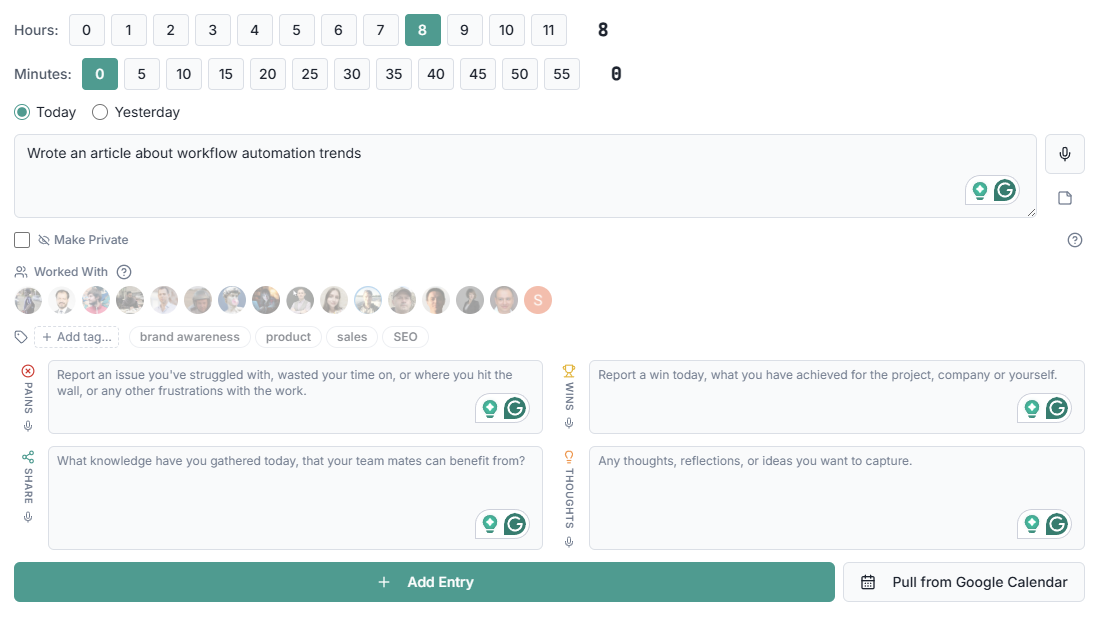
On a company level, we have a time tracking system for our employees that we built for ourselves using Lovable – no single line of code written. I mentioned it when I shared some thoughts on how to manage remote employees. We don’t need to supervise this system, only once a month, when it’s time to pay contractors. I want to write another piece about this system, but so far, here’s just a share of how our daily time reports may look like now.
The shift towards using AI in our company is partly practical, partly philosophical. On the philosophical part, we have a solid belief that people should enjoy their jobs, and since no one likes routine, all routine, repetitive tasks should be done by AI, not by humans. To illustrate the practical part, I can tell my story: I started working in marketing in 2010, and worked standard 8 hours per day (sometimes even more), but I wasn’t even close to the productivity level I have now with 5 hours per day and AI. As a small team, all we have against competitors is our speed. If we move fast, we can grab some part of the market; if not, we’ll just disappear. So far, we have been here for 13 years already.
Supervision of AI-run processes depends on what consequences could occur. The billable hours tracking system runs on its own because there’s not much risk. We also have a bunch of KPI documents that update monthly or quarterly. I can occasionally verify them when I need to make some strategic decisions.
We review each process and ask: “What happens if this is wrong?” If the answer is “We lose money” or “We lose reputation,” then this process needs to be verified by a human frequently before it can be run by an AI agent on its own.
One lesson that I learned while redesigning our team’s jobs is that it starts with the people, not the tools. You can’t just decide what AI will replace. Well, I mean, you can of course say: “Kevin, you will now use Perplexity to prepare for the annual meeting, because you spend too much time just preparing”. But it would be much better if this process went naturally.
As for me, I am trying to give AI as much of my job as possible. I used to spend hours updating different tables and dashboards, but now this is one area that AI does for me. I can focus on the most interesting part – interpreting this data into a strategy. And that’s the pattern across our team. We give the assembly-line parts to AI, and the human part is judgment and decisions.
My practical advice would be to ask your team these questions:
If you have a healthy culture, you will get great answers. People know their job better; they know what feels like a waste of time.
The second step would be to give your team PAID time to explore the tools available to automate their routine. If you don’t give them this time, it will not happen. Even if they love their job, they won’t spend their free time on that.
Another piece of advice (or warning) – don’t expect that everyone will be as excited as you are. People tend to be afraid of new things, especially now when there is so much threatening information, like “AI will steal your job”. Ironically, our developers were the last to adopt AI for work, but they understand tech better than, for example, marketing, which was the first one to start using AI. Allow people to move at their own pace. Forcing something always creates resistance, but showing what can be achieved creates curiosity.
Remote work is often discussed together with workflow automation as if one naturally solves the other. However, there are more nuances than most tool vendors want to admit.
Most of the workflow automation tools didn’t create any ultimate solution to remote teams’ problems, but they helped to repackaged coordination that already existed. Some tools and practices have meaningfully shifted how distributed teams work. Many of the automation tools (Zapier-style integrations, task routing, notifications, etc.) are meant to solve the problems of efficiency, not the problems of distance. They are also helpful in the office because they help to standardize processes, eliminate repetitive, routine work, and reduce manual handoffs. That’s useful, but it doesn’t address the core friction of remote work: lack of shared context, time zone gaps, and slower decision loops.
If a tool’s main pitch is “save clicks” or “connect apps,” it’s not really a remote-work breakthrough; it’s actually something that should be part of every team’s operational hygiene. Although Kanbanchi also pitches “click-saving”, there’s also the larger part of the “shared context” which is more important for remote teams.
The real benefit came from tools and practices that replace missing proximity:
Honestly, any tool can be used for communications, but what matters is the shift to async-first norms (recorded updates, documented decisions, tools that keep tasks and communications together). The key innovation here is to decouple communication from time.
Google Docs, Confluence, Notion – these matter because they externalize knowledge. In an office, you can tap someone on the shoulder; remotely, if it’s not written down, it doesn’t exist. Teams that got good at documentation reduced dependency on real-time access to people.
Tools like Kanbanchi, Jira, Asana, etc., became more valuable remotely because they create a shared source of truth about who’s doing what and why.
This quietly solved a big gap: tone and nuance without requiring a meeting. It reduced the need for synchronous calls while preserving clarity.
The biggest shift isn’t a tool; it’s a behavior. High-performing remote teams write down decisions and context. That prevents duplicate discussions and confusion across time zones.
The teams that are successful as remote teams have redesigned work itself:
What didn’t work as promised:
The real answer: Tools don’t just help remote work by themselves. It can be improved by making the work more explicit. Automation helps at the margins, but the real shift is to move from synchronous to asynchronous communications, to more explicit communication, to documented systems, and to switch the focus from presence to outcomes. Tools that reinforce those shifts moved the needle. Everything else is optimization, which is also good, but doesn’t solve the core problems.
I also shared my view on managing remote teams here. Feel free to read.
If you’re evaluating tools for a remote team, a good question is: “Will this reduce our dependence on being online at the same time, or will it make us faster when we are?” The first one is solving the core problem.
Many vendors keep implying that we have reached the stage of “everything talks to everything”, but in reality, we keep hitting the limits. It looks like a layered process. This is where we progressed:
However, it’s still not “seamless” – the word I like and hate at the same time 😆 It is seamless, but… There’s always this “but”…
What actually helps is having a central layer: pull data from all tools into one place, clean and unify it there, and then push it back out to tools where you need it. It doesn’t sound as attractive as “everything just connects”, but this is something that works.
And on top of that, let’s add AI. How could we forget? It isn’t actually changing the game, but it constantly interferes. Using AI won’t fix structural issues, but even more, it will highlight them. People who don’t understand that AI is also a model, a structure, if you want, keep thinking that it can build anything.
If you are building a system, don’t just aim for “any system integrates with any system”, but define your own “source of truth”, crucial integrations that you definitely need, integrations that are nice to have, and a backup plan if everything breaks.
The trend is a perfectly connected system; the reality for 2027 will be a solid, well-managed system of controlled, crucial connections and a set of nice-to-have connections that are backed up with separate tools.
This trend is one of the most technically impressive and the most hoped for. For most people, it sounds like “I don’t need to think anymore, just look at the chart, and it shows what we bet on”.

Well, I am the first who is skeptically optimistic about it. So far, there is a lot of mismatch between what AI can do and what data teams are feeding it.
At the moment, we already have a lot of fields where predictive systems are genuinely useful:
In all those cases, when the data is consistent, AI doesn’t do any magic; it just has clear signals and enough history to make forecasts (and it was there even long before the AI). In some more uncertain areas, however, AI can make forecasts as well, based on the cases the model was trained on, that’s true. Models are getting better and better at handling imperfect data. They can filter the patterns that are “good enough” to rely on, but the general rule is and will be “the better your data is structured, the better the forecast will be”.
That being said, we come to the point that most teams don’t have problems with data itself, but there might be problems with processes:
In this case, the most harmless outcome is that AI won’t be able to predict anything. In the worst scenario, you will get “confident nonsense” as a forecast, which may be more dangerous than no prediction at all.
So, in reality, we have reliable advanced analytics in some areas, and great progress in others, but it is not “AI will do the work, humans are no longer needed”. AI relies on humans no less than we rely on AI.
Core:
Advanced:
The real workflow automation trend is to use AI to do all the above. That’s where no-code and low-code platforms will be extremely useful. In this case, instead of waiting for perfect data from humans, tools are trying to co-evolve with user behavior.
For almost 11 years, I’ve been working for a SaaS, going from a marketer to a business leader. I remember that in our early stages, we cared a lot about velocity, but over the years, we shifted our perspective a bit. Speed matters if it brings value to customers or makes your work easier.
I remember when we integrated a new payment provider very fast; it took us days instead of weeks, because their API allowed that. I will be honest, we were proud and glad that we could receive payments from clients in a way they wanted. But it happened that we forgot to remove the old payment system, and some people were still buying through that flow. Later, when we were reconciling yearly revenue data, we saw that the data didn’t match. It wasn’t a disaster, but it added some hard work.
After that, we started questioning our processes, reviewing them, and we distinguished two zones. One is kind of a “sacred” zone, which is customer data, billing, security, etc. This is where we follow strict checklists, double-check, and move carefully. The opposite zone is our experimental ground. This is where we move fast, run A/B tests, check hypotheses, change interfaces, etc. And, of course, there’s no black and white, as usual. Most of the tasks are somewhere in between, and you need to balance. Keeping balance is to check which zone you are closer to before you start. To simplify, we roll anything we believe is risky to a small group of users first, then if it passes the test, it goes wider. All our experiments have an owner and a timeframe, and they are all on a shared Kanban board, where everyone can check status.
If I can give any advice, it would be simple: gather your team and tell them that they are free to express ideas and suggest experiments, because nowadays you have to move fast. Give your team permission not to ask leaders for permission on everything. However, clearly identify the areas where they should be careful, and the areas where they can only move after approval.
We have a content creation process at Kanbanchi. Each piece of content written with the help of AI, first of all, is written with strict guidelines. They are all documented and attached to the LLM that we use to create content. There are several files that are structured for LLM: technical explanations – all about Kanbanchi, functionality, etc. This one is to avoid factual mistakes. For example, before we added this document, AI often tried to write something like an “overview Gantt chart” for many projects. This is technically impossible in an app like ours, so we needed to include the obvious line in the guideline that we don’t have it.
Another document contains the explanation of the tone of voice, and one more document explains our guidelines for visual illustrations.
By making this part of the content creation process, we managed to reduce the time spent on human review by apx. 43%
Some of the content, however, needs more supervision, because it may contain personal opinions. For example, I used AI to help me write this article, but I reviewed it to write it with my own tone and the expressions that I use to make it sound like me, not like a machine.
The workflow automation trends are definitely promising. AI is evolving very fast, no-code tools are much more powerful, integrations are more available, and predictive analytics is delivering better results.
However, across those five factors, I mentioned, there’s still that human factor that may limit the results we see. AI needs structure to deliver better results. Models can’t learn from inconsistent behavior.
Those teams that benefit from workflow automation are not those that have chosen the best tool. They are those who are consistent with their choice and are building their system. That is slower than the marketing narrative suggests, but considerably more reliable.
I see so many successful teams among Kanbanchi users that are building their processes in Google Workspace and Kanbanchi. Their recipe for success is not that they have chosen the best workflow management software, but that they have chosen the one that is consistent with their ecosystem. And I am sure that now they can add AI on top of that consistency for even better results.
Interested in Kanbanchi? You can try. Want to check if there are any other thoughts from myself or my colleagues on AI and automation? Check this from time to time 😉

In this Article:
Start using Kanbanchi now
Start your free trial