
In this Article:
Try Kanbanchi now
Start your free trial


Choosing collaboration tools for product teams is not just about finding a cleaner task board. Product work moves through discovery, prioritization, delivery, documentation, stakeholder communication, and launch coordination. If those pieces live in disconnected places, product managers spend too much time translating work instead of leading it.
Many teams start by asking, “Which platform should we use?” A better first question is, “What needs to stay connected?” Your toolset should help everyone answer three things quickly: what are we building, why does it matter, and who owns the next step?
If you are looking for a direct list of collaboration tools, you can review this guide to the best team collaboration software. This article takes a different approach. It explains what a product team’s collaboration stack should include, how to choose the right mix of tools, and what to watch for before your workspace becomes another source of confusion.
Product teams rarely struggle because they have no tools. More often, they have too many tools that do not reflect how product work actually flows.
A customer request enters through support. A product manager turns it into an insight. Design explores possible solutions. Engineering estimates the work. Leadership asks how it fits the roadmap. Marketing wants launch dates. Customer success needs to know what to tell users. Somewhere in the middle, decisions get lost in chat threads, task comments, spreadsheets, and meeting notes.
Before choosing or replacing a platform, map the journey from idea to shipped product. A simple workflow is enough:
| Product stage | Main collaboration need | Common failure point |
|---|---|---|
| Feedback and discovery | Capture inputs and understand customer needs | Requests are scattered across sales, support, and calls |
| Prioritization | Compare opportunities and make tradeoffs | Decisions are unclear or based on the loudest voice |
| Planning | Turn priorities into initiatives, releases or projects | Roadmaps are disconnected from delivery capacity |
| Delivery | Track ownership, dependencies, blockers and deadlines | Status updates require meetings or manual reports |
| Documentation | Preserve context, specs and decisions | Knowledge lives in private docs or chat messages |
| Launch | Coordinate marketing, support, sales and operations | Go‑to‑market teams hear about changes too late |
| Review | Learn from outcomes and adjust priorities | Teams ship work but do not close the feedback loop |
Your product collaboration stack should support these stages without forcing every team to work in the exact same interface all day. Engineering may need an issue tracker. Product may need a roadmap view. Marketing may need a launch checklist. Leadership may need a high-level status report. The goal is not one tool for everything at any cost. The goal is a system where information moves cleanly, and ownership stays clear.
A product team’s toolset usually has five layers: feedback, roadmap planning, work management, documentation and communication. Some platforms cover several layers at once. Others are specialist tools that do one job well.
The right setup depends on company size, product complexity and team maturity. A five-person startup does not need the same stack as a product organization managing ten product lines across multiple regions. Still, the underlying needs are similar.
Product decisions should be informed by customer needs, market context, usage data, and internal strategy. That does not mean every request should become a feature. It means the team needs a reliable way to collect signals and review them later.
Feedback may come from support tickets, sales calls, customer interviews, app reviews, churn reasons, surveys, or internal teams. If those inputs stay scattered, product managers end up relying on memory and recent conversations.
At minimum, your feedback system should make it easy to record:
For early-stage teams, this may be a structured database, shared board, or spreadsheet. For teams with high feedback volume, a dedicated product discovery or feedback platform may be worth it. The point is not to collect everything forever. The point is to make product conversations more evidence-based.
A roadmap is not just a presentation for leadership. It is a decision system. It should show what the team intends to focus on, why those priorities matter, and how they connect to company goals.
Good roadmap tools help product teams avoid two common problems. The first is treating the roadmap as a promise list, where every item becomes a fixed delivery commitment too early. The second is keeping the roadmap so vague that delivery teams cannot plan around it.
Your roadmap layer should support different levels of detail. Leadership may need themes, outcomes, and strategic initiatives. Product and design may need discovery status and priority rationale. Engineering may need enough clarity to plan technical work. Sales and customer success may need confidence about what is coming soon, what is later, and what is not planned.
Pay attention to whether the roadmap tool helps explain tradeoffs. A roadmap that shows dates but not reasoning will still create confusion when priorities change.
This is where many teams feel the most day-to-day pain. Once priorities are chosen, work needs owners, statuses, dates, dependencies, and context. Without a shared work management hub, product managers become human routers, answering the same questions again and again.
A good work management hub should make active work visible to product, design, engineering, and go-to-market teams. It should answer practical questions without requiring a meeting:
For teams already working in Google Workspace or Microsoft 365, Kanbanchi can serve as a practical operational layer. It brings together Kanban boards, Gantt chart planning, task collaboration, file attachments, time tracking, calendar sync, tags, sorting, filtering, and reporting exports. That makes it useful when a product team needs a visible workflow for initiatives, releases, improvements, or launch plans without moving far away from the productivity environment people already use.
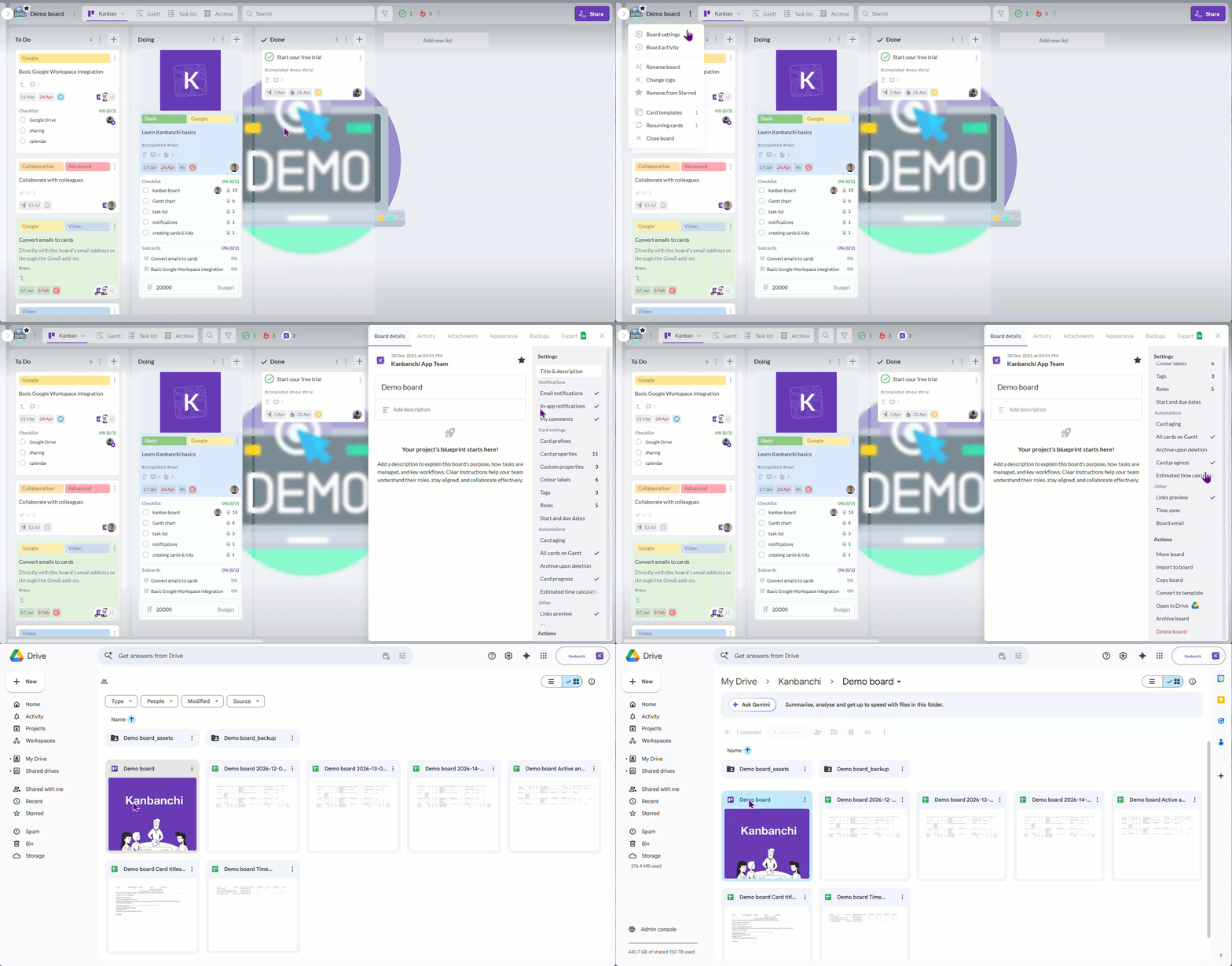
For example, Kanbanchi can work inside your Google Drive and connect your Drive files, Calendars, or even Google Forms input with the project board and the Gantt chart. Technically, it acts as a file inside your Google Drive.
The work management hub does not always need to replace engineering’s issue tracker. In many organizations, engineering execution stays in a dedicated development tool, while product and cross-functional coordination live in a more stakeholder-friendly workspace. What matters is that the handoff is clear and the same initiative does not carry five conflicting statuses across five tools.
Plan, prioritize, and manage your projects effortlessly with Kanbanchi - the all-in-one project management tool built for Google Workspace users.
Get a free trialProduct teams create a lot of context: research notes, product requirements, experiment plans, meeting notes, technical constraints, design decisions, launch messages, and post-release learnings. If that context is not organized, the team repeats old debates and new joiners struggle to understand why a product works the way it does.
Documentation tools should make decisions easy to find. They should not become dumping grounds for unfinished notes with no structure. A product documentation system usually needs a few consistent templates, such as:
The most useful documentation is connected to active work. If a task says “Update onboarding flow,” the related brief, design file, research note, and decision log should be attached or linked nearby. Otherwise, the team has documentation in theory but not in practice.
Chat and meetings are not the enemy. They become a problem when they are used as the system of record.
Fast communication tools are useful for quick clarification, problem solving, and informal alignment. Formal decisions, status updates, and ownership should still move back into the relevant product workspace. A launch decision made in chat should be summarized in the launch plan. A scope change agreed in a meeting should be reflected in the roadmap or task board.
Product teams also need different communication formats for different audiences. Engineers may need detailed implementation context. Leadership may need risks and timeline changes. Sales may need customer-facing positioning. Support may need help center updates or known limitations.
A strong collaboration system separates discussion from recordkeeping. Chat can move quickly, but the final answer should live where the work lives.
The best toolset is not the one with the most features. It is the one your team can use consistently under real pressure. When deadlines move, priorities change, or a launch gets complicated, the system should make collaboration easier rather than adding another layer of admin.
Every product team should know where each type of information lives. Without this, people create their own workarounds. Roadmap updates appear in slides, tasks appear in spreadsheets, launch dates appear in chat, and specs appear in private documents.
A simple ownership model prevents this:
| Information type | System of record question |
|---|---|
| Customer feedback | Where do we store raw input and linked insights? |
| Product priorities | Where do we explain what matters and why? |
| Delivery work | Where do we track owners, status, and blockers? |
| Documentation | Where do we store specs, decisions, and research? |
| Launch coordination | Where do go‑to‑market tasks and dates live? |
| Reporting | Where do managers check progress without manual updates? |
This does not mean everything must live in one product. It means each workflow has one clear home.
A mature product organization may benefit from advanced roadmap hierarchy, portfolio views, custom fields, dependency mapping, and structured prioritization methods. A small team may get more value from a simple board, clear owners, and a weekly review rhythm.
Overbuilding the stack too early creates maintenance work. Underbuilding it too late creates chaos. The right level of tooling should match the number of products, stakeholders, dependencies and decisions your team manages.
A useful test is to ask whether the tool solves a current collaboration problem or an imagined future one. If the team is not yet using basic statuses consistently, advanced automation will not fix the workflow.
Product work depends on people who do not live in product tools all day. Sales, marketing, support, customer success, legal, finance, and leadership all need visibility at different moments.
If stakeholders cannot understand the workspace, product managers will still create side updates. That usually means extra slide decks, manual reports, and repeated status messages. The tool may be technically powerful, but collaboration has not improved.
Look for views that non-technical teams can understand quickly: roadmap summaries, launch timelines, task owners, status labels, blockers and key dates. Avoid internal labels that only product and engineering understand unless they are clearly explained.
Integrations matter because product work crosses files, calendars, meetings, tickets, documents, and engineering tasks. A tool that connects with your existing workplace environment is easier to adopt than one that asks everyone to change habits immediately.
Still, integrations are not a substitute for process. Syncing two messy systems usually creates a bigger messy system. Before integrating tools, decide what should sync, who owns updates, and which platform wins when information conflicts.
For example, a product initiative may live in a shared planning board while technical subtasks live in an engineering tracker. That can work well if the initiative owner, delivery status, and milestone dates are clearly maintained in the planning layer.
Small product teams can often work well with one central collaboration hub. This is especially true when the team has a limited number of products, a straightforward delivery process, and a shared workplace environment.
One platform may be enough if your team mainly needs to manage initiatives, assign tasks, attach files, track dates, and keep stakeholders informed. In that case, a work management tool with boards, timelines, comments, and reporting can cover most collaboration needs.
Larger organizations usually need a connected stack. A mature product team might use one tool for customer feedback, another for roadmaps, another for engineering execution, and another for documentation. That can work if the system of record is clear. It becomes painful when the same roadmap item exists in four tools with four different statuses.
The decision is less about company size and more about coordination complexity. If work crosses many teams, products, time zones, or customer segments, your collaboration system needs more structure. If your team is still small, do not overbuild process before the process is needed.
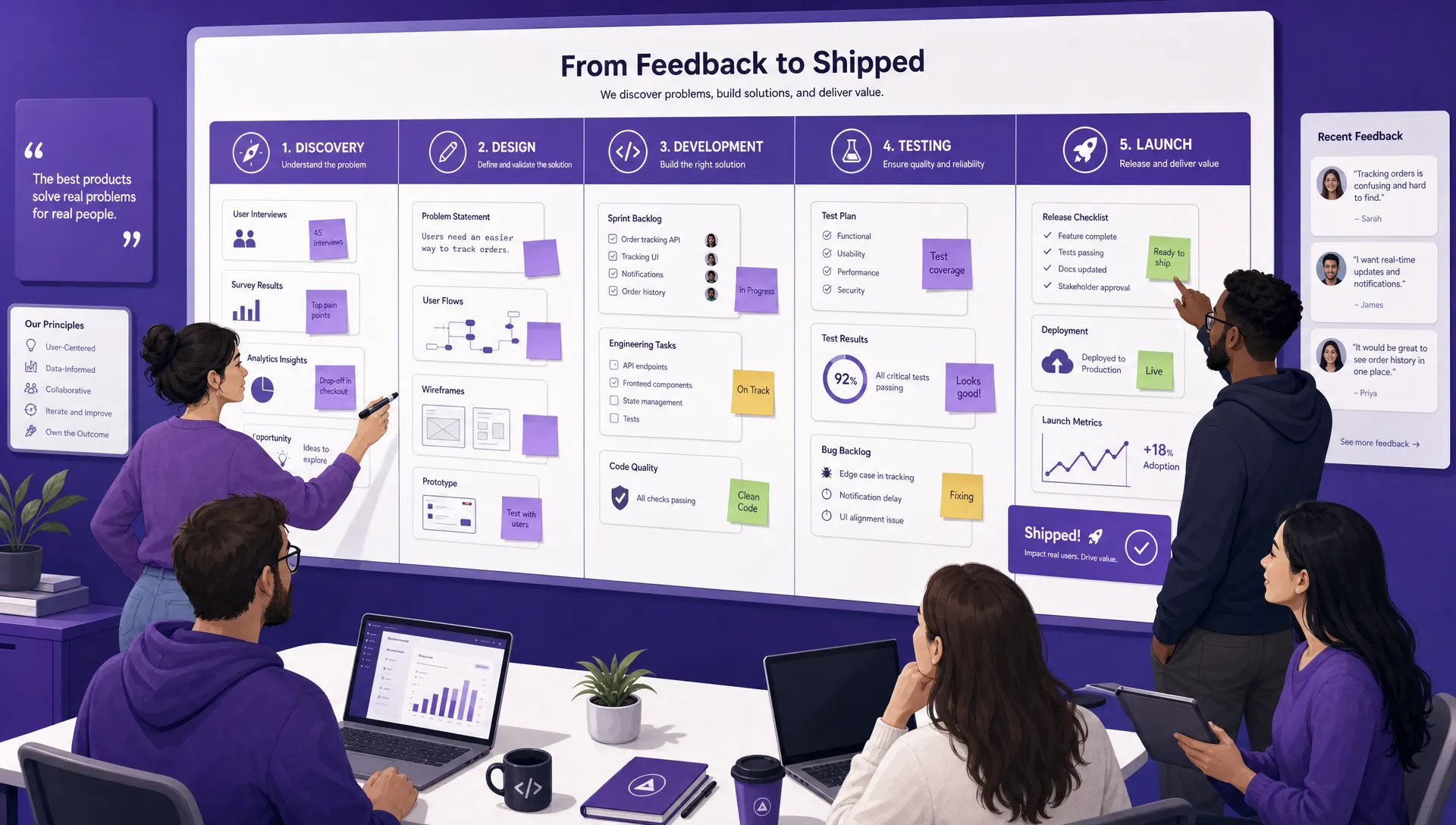
Product collaboration works best when discovery, planning, delivery, and launch coordination are connected in one visible workflow
Do not evaluate tools using demo data alone. Demo workspaces are always cleaner than real product work. Instead, choose one upcoming initiative and run a short pilot from discovery through delivery planning.
Use a real feature, improvement, or launch. Add the actual files, owners, dates, dependencies, comments, and stakeholders. Ask product, design, engineering, and at least one non-product stakeholder to participate. The pilot should show whether the platform reduces coordination or simply creates another place to update.
During the pilot, check whether people can find priorities without asking the product manager. Owners and next steps should be visible on every active work item. Product context should be attached to tasks or easy to reach from them. Stakeholders should be able to understand progress without extensive tool training. Managers should be able to see blockers, timing, and status without building a manual report.
If a platform only works when one operations-minded person maintains it perfectly, it may not be the right fit. Product collaboration tools should help normal teams behave consistently, not require perfect process discipline to be useful.
The first mistake is choosing the most feature-rich platform by default. More features can be helpful, but they also create more configuration choices. If the team does not understand the workflow, extra views and automations will not solve the problem.
The second mistake is ignoring non-technical stakeholders. Product teams depend on sales, customer success, marketing, support, operations, finance, and leadership. If those teams cannot understand the collaboration system, product managers will keep creating side updates in slides and spreadsheets.
The third mistake is failing to define the system of record. Decide where roadmap priorities live, where delivery work is tracked, where specifications are written, and where final decisions are documented. Put this in writing. Ambiguity is what creates duplicate work.
The fourth mistake is buying a tool before fixing the workflow. If the team has no shared definition of ready, blocked, approved, or done, software will only make the confusion more visible. Agree on basic workflow language before you scale the system.
The fifth mistake is treating documentation as separate from execution. Product context should be close to the work. When requirements, files, comments, and decisions are attached to tasks or linked from them, teams spend less time searching and more time moving work forward.
Most product teams need a way to capture feedback, prioritize ideas, plan the roadmap, manage delivery work, document decisions, and communicate updates. Small teams may cover these needs with one flexible work management platform, while larger teams often use a connected stack of specialist tools.
Smaller teams often benefit from one central tool because it reduces switching and duplicate updates. Larger teams may need several tools for feedback, roadmaps, engineering, and documentation. The important part is defining which tool owns each workflow.
Product teams should look for visible ownership, clear workflow stages, roadmap support, task-level context, file attachments, stakeholder-friendly views, integrations with existing tools, and reliable reporting. The goal is to make priorities and progress easier to understand.
Start by defining the system of record for feedback, roadmap priorities, delivery tasks, documentation, and reporting. Add a new tool only when it solves a clear workflow gap. If two tools do the same job, choose one owner and remove the duplicate process.
Test it with a real initiative, not a sample project. Add real tasks, files, owners, dates, comments, and stakeholders. Then check whether people can understand priorities, find decisions, and report progress without extra meetings or spreadsheets.
More blog posts on Product Management
A strong product collaboration stack does not just store tasks. It connects customer needs to decisions, decisions to delivery, and delivery to stakeholder communication.
If your product team already works in Google Workspace or Microsoft 365 and needs a clearer way to manage product work, explore Kanbanchi. It can help your team bring boards, timelines, files, time tracking, and collaboration into one practical workflow from planning to launch.



In this Article:
Start using Kanbanchi now
Start your free trial