
In this Article:
Try Kanbanchi now
Start your free trial

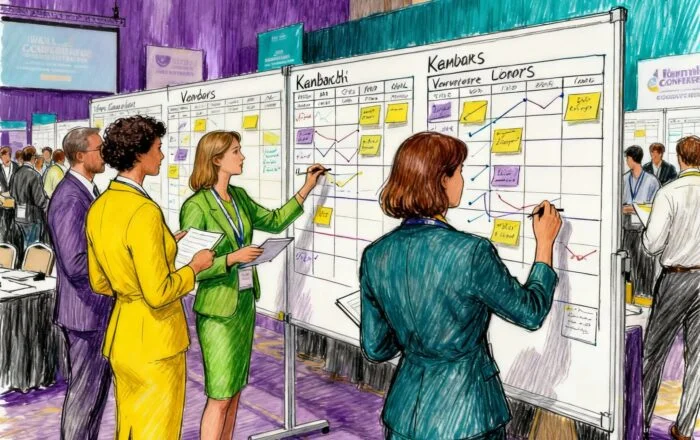
Large-scale events demand precision. Conferences with 500+ attendees, multi-day trade shows, and music festivals involve hundreds of moving parts and countless stakeholders. Event management project software has become essential for professional planners who coordinate vendors, track timelines, and manage real-time changes. This case study examines how Elite Event Productions transformed its operations using Kanbanchi’s visual boards and collaboration features. Their journey reveals concrete workflows, measurable results, and practical lessons for event professionals seeking better coordination tools.
Vendor coordination creates constant complexity. A single corporate conference might involve caterers, audiovisual companies, decorators, photographers, security teams, and transportation providers. Each vendor operates on different schedules with unique requirements and communication preferences.
Timeline dependencies multiply pressure. Venue setup must finish before decoration begins. Sound checks require completed stage construction. Registration systems need to be tested before attendees arrive. One delay cascades through the entire schedule.
Budget tracking becomes overwhelming. Event teams monitor deposits, milestone payments, change orders, and final invoices across dozens of vendors. Spreadsheets fail when multiple coordinators update information simultaneously.
Staff assignment confusion hampers efficiency. Significant events require clear role definition: who manages vendor check-in, who handles VIP coordination, who monitors budget compliance. Without systematic assignment tracking, critical tasks slip through gaps.
Last-minute changes threaten success. Client requests for additional seating, speaker schedule modifications, or dietary accommodations require instant communication across all affected parties. Email chains become unmanageable when changes multiply.
Client communication demands constant attention. Event sponsors expect regular updates on progress, vendor confirmations, and milestone completion. Manual status reporting consumes hours that coordinators could spend on actual event execution.
Elite Event Productions operates as a full-service event management company serving corporate clients across North America. The firm employs 28 event professionals managing approximately 85 events annually.
Their event portfolio spans multiple categories. Corporate conferences account for 45% of their business, typically featuring 200-800 attendees and multi-day programs. Trade shows and exhibitions account for 30% and involve complex booth coordination and exhibitor management. Product launches, galas, and award ceremonies fill the remaining 25% of their calendar.
The team structure reflects specialized expertise. Three senior event directors oversee client relationships and strategic planning. Twelve event coordinators manage day-to-day execution and vendor relationships. Eight logistics specialists handle venue coordination, transportation, and on-site operations. Five administrative staff support budget tracking, contract management, and client reporting.
Typical client profiles include Fortune 500 companies hosting annual conferences, industry associations organizing trade shows, and technology companies launching products. Events range from $50,000 to $500,000 in production budgets.
Elite Event Productions evaluated six platforms over a three-month period. Generic project management tools lacked event-specific terminology and workflows. Dedicated event management systems offered robust features but carried premium pricing that significantly exceeded budget constraints.
The evaluation team identified critical requirements. Visual workflow management topped the list. Coordinators needed instant visibility into task status without having to open multiple screens. Timeline visualization was essential for managing complex event schedules with interdependent tasks. Vendor collaboration requires secure board sharing with appropriate access controls. Mobile access mattered for on-site coordination when coordinators worked from venues rather than offices.
Cost considerations influenced decisions significantly. With 28 team members, traditional event management platforms would cost $4,000-$6,000 per month. This expense level called into question the budget justification for a productivity tool.
Kanbanchi emerged as the optimal solution through hands-on trials. The visual Kanban boards matched how event teams naturally conceptualize workflows. Google Workspace integration meant seamless connections with tools the company already used daily. The intuitive interface required minimal training, and coordinators became productive within hours rather than weeks.
Director of Operations Maya Sejezka explained the decision. “We needed something powerful enough for complex events but simple enough that coordinators would actually use it under pressure. Event day chaos doesn’t allow time for complicated software navigation”. The $ 5.99-per-user-per-month pricing structure made financial sense. “We implemented Kanbanchi company-wide for less than one premium platform license,” Sejezka noted.

The illustration of a stressed event coordinator juggling spreadsheets, emails, and multiple communication channels
Implementation launched with a pilot event: a three-day technology conference with 400 attendees. The project team included two coordinators, one logistics specialist, and the event director.
Board creation began during initial planning meetings. The team established a column structure representing major event phases: Planning, Vendor Confirmation, Pre-Event Setup, Event Day, and Post-Event. Each vendor became a card containing contact information, deliverables, deadlines, and budget allocation.
Vendor tracking systems evolved through practice. Cards included custom fields for vendor category, payment status, and confirmation status. Color-code differentiated vendor types: red for audiovisual, blue for catering, green for décor. Priority levels marked critical-path vendors requiring special attention.
Timeline templates streamlined future planning. After completing the pilot event, the team documented their board structure and created template boards for each event category. Corporate conference templates included standard vendor categories and typical milestone dates. Trade show templates reflected different workflow patterns specific to exhibitor coordination.
Client collaboration processes required careful planning. Elite Event Productions created separate board views for client access, showing only information relevant to sponsor decision-making while hiding internal operational details. This selective transparency built client confidence without overwhelming them with execution minutiae.
Team training happened in phases. Week one focused on basic board navigation and card creation. Week two introduced Gantt chart timeline views and deadline management. Week three covered mobile app usage for on-site coordination. Weekly check-ins addressed questions and shared emerging best practices.
Visual boards revolutionized operational visibility. Event coordinators could see every vendor’s status, every deadline, and every team member’s assignments at a glance. Eliminating status update meetings saved approximately 6 hours per event.
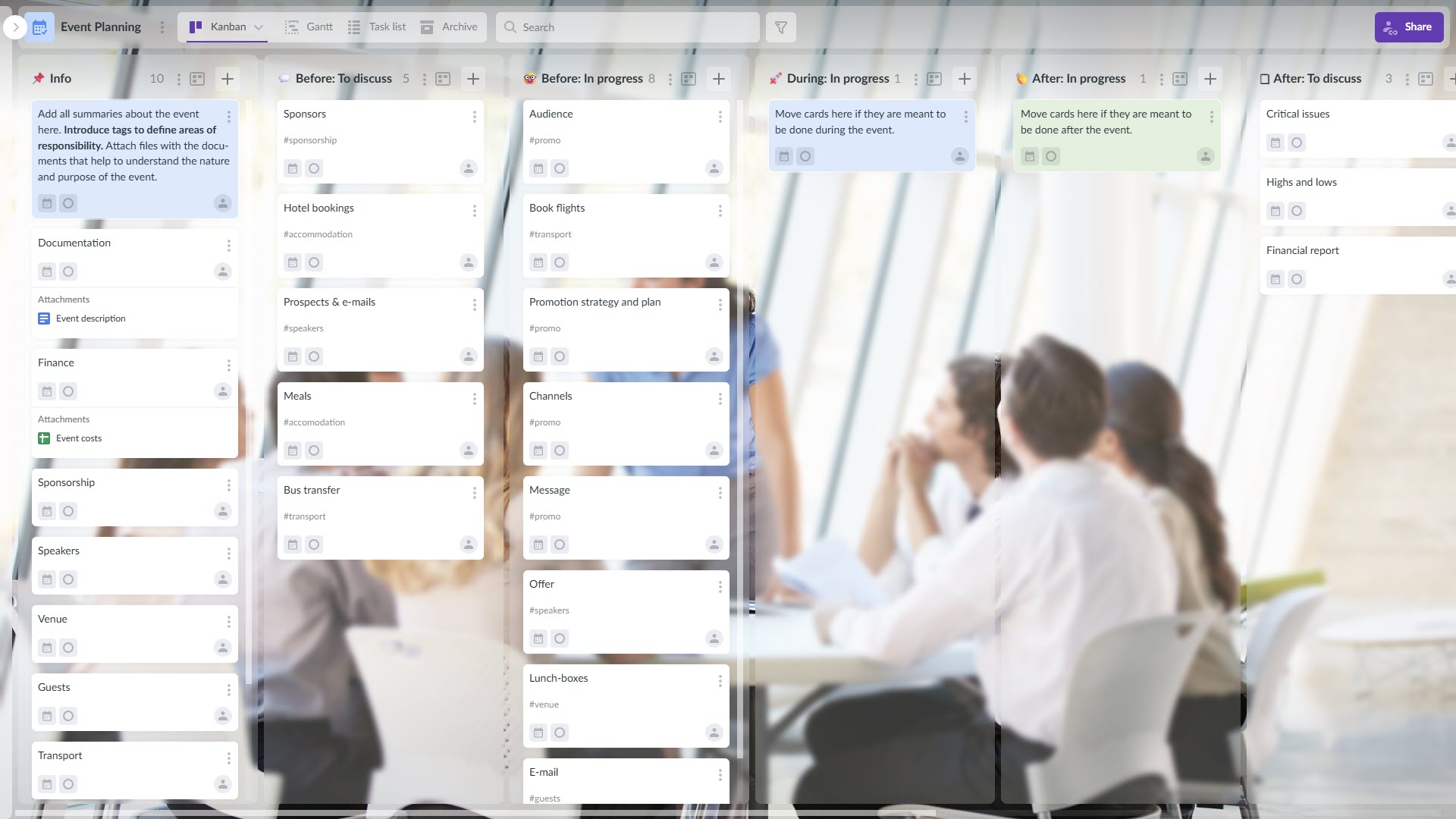
Example of the Kanbanchi board interface for event planning
Board sharing enabled client collaboration, differentiating Elite Event Productions from competitors. Clients accessed dedicated boards showing vendor confirmations, timeline milestones, and deliverable completion. This transparency reduced anxious client emails by approximately 60%.
The Gantt chart feature provided essential timeline visualization. Event coordinators could see task dependencies, identify scheduling conflicts, and adjust timelines when vendors requested date changes. Milestone tracking ensured critical deadlines received appropriate attention.
Card assignment and delegation created accountability. Each task showed the assigned coordinator’s name, eliminating confusion about responsibility. The “My tasks” feature aggregated all assignments across multiple event boards, preventing coordinators from missing deadlines.
Comments and mentions facilitated communication. Coordinators could tag colleagues with @ mentions when questions arose, creating threaded conversations directly attached to relevant tasks. This context-preserved communication eliminated the need to search email threads for vendor discussions.
Custom fields and labels enabled sophisticated organization. Event teams created fields for budget amounts, payment status, vendor category, and confirmation status. Labels marked cards by priority level and event phase. These organizational tools supported filtering and reporting across multiple concurrent events.
Mobile access proved essential for event day coordination. Coordinators updated vendor arrival status, photographed progress of setup, and communicated with teams from venue locations. The mobile interface provided full functionality without requiring laptop access.
Google Drive integration streamlined document management. Contracts, floor plans, and vendor agreements are attached directly to relevant cards. Teams accessed these documents from within Kanbanchi without navigating separate folder structures.
Calendar synchronization maintained deadline awareness. Important milestones appeared on both Kanbanchi boards and team member calendars. This dual visibility prevented deadline surprises during busy multi-event periods.
Time tracking supported productivity analysis and client billing. Coordinators logged hours spent on specific events and vendor coordination tasks. This data-informed approach to pricing decisions for future proposals identified efficiency improvement opportunities.
Planning time decreased substantially. The average time from contract signature to event-day preparation dropped from 47 days to 34 days, a 28% improvement. Streamlined communication and systematic workflows eliminated redundant coordination meetings.
Vendor miscommunication incidents declined dramatically. The number of vendor conflicts, missed deliverables, or confusion about requirements dropped by 62%. Centralized information in cards ensured that all team members had access to the exact vendor details.
On-time deliverable completion improved significantly. The percentage of vendor tasks completed on time increased from 73% to 91%. Visual workflow management and proactive deadline monitoring enabled earlier intervention when delays threatened.
Client satisfaction scores rose measurably. Post-event surveys showed satisfaction ratings increasing from 4.2 to 4.8 out of 5. Clients specifically praised transparency in communication and professional organization.
Revenue growth exceeded projections. Elite Event Productions increased annual event volume by 23% without expanding staff. Improved efficiency enabled the existing team to manage additional simultaneous events.
The financial impact was substantial. Director Sejezka quantified returns. “Kanbanchi enabled us to accept eight additional events annually with our current team. At our average project margin, that represents approximately $240,000 in additional annual profit”.
Overtime reduction improved work-life balance. Coordinator’s overtime hours decreased by 35% as systematic workflows replaced last-minute crisis management. This improvement reduced burnout and enhanced employee retention.

Senior Event Coordinator Jessica Martinez described operational changes. “Before Kanbanchi, I spent my mornings tracking down vendor confirmations and checking whether colleagues had completed tasks. Now I open my board and instantly see everything. That visibility saves me two hours daily”.
Logistics Specialist David Park emphasized mobile functionality. “Event day used to mean carrying a thick binder with vendor contacts, schedules, and floor plans. Now everything lives on my phone. When the caterer arrives early, I pull up their card, verify setup requirements, and photograph their progress for the client within two minutes”.
Event Director Rachel Thompson highlighted the benefits of client collaboration. “Sharing boards with clients transformed our relationships. They see vendor confirmations as they happen rather than waiting for weekly update calls. This transparency positions us as partners rather than service providers. Our client retention rate improved by 18%”.
Vendor Liaison Manager Kevin Wu appreciated the improved communication. “The @mention feature keeps conversations organized. When I need clarification about a vendor’s requirements, I mention the coordinator in a card comment rather than sending an email. The entire discussion history stays attached to that vendor for future reference”.
Budget Manager Lisa Anderson noted improvements in financial tracking. “Custom fields for budget amounts and payment status give me real-time financial visibility across all events. I can instantly see which vendors require deposits this week and where we stand against budget. This capability was impossible with our previous spreadsheet system”.
Board structure should mirror event phases. Most event teams benefit from columns representing Planning, Vendor Confirmation, Pre-Event Setup, Event Day Operations, and Post-Event Wrap-up. This structure provides a clear workflow progression.
Color coding creates instant visual clarity. Red typically indicates critical-path vendors requiring close monitoring. Yellow marks items awaiting client approval or decisions. Green shows confirmed and on-track vendors. Blue designates internal team tasks separate from vendor coordination.
Template setup accelerates future planning by documenting event types, board structure, standard vendor categories, and typical post-event milestones. Create template boards that new events can duplicate, inheriting proven workflow structures.
Custom fields support sophisticated tracking. Essential fields include vendor category, budget amount, payment status, confirmation status, and priority level. These fields enable filtering, reporting, and visual organization across complex multi-vendor events.
Client collaboration best practices require selective transparency. Create separate boards or board views showing only client-relevant information. Include vendor confirmations, significant milestones, and deliverable completion without exposing internal operational details or budget specifics.
Checklist implementation standardizes procedures. Create card templates with pre-populated checklists for common vendor types. A catering vendor template might include venue access confirmation, equipment needs verification, final headcount submission, and day-of contact information.
Mobile workflow optimization ensures event day success. Coordinators should practice mobile board navigation before high-pressure event days. Establish conventions for on-site updates, such as photographing completed setup stages and updating card status immediately upon vendor arrival.
Regular board review rituals maintain accuracy. Schedule 15-minute daily check-ins where coordinators review all active event boards, update card status, and flag potential issues requiring management attention. This systematic review prevents minor problems from escalating into event-day crises.
Capacity expansion drove primary financial returns. Elite Event Productions increased annual event volume from 85 to 104 events without hiring additional coordinators. At an average net margin of $12,600 per event, this 19-event increase generated $239,400 in additional annual profit.
Reduced coordination time created efficiency gains. Each event required approximately 15 fewer coordinator hours for status updates, vendor tracking, and internal communication. Across 104 annual events, this saved 1,560 coordinator hours valued at roughly $78,000 at average coordinator billing rates.
Vendor issue prevention eliminated crisis costs. The 62% reduction in vendor miscommunications prevented costly last-minute solutions. Rush vendor replacements, expedited shipping, and overtime labor previously averaged $8,400 annually. After implementing Kanbanchi, these crisis costs dropped to $3,200 annually.
Client retention improvement generated ongoing value. The 18% increase in the repeat client rate resulted in approximately seven additional returning clients annually. Acquiring new clients costs approximately 5-7 times as much as retaining existing ones. This retention improvement saved an estimated $35,000 annually in marketing and sales costs.
Overtime reduction provided both hard and soft returns. The 35% decrease in coordinator overtime saved approximately $32,000 in direct labor costs annually. Improved work-life balance enhanced employee satisfaction, reducing turnover-related expenses estimated at $18,000 per departure.
Software costs remained modest. At $5.99 per user monthly for 28 team members, the annual Kanbanchi investment totaled approximately $2,012. The documented returns exceeded this investment by more than 200-fold.
Total quantified ROI exceeded $400,000 annually. Director Sejezka emphasized scale. “Kanbanchi represents 0.5% of our software budget but delivers returns equivalent to hiring four additional coordinators without the salary expense, benefits, or office space requirements”.
Initial board templates establish the foundation. Begin by creating master templates for your primary event types. Corporate conference templates should include standard vendor categories, typical timeline milestones, and familiar task checklists. Trade show templates reflect different workflows specific to exhibitor coordination.
Vendor tracking setup requires field customization. Create custom fields for vendor category, contact information, budget amount, payment status, and confirmation status. Establish color-coding conventions that your team will use consistently across all events.
Timeline configuration leverages Gantt capabilities. Set up milestone markers for critical deadlines, such as venue contracts, vendor deposits, and pre-event walkthroughs. Configure dependency relationships between related tasks to automatically adjust schedules when changes occur.
Client access setup enables collaboration. Determine which information clients should see and which should remain internal. Configure board sharing settings that give clients view-only access to relevant cards without exposing budget details or internal notes.
The onboarding process should proceed systematically. Week one focuses on board navigation and card creation. Week two introduces timeline management and deadline tracking. Week three covers mobile usage for on-site coordination. This phased approach prevents team members from being overwhelmed by too many features at once.
Integration with Google Workspace happens automatically for existing Google users. Boards save directly to Google Drive following standard permission rules. Calendar synchronization activates with a single click, pushing deadlines to team members’ calendars.
Trial periods eliminate risk. Kanbanchi offers a 7-day free trial with full-feature access. Event companies can test the system with an actual upcoming event before financial commitment. The Essential plan starts at $5.99 per user per month, with higher tiers available for larger organizations that require advanced features.
Can external vendors access our boards? Yes, Kanbanchi supports board sharing with external collaborators. You can give vendors view-only access to specific cards showing their deliverables and deadlines. This capability enables vendor self-service status checking without granting access to other vendors’ information or budget details.
Does Kanbanchi integrate with event registration systems? Kanbanchi doesn’t offer direct integration with event registration platforms. However, teams successfully attach registration reports from Google Sheets to relevant cards. This manual attachment process provides visibility of registration data within the event board context.
How does mobile functionality work for on-site teams? Kanbanchi functions fully on smartphones and tablets through mobile browsers. Coordinators can update card status, attach photos, add comments, and view timelines from venue locations. The interface automatically adapts to mobile screens while maintaining complete functionality.
Can we manage multiple events simultaneously? Yes, event teams typically create separate boards for each event. Coordinators use the “My tasks” feature to view all their assignments across multiple event boards in a single consolidated view. This aggregation prevents coordinators from missing deadlines when juggling several concurrent events.
What happens to event data after completion? Boards remain accessible indefinitely in your Google Drive. Completed event boards serve as reference materials for similar future events. Teams can duplicate past event boards as starting templates, inheriting vendor lists and task structures from successful events.
Does Kanbanchi support budget tracking? While Kanbanchi doesn’t provide specialized accounting features, event teams successfully track budgets using custom fields for budget amounts and payment status. Many companies export data to Google Sheets for detailed financial analysis using Kanbanchi’s export capabilities.
How do we handle last-minute event changes? Card updates trigger automatic notifications to assigned team members. When urgent changes occur, coordinators use @ mentions in comments to alert relevant staff immediately. The activity log maintains change history for accountability and reference.
You will find more content related to managing operations here
Here are some of the other cases that you might want to check out:
How Store Managers Use Kanbanchi for Operations and Inventory Management
How to Use Kanbanchi as an Auto Repair Project Management Software
Professional event management demands systematic coordination. Multiple vendors, complex timelines, and countless stakeholders create operational complexity that scattered tools cannot adequately address. Event management project software like Kanbanchi brings order to this chaos through visual boards, timeline management, and collaboration features.
Elite Event Productions demonstrated measurable transformation. They reduced planning time by 28%, decreased vendor miscommunications by 62%, and increased annual event capacity by 22%. These improvements came from better visibility, streamlined communication, and systematic workflows.
The path forward begins with the free trial. Kanbanchi’s intuitive design means event teams can evaluate the platform with real events within days. The seven-day trial provides complete feature access without requiring payment information.
Integration with existing Google Workspace eliminates implementation barriers. Teams already using Gmail, Google Drive, and Google Calendar can deploy Kanbanchi immediately. Mobile access ensures coordinators stay connected during venue site visits and on event day.
Successful adoption requires leadership commitment and systematic rollout. Start with a pilot event involving experienced coordinators. Document workflows that prove effective. Expand gradually as team confidence builds. Focus on solving actual coordination problems rather than pursuing perfect system design.
Corporate event planning tools must balance power and usability. Kanbanchi delivers this balance through visual workflows that match how event professionals naturally conceptualize work. Conference management task tracking becomes manageable when every vendor, deadline, and deliverable stays visible at a glance.
Trade show project coordination and festival planning management software requirements differ, yet Kanbanchi’s flexible board structure adapts to a range of event types. Template boards capture proven workflows while custom fields track event-specific data.
START YOUR FREE KANBANCHI TRIAL NOW


In this Article:
Start using Kanbanchi now
Start your free trial