
In this Article:
Try Kanbanchi now
Start your free trial

If you’re comparing Kanbanchi vs ProofHub, you’ve probably already encountered the same question every buyer in this category asks: Is a flat monthly fee actually cheaper once you count seats, or does it just look that way?
The platforms sell simplicity in two distinct ways: ProofHub through pricing, and Kanbanchi via how the product fits inside Google Workspace. This guide walks through both claims with real numbers, whether you’re looking for ProofHub alternatives or comparing ProofHub pricing directly.
Kanbanchi is the stronger choice as project management software for Google Workspace, particularly if you need boards stored directly in Drive, SOC 2 and ISO 27001 certified security, and single sign-on in every plan, including free. ProofHub suits teams that need built-in file proofing and don’t require Google-native storage or enterprise-grade certification. If you have under 20 people and are comparing Kanbanchi vs ProofHub on cost and security, Kanbanchi’s per-seat pricing works out cheaper than it first appears.
| Platform | Kanbanchi | ProofHub |
|---|---|---|
| G2 | 4.7 / 5 (95 reviews) | 4.6 / 5 (115 reviews) |
| Capterra | 4.5 / 5 (292 reviews) | 4.6 / 5 (154 reviews) |
ProofHub earns praise on G2 for its flat pricing and for centralizing tools that would otherwise need several subscriptions. Users commonly highlight ease of setup and support quality for Kanbanchi. A typical Capterra ProofHub review mentions that the lack of a permanent free plan feels restrictive for teams wanting more time to test before committing a budget. Kanbanchi’s Capterra reviews consistently single out its support team, a point that rarely comes up in a ProofHub review focused mainly on price.
ProofHub is an all-in-one project management and team collaboration platform. One of its biggest differentiators is pricing, with ProofHub built around flat-rate pricing rather than the per-seat model most competitors use. This model means it appeals to agencies and operations departments who want to add contractors and large internal teams without costs quickly increasing.
ProofHub bundles a variety of tools into one subscription with no charge per additional user, including:
Its proofing tool, letting reviewers mark up files and approve them without leaving the platform, is a genuine strength for creativity.
Kanbanchi is specialized project management software for Google Workspace, with a Microsoft 365 version also available. What sets it apart is where your data lives: boards are stored directly in Google Drive as files that behave like any other Drive document, and permissions follow your existing Google Admin setup rather than a separate system.
The platform brings Kanban boards, Gantt charts, List view, Team Workload view, Swimlanes, and time tracking together within a single data model, so you can start simple and add complexity as projects grow. Kanbanchi holds SOC 2 Type II, ISO 27001, GDPR, HIPAA, and CASA certification, with Google Vault support on Enterprise.
| Feature | Kanbanchi | ProofHub |
|---|---|---|
| Free Plan | Yes (unlimited users, unlimited projects, 36 active cards per project; 7-day free trial) | No (14-day free trial, no credit card required) |
| Pricing Model | Per-seat, discounted from 2 seats | Flat rate, unlimited users |
| Kanban Board | Yes (all plans) | Yes (all plans) |
| Gantt Chart | Yes (Professional+) | Yes (all plans) |
| Time Tracker | Yes (Professional+) | Yes (Ultimate Control only) |
| Team Workload View | Yes (Professional+) | No dedicated workload view |
| Task Dependencies | Yes (Professional+) | Yes (Gantt-based) |
| Recurring Tasks | Yes (Premium+) | No native recurring tasks |
| Custom Fields | Yes (Professional+) | Yes (all plans) |
| File Proofing and Annotation | No | Yes (all plans) |
| Google Workspace (native) | Yes (boards stored as Drive files) | Connector-based (Calendar/iCal only) |
| Mobile App (iOS or Android) | Yes | Yes |
| SSO | Yes (all plans via Google/Microsoft) | No SSO or SAML offered |
| SOC 2 Type II | Yes | No |
| API Access | No public API described | Yes (Ultimate Control only) |
As you can see from the table, a big difference in this Kanbanchi vs ProofHub review is design philosophy. ProofHub bundles proofing into every seat at a flat rate, while Kanbanchi concentrates on task-focused execution. This includes everything from Gantt scheduling and time tracking to workload visibility, all inside a board that lives in Google Drive.
Another of their clearest divides is security. ProofHub doesn’t publish SOC 2 or ISO 27001 certification and offers no single sign-on at any tier, which matters if compliance is an important factor for you.
Open ProofHub for the first time and you’ll see a dashboard built from widgets: tasks, project shortcuts, a calendar snippet, and recent activity. It’s functional, though several reviewers describe this visual design as looking slightly dated. Getting from the dashboard to an active board takes only a few clicks, but the density of tabs and menus means you’ll likely spend your first session trying to locate features.
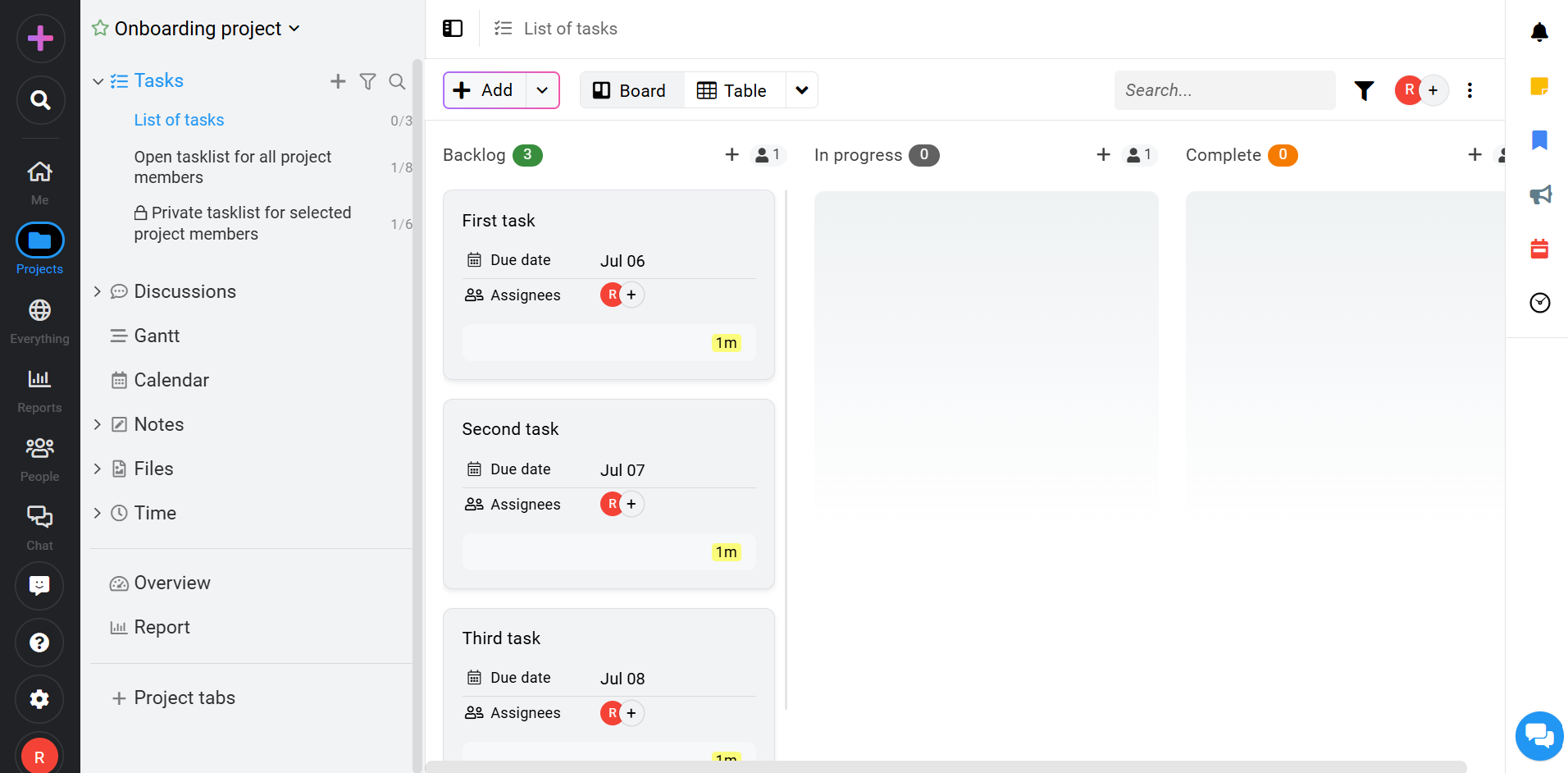
ProofHub interface showing project and task management features for team collaboration.
Kanbanchi opens straight to a board, with lists that are visible immediately. Creating a card also takes just seconds. Run a side-by-side onboarding test on Kanbanchi vs ProofHub and you’ll find that the first-session experience clearly favors Kanbanchi, especially if you’re working within a smaller agency.
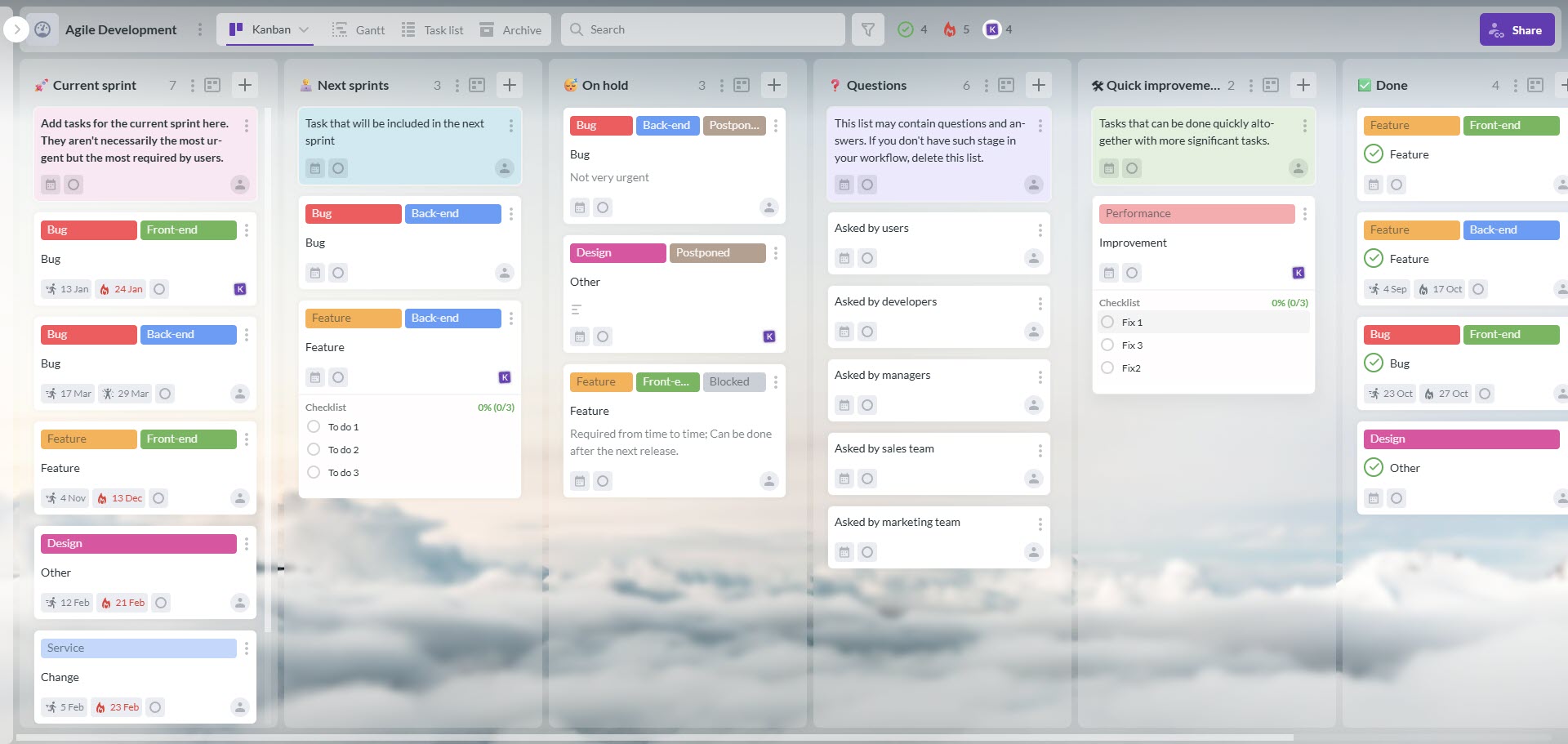
Kanbanchi interface displaying a Kanban board for project and task management within Google Workspace.
It’s easy to set up your ProofHub account. Start by creating projects and inviting an unlimited number of users, then assign work. Where you’ll need to invest more time is in entering new daily tasks on the system.
ProofHub’s main structured intake method is Forms, routing client or team requests into tasks. There’s no email-to-task creation and no native Gmail or Outlook add-on.
Kanbanchi’s account setup is just as simple, but the ongoing workflow differs. Every board gets its own email address, so a task can be created directly from an email thread, and the Gmail add-on turns a message into a card without leaving your inbox.
If you often respond to client requests via email, or are researching ProofHub alternatives for a Google Workspace-first workflow, you’ll notice the gap between the two tools here almost immediately.
Both tools organize work around boards and cover the basics for team task management, but here’s where their approaches differ.
Kanbanchi’s card is the operational unit, and moving it across lists shows real workflow progress. Cards hold assignees, dates, estimates, attachments, comments, subcards, dependencies, and custom properties. ProofHub’s board view works similarly for basic Kanban use, and its table view adds a spreadsheet layer for updating status across many tasks at once.
However, Kanbanchi’s cards and subcards break large work into linked child cards, while ProofHub relies more on task lists and milestones.
The ProofHub Gantt chart is included on both plans, which is a notable strength given that Kanbanchi reserves this feature for Professional and above.
But it’s the opposite way round for time tracking – ProofHub only includes it on Ultimate Control, while Kanbanchi’s Time Tracker and Team Workload view arrive together on Professional. This gives managers a combined view of hours logged and work distributed across the team.
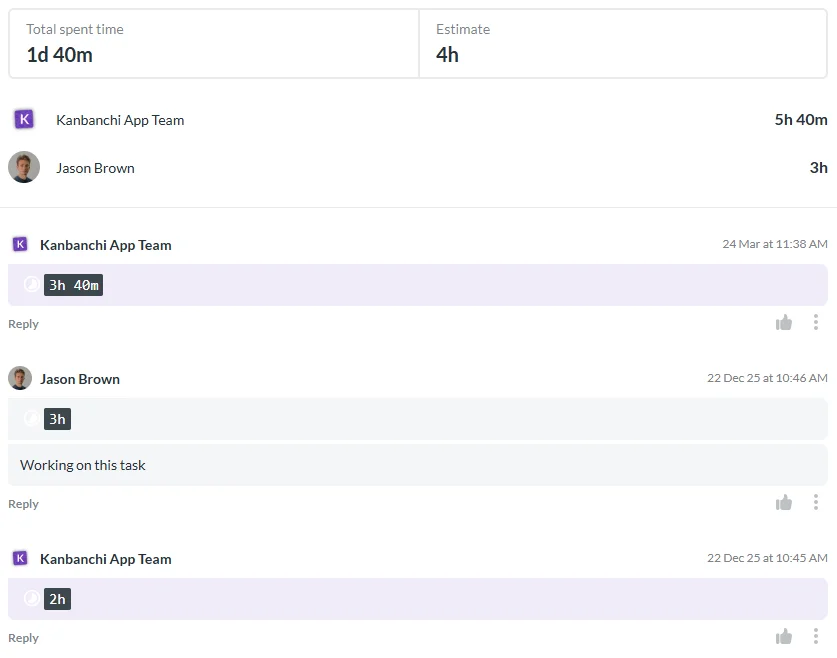
Kanbanchi Time Tracker helps teams estimate, log, and monitor time spent on tasks without leaving the project board.
Where ProofHub has no real equivalent is proofing. The markup tools let reviewers comment directly on images, PDFs, and documents, and approve them without downloading files or switching to email. It’s a real advantage for creative teams, particularly if your core workflow is client-facing creative review. Kanbanchi’s strengths instead lie in scheduling and time tracking, along with staying inside the Google Drive files teams already use.
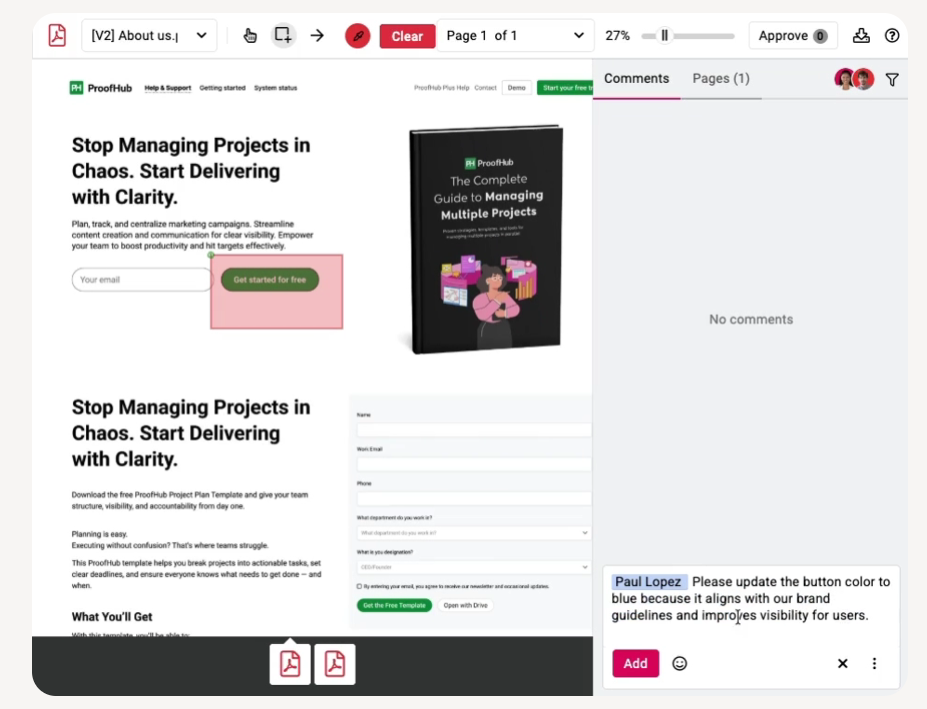
ProofHub’s proofing tool enables teams to review files, leave annotations, and approve creative work collaboratively.
Security is where Kanbanchi vs ProofHub matters most for procurement.
Kanbanchi’s security certifications include everything organizations in regulated industries require: SOC 2 Type II, ISO 27001, GDPR, HIPAA, and CASA certification, with Google Vault support on Enterprise. Single sign-on (SSO) works through your Google or Microsoft account on every plan, including free, and board permissions are provided by Google.
ProofHub’s public security documentation covers SSL encryption in transit, IP restriction on Ultimate Control, and activity logging. But if you need SSO or a signed compliance report, it may not be the best option. ProofHub doesn’t appear to have SOC 2, ISO 27001, or HIPAA certification, and offers no SAML SSO at any tier.
Something that both platforms do have, though, is custom roles. They’re available on ProofHub’s Ultimate Control plan, while Kanbanchi extends role-based sharing with Google Groups on Enterprise.
ProofHub connects to Slack, Dropbox, Box, OneDrive, Google Calendar, iCal, FreshBooks, and QuickBooks.
That’s a lot of integrations, but one that’s notably absent (and often mentioned by teams researching ProofHub alternatives because they run on Google Workspace) is Google Drive integration. Files aren’t attached directly, and there’s no Gmail add-on for creating tasks.
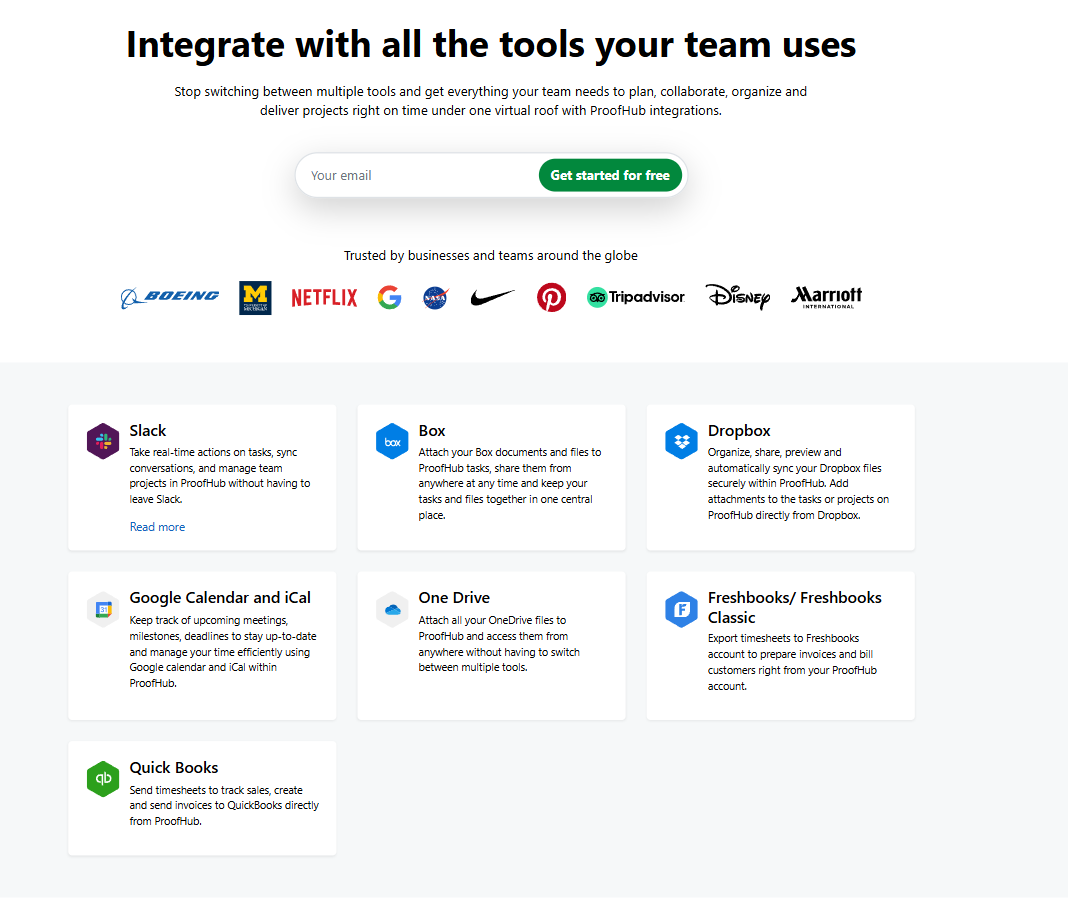
ProofHub integrates with popular business applications to streamline communication, file sharing, and project workflows.
Kanbanchi’s architecture is built around Google Workspace. The six Google Workspace integrations are:
In contrast, ProofHub’s own Forms feature handles client and team request intake. Kanbanchi’s native depth, the core of project management software for Google Workspace, is where it separates itself from a connector-based approach.
In terms of mobile, both Kanbanchi and ProofHub have mobile apps at no extra cost. Kanbanchi’s visual boards work exactly the same way, so updating cards or leaving a comment from a phone feels consistent with the desktop experience.
ProofHub’s iOS app scores 3.4/5 in the App Store, and user feedback describes the mobile experience as noticeably slower than the web version. Some reviewers also note lag when moving between projects. Real-time notifications are frequently praised, which offsets some of the performance concerns, especially if you mainly need alerts rather than deep editing on the go.
But if you’re managing detailed tasks from a phone regularly, test this through a ProofHub free trial before committing.
ProofHub offers basic support at all levels, including email, live chat, scheduled Zoom calls, and a knowledge base with video tutorials. Priority support, however, is reserved for the Ultimate Control plan, meaning Essential-plan customers may wait longer during busy periods. This is something you’ll often find mentioned in a ProofHub review.
Kanbanchi’s support is a recurring theme in reviews on both G2 and Capterra, with a team that understands the product deeply. They engage with the actual business problem rather than reading from a script, and stay with an issue until it is resolved. This means you’re able to troubleshoot specific board configurations and get actual value from the platform, without waiting weeks for a reply when you’re mid-project.
ProofHub pricing works on a flat-rate model
Both plans include unlimited users at no extra charge, and there’s also a 14-day free trial option with no credit card required. ProofHub offers a nonprofit discount, too, on request.
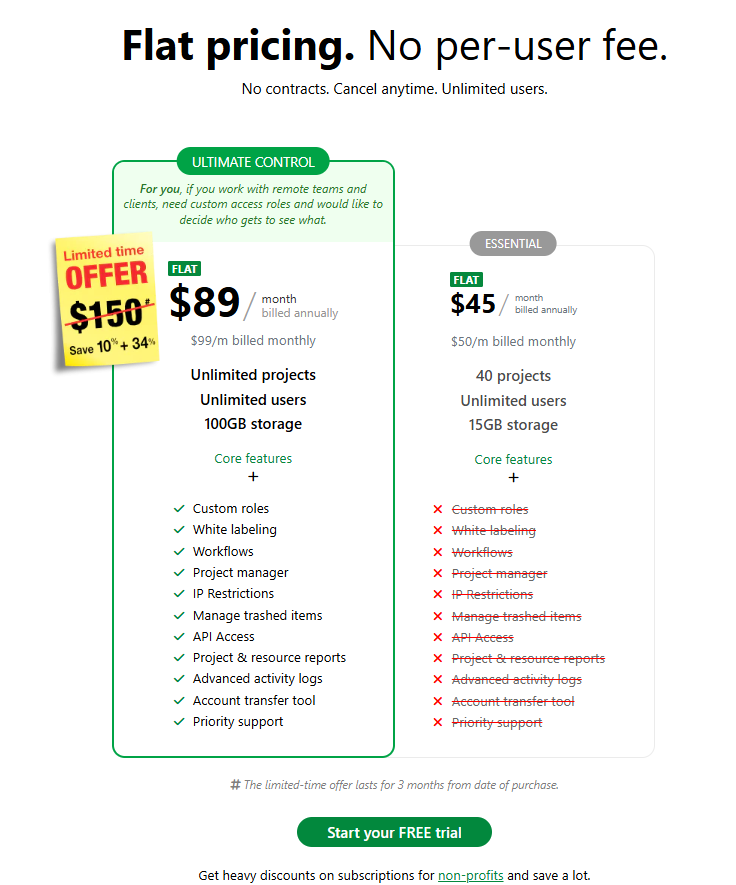
ProofHub pricing overview comparing plans and features for teams managing projects and collaboration.
Kanbanchi’s Essential plan costs $3.97 per user per month on annual billing. Pricing is custom from two seats, so volume discounts apply even at small team sizes. The free plan is also permanent, limited only by 36 active cards per board rather than by time.
Nonprofits qualify for a 25% discount on Kanbanchi plans except Essential, and Google Drive integration is included on every Kanbanchi plan, including free.
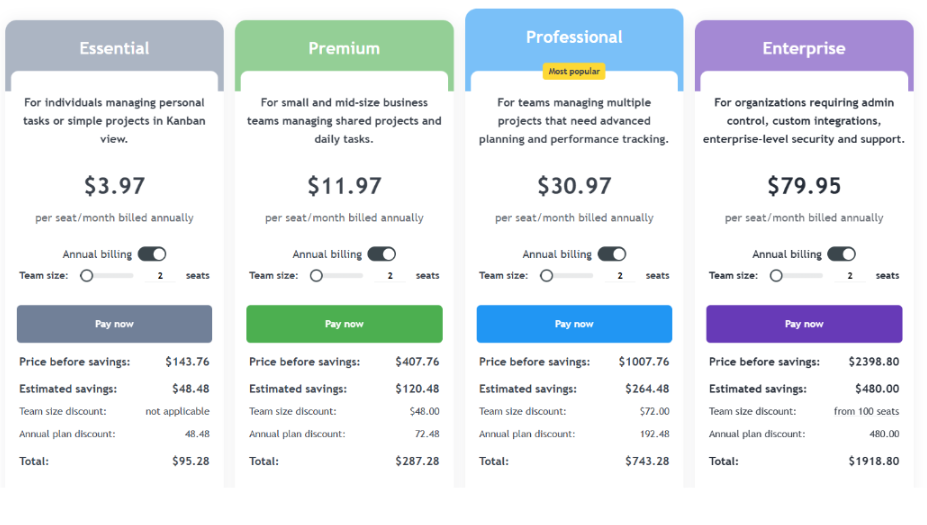
Kanbanchi pricing overview highlighting plans and features for Google Workspace project management teams.
But if you’re comparing Kanbanchi vs ProofHub pricing, you’ll need to consider it in terms of seat count to work out which will truly be most cost-effective for your organization.
Kanbanchi Essential works out to roughly $47.64 per seat per year.
ProofHub Essential is a flat $540 per year regardless of headcount.
Divide $540 by $47.64 and the breakeven lands just under 12 seats. Teams of 11 or fewer pay less on Kanbanchi Essential, teams of 12 or more pay less on ProofHub Essential, assuming Essential-tier features cover what both need.
Add time tracking, though, and the breakeven point moves.
ProofHub only includes it on Ultimate Control, which costs $1,620 a year at its standard rate, still flat regardless of team size. Kanbanchi’s Professional plan adds time tracking, Gantt, dependencies, and Team Workload, priced custom from two seats. Kanbanchi Essential’s $952.80 a year still undercuts ProofHub Ultimate Control’s $1,620 for a 20-person team.
Moving to Kanbanchi Professional (which includes time tracking, Gantt, and workload views) is priced custom from two seats. At 20 people, this is still more cost-effective than ProofHub in most configurations.
| Choose Kanbanchi if… | Choose ProofHub if… |
|---|---|
| Your team runs on Google Workspace and wants boards stored in Drive | You need a flat monthly fee regardless of team size |
| You need SOC 2, ISO 27001, or SSO for a compliance review | Your core workflow centers on file proofing and creative review |
| You want a permanent free plan to test the tool with no time limit | You have 25 or more users and only need Essential-tier features |
| You need native email-to-card creation from Gmail | You are not on Google Workspace and don’t need native Drive storage |
| Time tracking, Gantt charts, and workload views matter from day one | A ProofHub free trial is enough time for you to evaluate fit |
Larger organizations with simple, Essential-tier needs and no Google Workspace dependency may find ProofHub’s flat fee genuinely more affordable. And if you’re part of a creative team whose main workflow is file review, weigh its proofing tools seriously. For everyone else, Kanbanchi is the stronger fit.
Our final verdict in this Kanbanchi vs ProofHub review comes down to what your team needs most.
ProofHub wins on simple pricing, featuring one flat-rate project management software fee with unlimited seats, and a proofing tool that genuinely cuts down email-based review cycles. It’s a great choice if you require a straightforward task management tool, but not Google-native storage or formal security certification.
Kanbanchi is stronger on fit: boards that live inside the Google Drive your team already uses, single sign-on and certification on every plan, including free, and task-focused features like time tracking and Team Workload (a point that ProofHub reserves for its top tier). If you’re a Google Workspace team with under roughly 25 seats, or need SOC 2, ISO 27001, or SSO as a procurement requirement, Kanbanchi is a better choice.
Whether you’re weighing ProofHub alternatives for the first time or want Gantt charts and time tracking without a custom quote at every step, start with Kanbanchi’s free plan today.
Kanbanchi wins for Google Workspace teams needing time tracking, Gantt charts, and security certification in most Kanbanchi vs ProofHub reviews. ProofHub suits larger teams wanting flat-rate pricing and built-in proofing but not Google-native storage or SOC 2 certification. But the right answer really depends on your team size and compliance needs.
No, ProofHub offers a 14-day free trial with no credit card required, but there’s no permanent free plan. You’ll need to add payment information once this trial ends, or the account expires. In contrast, Kanbanchi has a permanent free plan limited only by 36 active cards per board.
Kanbanchi is one of the strongest ProofHub alternatives for teams running on Google Workspace. It stores boards directly in Google Drive and includes the native Gmail and Calendar integration that ProofHub lacks, while also offering SSO on every plan. As project management software for Google Workspace, this architecture makes a real difference daily.
ProofHub charges a flat $45 per month for Essential or $89 per month for Ultimate Control, rising to $135 after three months, both with unlimited users. Kanbanchi charges $3.97 per user per month for Essential on annual billing. Under about 11 seats, Kanbanchi Essential is typically cheaper. Beyond that, ProofHub pricing is more cost-effective.
No, ProofHub offers no SAML SSO or any form of single sign-on at any pricing tier. Kanbanchi includes SSO via your Google or Microsoft account on every plan, including free, along with SOC 2 Type II, ISO 27001, GDPR, HIPAA, and CASA certification.
Kanbanchi doesn’t include dedicated proofing or file annotation tools the way ProofHub does. Teams whose core workflow centers on marking up creative files may prefer ProofHub for that use case. Kanbanchi’s strength lies in task management, scheduling, and Google Workspace integration rather than creative file review.
Read more articles related to Project Management


In this Article:
Start using Kanbanchi now
Start your free trial