-  views

Law Firm Project Management Software for Legal Excellence: Mastering Case Management with Kanbanchi

Try Kanbanchi now

Start your free trial

 

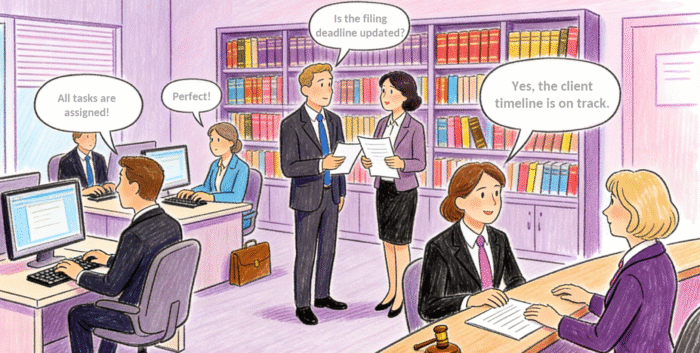
An illustration of a legal team setting and confirming task assignments and timelines, demonstrating the efficiency of a well-implemented attorney task management system

Running a modern practice means balancing dozens of moving parts: deadlines, filings, discovery requests, deposition prep, and client updates, often across multiple attorneys and paralegals. The difference between a calm, predictable workflow and a last-minute scramble usually comes down to whether your law firm project management software makes work visible, repeatable, and easy to coordinate.

Below is a litigation-focused, real-world view of how legal teams use Kanbanchi to track case progress, coordinate depositions, and manage document workflows while keeping collaboration centralized in their preferred Workspace (Google or Microsoft).

Why Law Firms Need Project-Style Case Management

Traditional “matter management” often tracks high-level information, but falls short when you need to operationalize the work: who drafts what, which exhibits are pending, what’s blocking a motion, and how today’s deposition affects next week’s filing.

Law firms adoptinglaw firm project management software are typically solving for:

  • Deadline risk: Court dates, internal review deadlines, and client commitments need consistent reminders and ownership
  • Work fragmentation: Tasks, emails, files, and notes scattered across tools slow teams down
  • Bottlenecks: Partners become inadvertent chokepoints without clear queues and delegation
  • Inconsistent execution: Repeating the same process (intake, discovery, filing) shouldn’t require reinventing a checklist

This is where Kanbanchi serves as a practical layer on top of legal case management tools, turning each matter into a shared, trackable workflow.

Kanbanchi as a Legal Case Management Tool Inside Google Workspace

Many firms already run on Gmail, Google Calendar, Google Drive, and Google Docs. Kanbanchi’s value lies in organizing work where the firm already operates, reducing friction, and improving adoption. Typical workspace benefits include:
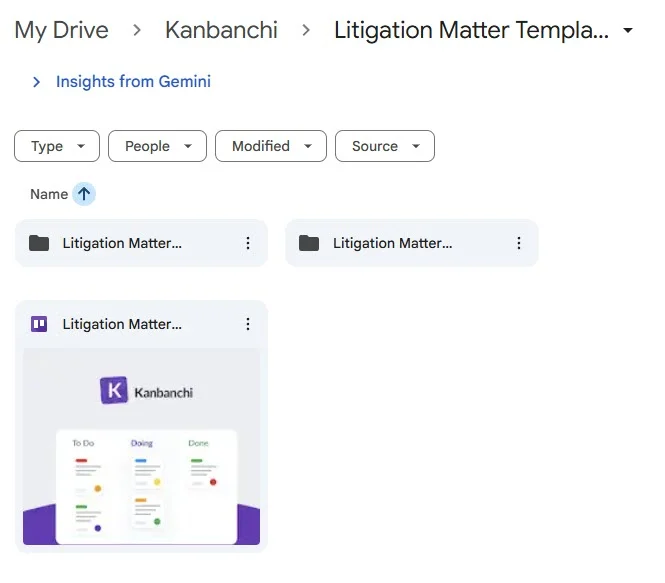
  • Centralized matter board: A board with a card per case/matter, with columns that reflect your phases (e.g., Intake, Pleadings, Discovery, Depositions, Motions, Trial Prep, Closed) or a separate board for long cases
  • Drive-linked documents: Tasks can link directly to the relevant files, drafts, exhibit binders, and evidence files
  • Clear accountability: Each task has an owner, due date, and status, so “someone should handle this” becomes “Alex should do it by Friday”
A screenshot of a Google Drive folder structure showing a Kanbanchi board titled "Litigation Matter Template" stored alongside case folders, illustrating native integration with Google Workspace

Kanbanchi stores project boards as files within your existing Google Drive, making access intuitive for the whole firm

If your firm evaluates legal case management tools primarily on usability and team uptake, this “inside Workspace” approach can be a deciding factor.

Attorney Task Management System: Turning Case Chaos Into Daily Clarity

Attorneys don’t want more dashboards; they want a reliable daily view of what matters, what’s due, and what’s blocked. Kanbanchi supports this by converting the case plan into a personal, actionable workload.

How it functions as an attorney task management system in practice:

  • Personal task views: Attorneys can focus on tasks assigned to them across all matters, rather than hunting case-by-case
  • Due dates that drive behavior: Tasks tied to filing deadlines and internal review windows prevent “silent slips”
  • Delegation with context: Assign drafting, cite-checking, or exhibit preparation tasks with links, notes, and checklists attached

Example: A partner assigns “Draft motion to compel” with (1) a link to the discovery dispute folder in Drive, (2) a checklist for required exhibits, and (3) an internal deadline one week before filing. That structure reduces follow-up emails and avoids missed components.

Litigation Project Coordination: Managing Timelines, Dependencies, and Depositions

Litigation isn’t just a set of tasks – it’s a sequence. One late response can cascade into motion deadlines, deposition scheduling changes, and trial prep compression. Kanbanchi supports litigation project coordination by making the sequence visible and adjustable.

A practical board setup for litigation:

  • Columns by phase: Discovery tasks don’t sit next to trial prep tasks unless they should
  • “Blocking” signals: Add a label or status for “Waiting on client,” “Waiting on opposing counsel,” or “Pending court ruling”
  • Timeline thinking: Use due dates and recurring checklists to map the cadence (meet-and-confers, drafting windows, filing prep)

Read more business blogs here

Coordinating Depositions (Real Workflow Example)

Depositions are coordination-heavy because they involve strict timing, multiple stakeholders, and extensive documentation: notices, witness preparation, exhibit selection, court reporter scheduling, tech checks, interpreter needs, confidentiality orders, and follow-up actions. The risk isn’t just “forgetting a task”, it’s losing sequence control (e.g., exhibits aren’t finalized before the prep session, or a remote setup isn’t tested until the morning of the depo).

A Kanbanchi card can serve as the single coordination hub and include:
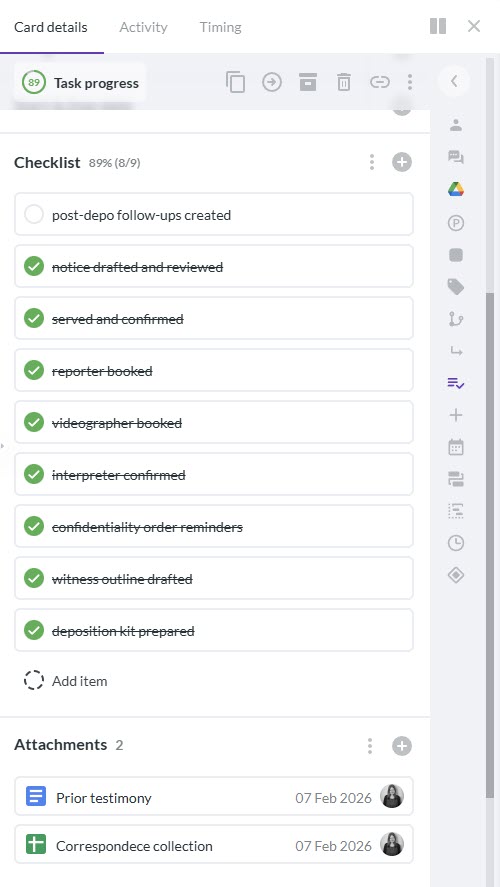
  1. Task checklist: Notice drafted and reviewed; served and confirmed; reporter booked; videographer booked; interpreter confirmed (if needed); remote platform selected; confidentiality order reminders; witness outline drafted; exhibit list drafted; exhibit set finalized; deposition kit prepared; post-depo follow-ups created
  2. Linked files: The outline, exhibits, key pleadings, prior testimony, and correspondence (in Google Drive or Microsoft storage, depending on your environment)
  3. Assignments: Paralegal handles scheduling/logistics; associate handles outline, exhibit curation, and deposition memo template; partner owns strategy, prep session, and final exhibit sign-off
  4. Deadlines: Tech check 48 hours prior; witness prep  hours prior; final exhibit set 2 hours prior; deposition summary memo due  hours after
A screenshot of a Kanbanchi task card displaying a "Deposition" checklist with items like "reporter booked" and "videographer booked," alongside Google Drive attachments for prior testimony and correspondence

Eliminate the risk of losing sequence control by using a single card as your coordination hub, keeping your logistical checklist and key case documents side-by-side

Case Study: Employment Dispute Deposition Sprint

In an employment retaliation case, the team planned three depositions in two weeks: the HR manager, the direct supervisor, and a coworker witness. The main challenge was compressing preparation without letting exhibits and outlines drift into email chains.

They set up a Kanbanchi board called “Depositions” with a card per witness:

  • Key documents linked to each card
  • Each card has a checklist: the outline draft had to be done before exhibits could be locked, and exhibits had to be locked before the partner prep session
  • The paralegal attached logistical confirmations (reporter, videographer) directly to the card comments so the team didn’t hunt across inboxes

Result in practice: everyone knew whether they were “ready” because the card status reflected reality. If “Exhibits finalized” wasn’t checked, the prep session agenda automatically shifted to unblock it.

Case Study: Remote Deposition With Cross-Time-Zone Coordination

In a commercial dispute, the witness was overseas, and the deposition was conducted remotely. The risks were predictable: tech instability, missing screen-share permissions, and last-minute exhibit confusion.

Their Kanbanchi deposition card included:

  • A “Remote readiness” checklist item with explicit steps (platform dry run, backup dial-in, screen-share permissions, exhibit numbering test)
  • A “Day-of run sheet” attachment (who opens the meeting, who admits participants, who shares exhibits, who handles objections log)
  • A follow-up automation habit: immediately after the deposition, the paralegal duplicated a “Post-depo package” card template (order transcript, store transcript, create depo summary memo, update chronology, flag follow-up discovery)

This is what turns deposition preparation into a repeatable process rather than a rush-driven event, because the process lives as a template you can copy, not as institutional memory.

Paralegal Workflow Management: Document Workflows That Actually Stay Organized

Paralegals often carry the operational burden: filing packets, service coordination, exhibit management, and document hygiene. Kanbanchi supports paralegal workflow management by standardizing repeatable work and keeping the “source of truth” visible to the whole case team.  Attorneys can focus on strategy while staff run the machine with confidence.

Document workflow patterns that work well:
  • Draft → review → finalize → file: Use lists to reflect document maturity and prevent premature filing
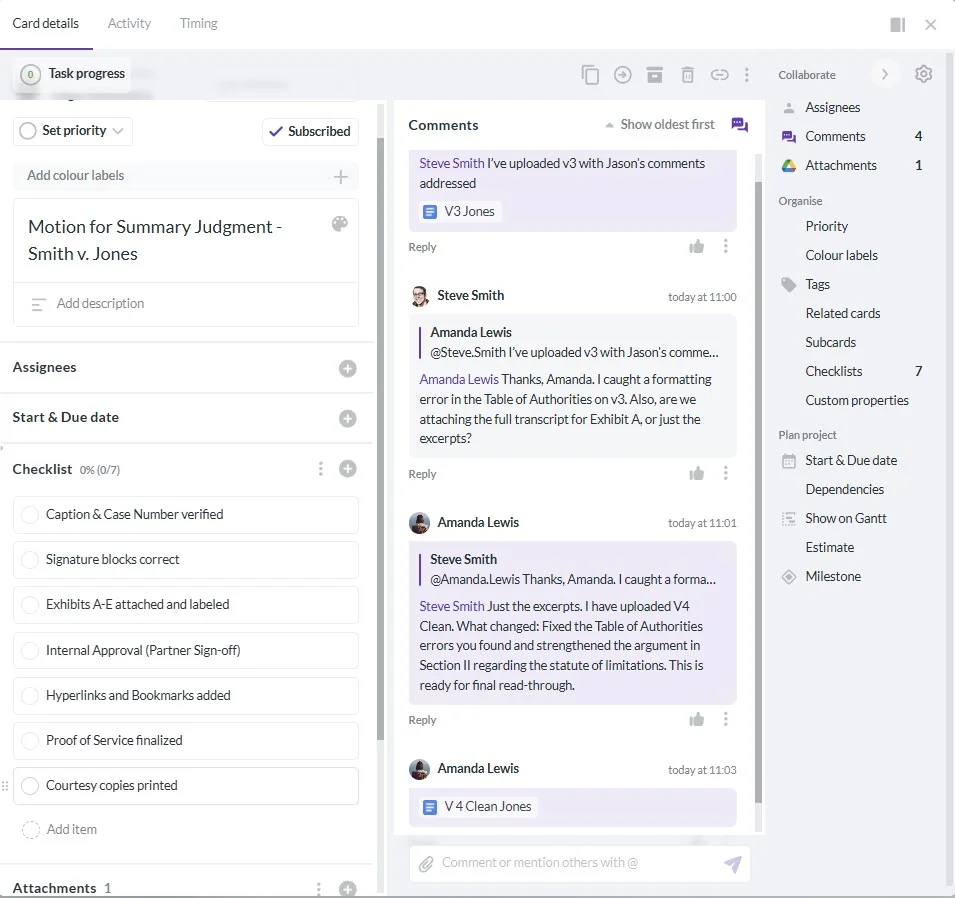
  • Filing packet checklist: Caption, signature blocks, certificates, exhibits, proof of service, formatting requirements, hyperlinks/bookmarks (where required), courtesy copies, and internal approvals
  • Version discipline: Keep the active draft linked in the card, and add a short “what changed” note in the card comments
A screenshot of a Kanbanchi task card titled "Motion for Summary Judgment," featuring a detailed filing checklist on the left and a comment thread on the right where team members discuss edits and attach Google Doc versions like "V3 Jones" and "V 4 Clean Jones"

A “filing-ready” gatekeeper checklis combined with a transparent comment history establish a single source of truth for document versions and approvals

Case Study: Motion Practice With “Filing-Ready” Gates

In a fast-moving litigation matter, the team had multiple filings in the same month (motion to dismiss opposition, a discovery motion, and a stipulated protective order). Their biggest pain was rework: attorneys would mark a draft “done” before exhibits, declarations, and service details were complete.

They introduced a Kanbanchi “Filing-ready checklist” that acted like a gate. The paralegal owned the gate and only moved the filing card into “Ready to File” once every checklist item was complete:

  1. All exhibits finalized and correctly referenced
  2. Declarations executed and attached
  3. Proof of service drafted and verified
  4. Filing format checks completed (pagination, captions, local rules)
  5. Final PDF saved in the “Filed” folder with consistent naming

This reduced last-minute panic because the team stopped treating “final draft” as the finish line; “filing-ready” became the finish line.

Case Study: Exhibit Management That Survives Handoffs

Exhibit sets are where version chaos often shows up: duplicate PDFs, renumbered exhibits, and uncertainty about what was actually used in the deposition.

A simple Kanbanchi approach:

  • One exhibit-tracking card per deposition or hearing with a checklist: “Exhibit list drafted,” “Numbers assigned,” “Redactions confirmed,” “Bates range verified,” “Final set exported,” “Shared with witness/team”
  • A single linked file in Google Drive with strict naming conventions (e.g., “Ex_012 – Email chain re: contract terms.pdf”)
  • Clear ownership: paralegal curates the folder with the files; associate confirms relevance; partner approves the final set

Because all three roles collaborate on the same card, handoffs become explicit and audit-friendly (who approved what, and when).

Tracking Client Communication Without Losing Context

Clients judge competence by responsiveness and clarity. When communication lives only in inbox threads, teams lose continuity. Especially when a teammate is out, a matter spans months, or the client asks, “What happened after that deposition again?”

A simple approach in Kanbanchi is to treat client communications like deliverables with owners and due dates:

  • Create a “Client Updates” list: Checklists for planned touchpoints (weekly status, post-hearing recap, deposition outcome, settlement options memo)
  • Log touchpoints: Note date, attendees, questions asked, promises made, and next steps; attach or link the email draft or call notes
  • Tie updates to deliverables: Link the update card to the motion, discovery response, or deposition card so context is one click away

Case Study: Weekly Status Updates That Stop Surprises

In a multi-month commercial dispute, the client complained that updates were “either too frequent and vague, or too late and urgent.” The team switched to a Kanbanchi rhythm:

  • Every Friday, a “Weekly Client Update” card auto-recurs
  • The associate fills in three fields in the card description: “What changed,” “What’s next,” “What we need from you”
  • The partner reviews, then the paralegal sends and logs it (including any client replies that create new tasks)

This keeps the client informed without overloading them, and it creates a durable record of what the firm communicated and when.

Case Study: Communication Tracking Tied to Litigation Milestones

After a deposition, the client wanted immediate guidance: “Does this help us settle, or are we heading to trial?” Instead of a long email thread, the team created:

  • A “Post-deposition client brief” card linked directly to the deposition card
  • A checklist: transcript ordered; key admissions captured; risks updated; settlement range discussion scheduled
  • A due date  hours after the deposition for a short, structured summary

This is especially useful when your law firm project management software is expected to support both internal execution and client-facing predictability, because it connects operations (tasks and documents) to confidence (clear, timely communication).

Read the largest case of the legal firm streamlining client engagement, and more

Practical Setup: A repeatable Kanbanchi Case Template

To get value quickly, build one “Litigation Matter Template” board and duplicate it per case. Suggested core elements:

  • Phases as lists: Intake, Pleadings, Discovery, Depositions, Motions, Trial Prep, Closed
  • Standard cards: Engagement + conflicts, initial case theory memo, document request list, discovery plan, deposition plan, motion calendar, trial binder prep
  • Roles baked in: Assign default owners (attorney/paralegal) and add checklists for repeatable steps
  • Permissions discipline: Use Workspace sharing rules so the right people have access to the right matter boards and Drive folders
A screenshot of a Kanbanchi board layout titled "Litigation Matter Template," displaying standard legal workflow columns including "Intake," "Pleadings," "Discovery," and "Depositions."

Such a very simple board layout template instantly establishes your standard phases and roles

This template approach is often what turns a tool from “nice board” into a durable operating system for the firm.

Why Kanbanchi Fits Firms That Want Secure, Collaborative Execution

Firms evaluating law firm project management software usually care about two things at once:

  1. smoother delivery
  2. controlled collaboration

Kanbanchi’s strongest use case is helping legal teams collaborate on tasks and documents while staying anchored in Google Workspace or Microsoft environment. So, work is easier to find, easier to hand off, and harder to drop.

SIGN UP FOR A FREE TRIAL TODAY

    MultipleAuthors\Classes\Objects\Author Object
    (
        [term_id] => 973
        [term:MultipleAuthors\Classes\Objects\Author:private] => 
        [metaCache:MultipleAuthors\Classes\Objects\Author:private] => Array
            (
                [user_email] => olga.alekseeva@kanbanchi.com
                [user_id] => 20
                [first_name] => Olga Alekseeva
                [last_name] => 
                [job_title] => Growth hacking expert with over 10 years of experience with Kanbanchi
                [description] => Olga wears multiple hats across marketing, sales, product, and ops after 10+ years in the SaaS world. She is passionate about helping teams streamline their workflows with Kanbanchi and Google Workspace or Microsoft 365. "When I'm not optimizing processes or writing guides, I'm probably tweaking our product roadmap or diving into the latest productivity tools".
                [user_url] => https://linkedin.com/in/olgksv
            )
    
        [userObject:MultipleAuthors\Classes\Objects\Author:private] => WP_User Object
            (
                [data] => stdClass Object
                    (
                        [ID] => 20
                        [user_login] => olga.alekseeva
                        [user_pass] => $wp$2y$10$WuiuvYMj7CDnLrRbWchEkuBwKzmbBakK64Uk5c68bDY3qA46MFam6
                        [user_nicename] => olga-alekseeva
                        [user_email] => olga.alekseeva@kanbanchi.com
                        [user_url] => https://linkedin.com/in/olgksv
                        [user_registered] => 2025-09-03 15:47:58
                        [user_activation_key] => 
                        [user_status] => 0
                        [display_name] => Olga Alekseeva
                    )
    
                [ID] => 20
                [caps] => Array
                    (
                        [editor] => 1
                        [author] => 1
                        [contributor] => 1
                        [wpseo_editor] => 1
                        [wpseo_manager] => 1
                        [administrator] => 1
                    )
    
                [cap_key] => wp_capabilities
                [roles] => Array
                    (
                        [0] => editor
                        [1] => author
                        [2] => contributor
                        [3] => wpseo_editor
                        [4] => wpseo_manager
                        [5] => administrator
                    )
    
                [allcaps] => Array
                    (
                        [moderate_comments] => 1
                        [manage_categories] => 1
                        [manage_links] => 1
                        [upload_files] => 1
                        [unfiltered_html] => 1
                        [edit_posts] => 1
                        [edit_others_posts] => 1
                        [edit_published_posts] => 1
                        [publish_posts] => 1
                        [edit_pages] => 1
                        [read] => 1
                        [level_7] => 1
                        [level_6] => 1
                        [level_5] => 1
                        [level_4] => 1
                        [level_3] => 1
                        [level_2] => 1
                        [level_1] => 1
                        [level_0] => 1
                        [edit_others_pages] => 1
                        [edit_published_pages] => 1
                        [publish_pages] => 1
                        [delete_pages] => 1
                        [delete_others_pages] => 1
                        [delete_published_pages] => 1
                        [delete_posts] => 1
                        [delete_others_posts] => 1
                        [delete_published_posts] => 1
                        [delete_private_posts] => 1
                        [edit_private_posts] => 1
                        [read_private_posts] => 1
                        [delete_private_pages] => 1
                        [edit_private_pages] => 1
                        [read_private_pages] => 1
                        [wpseo_bulk_edit] => 1
                        [copy_posts] => 1
                        [ppma_edit_post_authors] => 1
                        [ppma_edit_own_profile] => 1
                        [wpseo_edit_advanced_metadata] => 1
                        [wpseo_manage_options] => 1
                        [view_site_health_checks] => 1
                        [switch_themes] => 1
                        [edit_themes] => 1
                        [activate_plugins] => 1
                        [edit_plugins] => 1
                        [edit_users] => 1
                        [edit_files] => 1
                        [manage_options] => 1
                        [import] => 1
                        [level_10] => 1
                        [level_9] => 1
                        [level_8] => 1
                        [delete_users] => 1
                        [create_users] => 1
                        [unfiltered_upload] => 1
                        [edit_dashboard] => 1
                        [update_plugins] => 1
                        [delete_plugins] => 1
                        [install_plugins] => 1
                        [update_themes] => 1
                        [install_themes] => 1
                        [update_core] => 1
                        [list_users] => 1
                        [remove_users] => 1
                        [promote_users] => 1
                        [edit_theme_options] => 1
                        [delete_themes] => 1
                        [export] => 1
                        [bcn_manage_options] => 1
                        [manage_security] => 1
                        [restrict_content] => 1
                        [list_roles] => 1
                        [create_roles] => 1
                        [delete_roles] => 1
                        [edit_roles] => 1
                        [cfdb7_access] => 1
                        [ppma_manage_authors] => 1
                        [ppma_manage_layouts] => 1
                        [ppma_manage_custom_fields] => 1
                        [ppma_manage_author_categories] => 1
                        [iwc_read_posts] => 1
                        [iwc_create_posts] => 1
                        [iwc_edit_posts] => 1
                        [iwc_delete_posts] => 1
                        [iwc_read_users] => 1
                        [iwc_create_users] => 1
                        [iwc_edit_users] => 1
                        [iwc_delete_users] => 1
                        [iwc_read_comments] => 1
                        [iwc_create_comments] => 1
                        [iwc_edit_comments] => 1
                        [iwc_delete_comments] => 1
                        [iwc_upload_files] => 1
                        [iwc_read_media] => 1
                        [iwc_edit_media] => 1
                        [iwc_delete_media] => 1
                        [iwc_read_terms] => 1
                        [iwc_create_terms] => 1
                        [iwc_edit_terms] => 1
                        [iwc_delete_terms] => 1
                        [editor] => 1
                        [author] => 1
                        [contributor] => 1
                        [wpseo_editor] => 1
                        [wpseo_manager] => 1
                        [administrator] => 1
                    )
    
                [filter] => 
                [site_id:WP_User:private] => 1
            )
    
        [hasCustomAvatar:MultipleAuthors\Classes\Objects\Author:private] => 1
        [customAvatarUrl:MultipleAuthors\Classes\Objects\Author:private] => Array
            (
                [url] => https://www.kanbanchi.com/wp-content/uploads/2025/09/photo_2024-04-10_17-25-16.jpg
                [url2x] => https://www.kanbanchi.com/wp-content/uploads/2025/09/photo_2024-04-10_17-25-16.jpg
            )
    
        [avatarUrl:MultipleAuthors\Classes\Objects\Author:private] => 
        [avatarBySize:MultipleAuthors\Classes\Objects\Author:private] => Array
            (
                [96] => 
                [80] => 
                [50] => 
            )
    
    )
    
  • Growth hacking expert with over 10 years of experience with Kanbanchi

    Olga wears multiple hats across marketing, sales, product, and ops after 10+ years in the SaaS world. She is passionate about helping teams streamline their workflows with Kanbanchi and Google Workspace or Microsoft 365. "When I'm not optimizing processes or writing guides, I'm probably tweaking our product roadmap or diving into the latest productivity tools".

    All articles
Share

Try Kanbanchi now

  • Collaborate seamlessly
    with your team
  • Integrate Kanbanchi
    with Google or Microsoft
  • Manage all your work in one place
Start for free

Start using Kanbanchi now

Start your free trial