
In this Article:
Try Kanbanchi now
Start your free trial


Cross-functional work rarely fails because people lack effort. It fails because every function sees a different version of the plan. Marketing is tracking launch assets, operations is watching capacity, finance is checking budgets, leadership wants milestones, and delivery teams need clear next actions. Without a shared system, progress becomes dependent on meetings, status requests, and individual memory.
The right project and team management software gives every function one place to see what matters: what is being done, who owns it, when it is due, what is blocked, and how each task connects to the larger goal. For business owners and team leads, this is not just about productivity. It is about predictable execution across teams that do different kinds of work.
Cross-functional projects involve people with different priorities, tools, terminology, and approval paths. A simple checklist can capture tasks, but it rarely captures context. That is where many teams start to lose control.
A product launch might begin in a strategy document, move into a design folder, become a development backlog, trigger a legal review, and end with a sales enablement checklist. Each department may feel organized locally, while the overall project remains fragmented.
That fragmentation creates familiar symptoms: duplicate updates, missed handoffs, unclear priorities, and meetings that exist only to rebuild the status picture. When several teams are involved, a static spreadsheet or personal to-do app becomes a bottleneck rather than a source of truth.
In cross-functional work, the question is often not “Is someone working on this?” but “Who is accountable for moving it to the next stage?” There may be contributors, reviewers, approvers, and stakeholders, but only one clear task owner should be responsible for forward motion.
This matters because cross-functional teams are especially vulnerable to coordination failure. A widely cited Harvard Business Review article on cross-functional teams reported that many such teams struggle to meet targets for budget, schedule, specifications, customer expectations, and alignment with company goals. Software will not fix poor leadership by itself, but it can make unclear ownership visible enough to address.
Most delays are not caused by the main task. They are caused by something the main task depends on: a decision, a file, a supplier response, a sign-off, a completed design, or a technical prerequisite.
When dependencies live in chat threads or inboxes, managers discover problems late. A good project system surfaces dependencies before they turn into missed deadlines.
For cross-functional work, the goal is not to collect features. The goal is to create a working environment where different departments can coordinate without losing their own way of working.
| Capability | Why it matters for cross-functional work | What to look for |
|---|---|---|
| Visual task boards | Teams can see work moving through stages instead of reading long status lists | Kanban boards, filters, tags, swimlanes, and clear task ownership |
| Timeline planning | Leaders need to understand deadlines, overlaps, and dependencies | Gantt charts, start and due dates, milestones, and dependency management |
| File and context management | Work depends on documents, briefs, contracts, designs, and approvals | Integration with Google Drive, Shared Drives, OneDrive, or SharePoint |
| Communication around tasks | Updates should stay attached to the work, not disappear in chat | Comments, notifications, mentions, and task activity history |
| Time and workload visibility | Managers need to know whether plans match real capacity | Time tracking, workload views, reports, and export options |
| Security and access control | Cross-functional often means internal and external collaboration | Permission alignment with company policies and enterprise-level compliance |
| Adoption-friendly interface | A tool only works if every function can use it | Simple navigation, templates, imports, and minimal training burden |
The best solution should help teams answer practical questions quickly. What is waiting for approval? Which department is overloaded? Which milestone is at risk? Which tasks are blocked by another team? Which files and comments explain the current decision?
Buying software is only half of the decision. The other half is designing a workflow that people will trust. A board that mirrors your org chart too closely can reinforce silos. A board that ignores departmental differences can become too generic to be useful.
Every cross-functional board should begin with the business outcome, not the department names. For example, “Launch new customer onboarding flow” is stronger than “Marketing tasks” or “Operations work.” The shared outcome reminds everyone that the project is not complete when one department finishes its part. It is complete when the business result is delivered.
A useful project card should usually include the owner, due date, priority, current status, relevant files, comments, subtasks, and any dependencies. That turns the card into a small operating hub for the work.
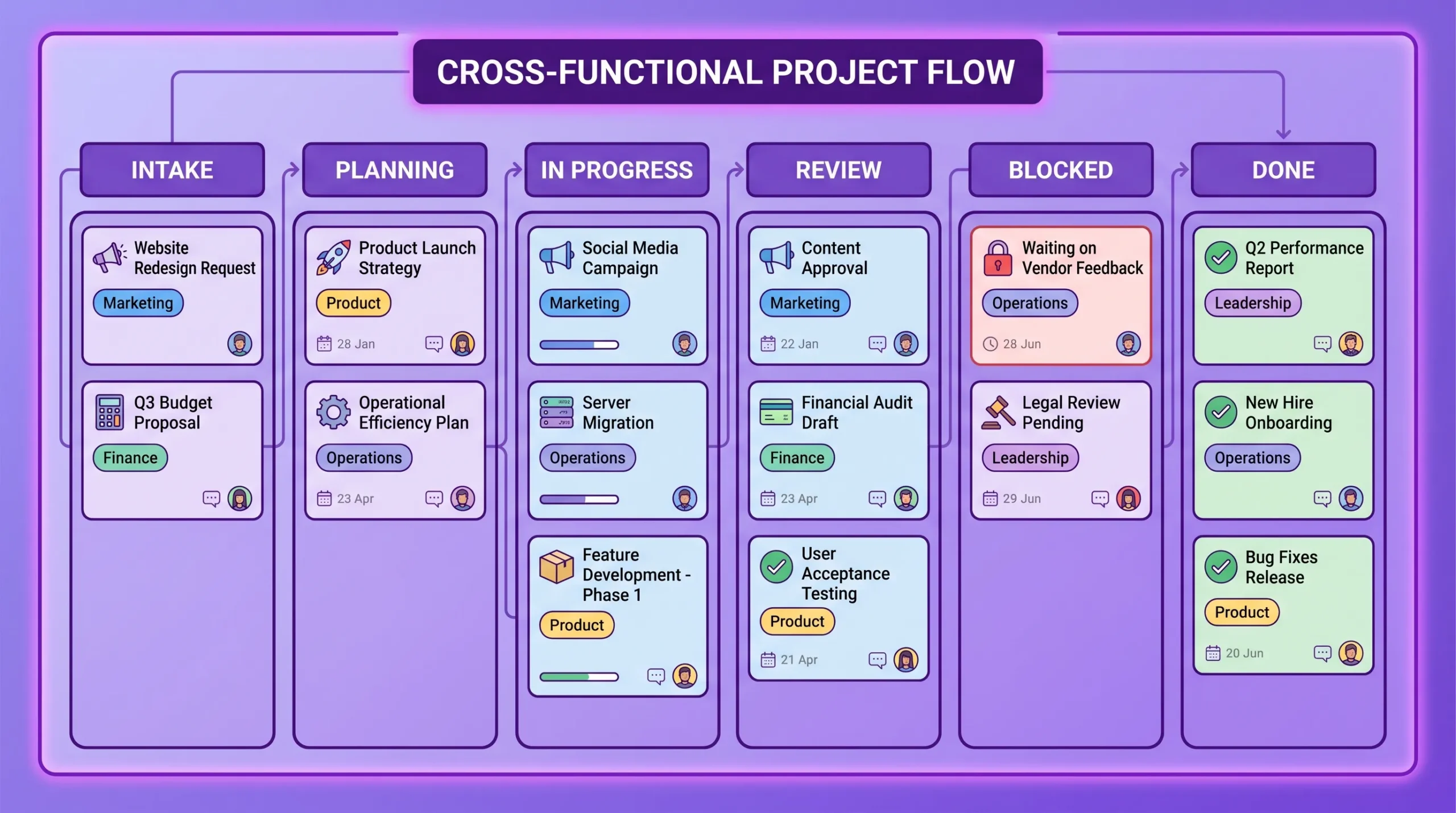
Instead of creating columns for each function, consider creating stages of work. This makes handoffs easier to see and prevents tasks from disappearing inside departmental buckets.
| Workflow stage | Purpose | Example card |
|---|---|---|
| Intake | Capture new requests and ideas before commitment | “Review partner campaign proposal” |
| Planning | Clarify scope, owner, priority, and timeline | “Define launch success metrics” |
| In progress | Work is actively being completed | “Create sales enablement deck” |
| Review | Waiting for feedback, QA, or approval | “Legal review of customer terms” |
| Blocked | Cannot move forward without a dependency | “Waiting for supplier quote” |
| Done | Completed and accepted by the relevant owner | “Publish help center article” |
Departments can still be represented through labels, tags, assignees, swimlanes, or filters. This keeps the main workflow focused on progress rather than hierarchy.
Not everyone needs the same view. Individual contributors need clear next tasks. Project managers need blockers, due dates, and dependencies. Executives need timeline confidence and progress summaries.
That is why cross-functional teams benefit from software that supports multiple views of the same work. A Kanban board is useful for daily execution. A Gantt chart is useful for planning deadlines and dependencies. A list view is useful for scanning, filtering, and sorting. Reports are useful for leadership reviews and resource discussions.
The important part is that these views should not create separate data sets. If the same task exists in five places, the team will eventually stop trusting at least four of them.
Cross-functional coordination is not limited to software development or formal project management offices. It appears anywhere an outcome depends on multiple teams.
A launch may involve product, engineering, marketing, sales, customer success, finance, and legal. Each group has different deliverables, but the launch date connects them all.
Project and team management software helps by linking launch tasks to a shared timeline. Teams can see when product materials are due, when website updates need approval, when sales enablement starts, and when customer communications must be ready. If a dependency slips, the impact becomes visible early.
Operations teams often coordinate vendors, warehouse activity, finance approvals, customer communications, and delivery deadlines. These projects become difficult when procurement details, shipping updates, and internal approvals live in separate systems.
For example, a resale or liquidation business might coordinate purchasing, listing, fulfillment, and finance workflows while sourcing inventory from suppliers such as American Bulk Pallets. A shared project board can connect supplier follow-up, margin checks, storage planning, and shipping tasks so that operational work stays visible from purchase to delivery.
Client onboarding usually involves sales, account management, implementation specialists, support, billing, and sometimes legal or security teams. The customer sees one experience, even if the work passes through several internal groups.
A shared board helps teams track every onboarding step, from contract handoff to kickoff, setup, training, data migration, and post-launch review. Managers can spot stalled accounts and ensure that customer-facing teams are not waiting on hidden internal tasks.
HR projects often require input from leadership, finance, IT, legal, department heads, and employees. Examples include policy updates, onboarding redesigns, performance review changes, HRIS implementation, and training rollouts.
Because these initiatives affect many stakeholders, transparent ownership and review stages are essential. Software helps HR teams avoid chasing updates across email while giving managers a clear view of progress.
Many teams already have strong collaboration habits inside Google Workspace or Microsoft 365. They use shared files, calendars, email, cloud storage, and video meetings every day. The problem is that these suites do not always provide a complete project execution layer on their own.
If your team lives in Google Drive, Gmail, Google Calendar, Docs, Sheets, and Meet, then a disconnected project tool creates extra work. People need to upload files again, copy links, recreate tasks from email, and manually update calendars.
The same principle applies to Microsoft 365 teams using OneDrive, SharePoint, Outlook, and Teams. Project software should support the environment your team already trusts rather than forcing people into a parallel workspace.
For Google Workspace users, this is especially important because project context often begins in Gmail and Drive. A dedicated tool can turn that context into structured tasks while keeping files connected to the project.
Cross-functional work often includes sensitive information: budgets, hiring plans, customer data, contracts, product roadmaps, and vendor discussions. The tool you choose should support secure collaboration, including internal and external sharing that respects your company policies.
For larger organizations, security and compliance are not optional selection criteria. They are part of whether the tool can be adopted across departments at all.

Kanbanchi is designed for teams that want visual project management inside the productivity ecosystem they already use. It works with Google Workspace and Microsoft 365, giving teams a practical way to organize tasks, timelines, files, and collaboration without scattering project information across disconnected apps.

Kanbanchi boards help teams organize work with cards, lists, tags, color labels, priorities, filters, and sorting. Teams can create and share project boards and cards, communicate around tasks, and receive notifications about board updates.
For cross-functional projects, swimlanes are especially useful. A single board can separate work by project, department, customer segment, initiative, or phase while still keeping the whole workflow visible. Complex tasks can be broken into subcards, which makes it easier to assign and track detailed work without losing the big picture.

Cross-functional work needs more than a “doing” column. Teams also need to understand time. Kanbanchi lets users convert a board to a Gantt Chart with one click, making it easier to see how cards relate over time and plan schedules visually.
This is useful when leadership needs to understand whether a launch, implementation, campaign, or operational change is still on track. It also helps project managers identify timeline conflicts before they become urgent.
Kanbanchi includes a Time Tracker so teams can track time directly on cards. Managers can review timing data to understand actual effort, compare progress, and improve future planning.
The reporting capabilities help leaders monitor team progress and adjust workflows. Teams can export board data to Google Sheets, including assignments, dates, checklists, and comments. They can also extract data and connect it to a preferred reporting dashboard, such as Google Looker Studio.

Kanbanchi supports Google Workspace workflows by connecting tasks with the tools teams already use. Users can create cards from Gmail, attach files from Google Drive and Shared Drives, add events to Google Calendar, and create boards as files in Google Drive. Enterprise users can create boards directly in Shared Drives.
For Microsoft 365 teams, Kanbanchi is also compatible with OneDrive and SharePoint, which helps teams keep project files connected to the relevant work.
Cross-functional work becomes easier when teams do not have to rebuild the same structure every time. Kanbanchi offers a template gallery and custom board templates, as well as card templates for repetitive work.
Teams migrating from other systems can import Trello boards or CSV data. Backups support recovery of important boards, and corporate branding lets organizations add their logo and background images for a more familiar internal experience.
If you want to explore how visual boards work in practice, the Kanbanchi guide to project boards is a useful next step.
Start free trial of Kanbanchi now
Before selecting project and team management software, involve representatives from the teams that will actually use it. A tool chosen only by leadership may fail at the adoption stage. A tool chosen only by one department may fail when work crosses boundaries.
Use these questions to evaluate fit:
| Question | What a strong answer looks like | Why it matters |
|---|---|---|
| Can every function understand the workflow quickly? | The board structure is visual, simple, and easy to explain | Adoption depends on clarity |
| Does the tool support both task flow and timeline planning? | Kanban and Gantt views work from the same task data | Teams need daily execution and long-term planning |
| Can files stay connected to tasks? | Drive, Shared Drives, OneDrive, or SharePoint files attach naturally | Context should not be separated from work |
| Can managers see workload and progress? | Time tracking, reports, filters, and exports are available | Leaders need data for resource decisions |
| Does it support external and internal collaboration securely? | Sharing aligns with company policies and compliance needs | Cross-functional often includes partners or clients |
| Can the team migrate existing work? | Import from Trello or CSV is supported | Migration effort affects rollout speed |
| Can the workflow scale? | Templates, subcards, swimlanes, and reporting support larger projects | Today’s small process may become tomorrow’s company standard |
A practical test is to run one real project in the software before making a company-wide decision. Choose a project that involves at least three functions, has a real deadline, and includes dependencies. That will reveal whether the tool supports your actual work, not just an idealized demo.
Start with one workflow that has visible pain. A product launch, onboarding process, procurement cycle, or internal change project is usually a good candidate. Avoid trying to standardize every department on day one.
Next, define a basic board structure and naming convention. Keep the first version simple. Too many columns, labels, and rules can make adoption harder. Your first goal is shared visibility, not perfect process design.
Then assign clear owners. Every card should have someone responsible for moving it forward. Contributors and reviewers can be included, but accountability should not be ambiguous.
Finally, establish a review rhythm. A weekly cross-functional review can focus on blocked work, overdue tasks, upcoming dependencies, and changes to scope or timeline. When the board becomes the agenda, meetings become shorter and more useful.
What to Look for in the Best Team Collaboration Software in 2026
Project and team management software helps organizations plan, assign, track, and complete work across individuals and departments. For cross-functional teams, it provides a shared view of tasks, timelines, files, owners, dependencies, and progress.
A simple task manager is usually focused on personal or small-team to-do lists. Cross-functional project software supports shared workflows, multiple views, dependencies, reporting, permissions, and collaboration across departments.
The most important features are visual boards, clear ownership, timeline planning, file integration, task-level communication, time tracking, reporting, and secure sharing. Teams using Google Workspace or Microsoft 365 should also prioritize native integration with their existing tools.
Google Workspace is excellent for communication, documents, calendars, and file storage, but it does not include a full native project management system with Kanban boards, Gantt charts, workload tracking, and integrated reporting. Many teams add a tool like Kanbanchi to create a structured execution layer inside their Workspace environment.
Start with one real cross-functional workflow, keep the board structure simple, assign clear owners, connect files and conversations to tasks, and use the board during meetings. Adoption improves when the tool reduces status-chasing rather than adding administrative work.
Cross-functional work needs visibility, ownership, timelines, and context in one place. If your teams already work in Google Workspace or Microsoft 365, Kanbanchi helps turn that environment into a practical project execution hub with Kanban boards, Gantt charts, time tracking, reporting, file integration, and secure collaboration.
Explore Kanbanchi to see how your team can manage cross-functional projects with less confusion and a clearer path from planning to delivery.
Start free trial of Kanbanchi now



In this Article:
Start using Kanbanchi now
Start your free trial