
In this Article:
Try Kanbanchi now
Start your free trial


Leaders do not adopt project tracking tools because they want another place to store tasks. They adopt them because the old way of tracking work stops working: updates are scattered across email, deadlines live in calendars, files sit in shared drives, and the only person with the full picture is the project manager who built the spreadsheet.
That is risky for growing teams. When work is hidden, leaders make decisions late. They find out about blocked tasks after deadlines slip. They see workload problems only when someone burns out. They discover scope creep when the budget is already under pressure.
The right project management tracking software changes that. It turns project work into a shared, visible system where leaders can see what is happening, what is late, who owns what, and where attention is needed before a small issue becomes a delivery problem.
Leadership visibility is not micromanagement. It is the ability to understand progress without interrupting the team every few hours for status updates.
There’s a real line between tracking work and monitoring people, and it’s worth knowing where it sits: see remote project tracking without surveillance.
For a team lead, visibility might mean knowing which tasks are in progress today and which ones are blocked. For a department head, it might mean seeing whether three active projects are competing for the same people. For an executive, it might mean understanding whether strategic initiatives are moving on schedule.
Strong project tracking tools should help leaders answer questions like these quickly:
The key is that these answers should come from the team’s daily workflow, not from a separate reporting process that becomes outdated as soon as it is created.

Spreadsheets can work for a small, simple project. Status meetings can work when everyone is in the same room, and the work is predictable. But as soon as the team grows, the limits become clear.
A spreadsheet is usually a snapshot, not a live workflow. Someone has to update it manually, and the data often depends on people remembering to report progress. Chat messages are fast but hard to audit. Email threads contain context, but that context is difficult to connect to the task, timeline, or owner. Meetings give leaders a human update, but they also take time away from execution.
| Tracking method | What it does well | Where it creates visibility gaps |
|---|---|---|
| Spreadsheets | Simple lists, budgets, one-time plans | Manual updates, weak collaboration, limited workflow visibility |
| Email and chat | Fast communication, quick decisions | Context gets buried, ownership is unclear, no reliable project overview |
| Calendar-only tracking | Dates, meetings, milestones | No task flow, no dependency logic, limited progress detail |
| Dedicated project tracking tools | Live task status, ownership, timelines, reporting | Requires consistent team adoption and a clear workflow |
For leaders, the problem is not that teams lack effort. The problem is that effort is invisible until it is organized inside a system designed for tracking work.
A Kanban board gives leaders an immediate view of work in motion. Instead of reading through updates, they can see tasks move through stages such as Backlog, Ready, In Progress, Review, Blocked, and Done.
This is especially useful for teams that handle continuous work, such as marketing requests, support operations, HR projects, IT tasks, and product improvements. A visual board makes bottlenecks obvious. If too many cards sit in Review, the team may need faster approvals. If work piles up in In Progress, the team may be overcommitted.
Kanban boards also create accountability without constant follow-up. A task card can show the owner, priority, deadline, comments, attachments, checklist items, and current stage. Everyone sees the same source of truth.

A board shows flow. A timeline shows sequence.
Leaders often need both. A Gantt chart helps them see how tasks relate over time, where dependencies exist, and which activities could affect a target launch date. This matters for projects with phases, milestones, vendor coordination, approvals, implementation windows, or fixed deadlines.
For example, a product launch might include content creation, design, QA, sales enablement, email campaigns, and customer support preparation. The Kanban board helps each team manage day-to-day tasks. The Gantt chart helps leadership understand whether all streams are moving toward the launch date together.
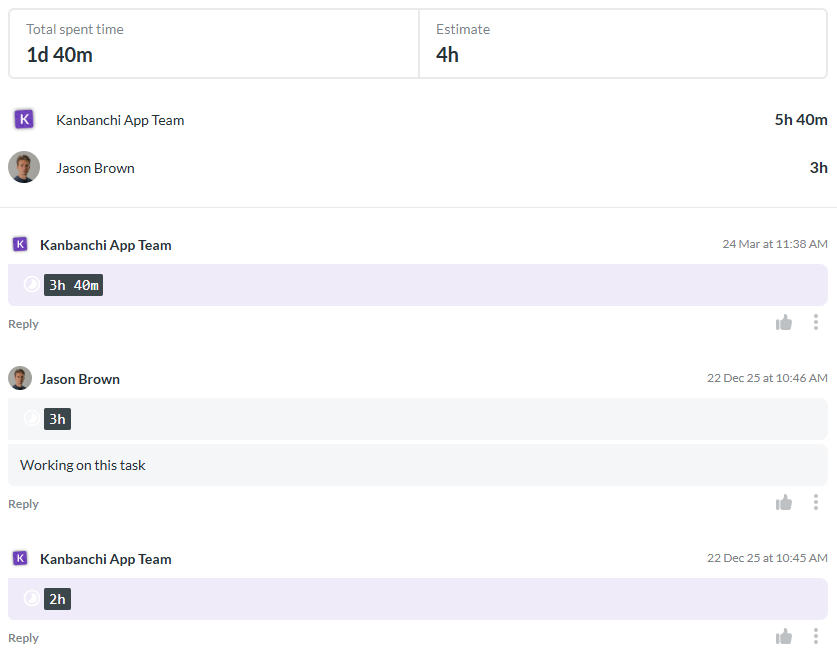
Visibility is incomplete if leaders only see whether tasks are done. They also need to understand effort.
Time tracking helps teams compare estimated effort with actual work. Over time, this improves forecasting, staffing, and prioritization. If one type of task repeatedly takes twice as long as expected, leaders can adjust future plans instead of repeating the same estimation mistake.
Time data is also useful for identifying hidden workload problems. A team member may have fewer assigned tasks but more complex work. Another may be completing many small tasks quickly. Without effort data, leaders can easily misread capacity.
Project tracking tools should make reporting easier, not create more administrative work. Leaders need flexible ways to review information by project, person, priority, deadline, status, client, department, or strategic initiative.
Filters help managers focus on what matters now, such as overdue tasks, high-priority work, blocked items, or tasks assigned to a specific team. Exports help when project data needs to be analyzed in a reporting dashboard or shared with stakeholders who do not work inside the tool every day.
In Kanbanchi, teams can export board data to Google Sheets, including assignments, dates, checklists, and comments. This is helpful when leaders want to connect project data with broader reporting workflows.
Visibility declines when teams have to jump between too many apps. A project card should not be isolated from the files, emails, dates, and conversations that explain the work.
For Google Workspace teams, this means project tracking should work naturally with Google Drive, Shared Drives, Gmail, and Google Calendar. For Microsoft 365 teams, it should fit with OneDrive and SharePoint. When work is connected to the tools people already use, adoption improves, and project context is easier to maintain.
Kanbanchi is designed for Google Workspace and Microsoft 365 environments, with visual boards, timeline planning, time tracking, and file integration through Google Drive or OneDrive and SharePoint.
Start a free trial of Kanbanchi now
The best systems don’t try to track everything. They track the information that helps teams coordinate and helps leaders see progress without asking the same questions twice.
Every active task needs a clear status simple enough for the team to update in seconds, meaningful enough for a leader to read at a glance. For most teams, visual stages such as Backlog, To Do, In Progress, Review, Blocked, and Done are enough. The labels matter less than consistency. If two people use the same stage differently, the board becomes decorative rather than operational.
This matters most for blocked work. A blocked task shouldn’t sit quietly in the same column as healthy work. It should be visible, searchable, and easy to discuss.
A task without an owner is a risk. It might eventually get done, but nobody knows who is responsible for moving it forward.
Project management tracking software should make ownership obvious: the person responsible, the next action, the due date where relevant, and any collaborators. That saves managers from vague follow-ups and helps team members understand where their responsibility begins and ends.
Ownership is not the same as blame. In a healthy tracking system, the owner is the person empowered to move work forward, or to raise the issue when they can’t.
Teams often learn that work is late only after the deadline passes. Tracking software should surface that earlier, through start dates, due dates, milestones and dependencies. A board shows flow; a timeline shows whether the flow fits the calendar.
Time tracking is most useful when it’s attached to real tasks rather than kept in a separate timesheet nobody opens until month-end. When time entries live next to the work, leaders can compare effort against expectations and make better capacity decisions.
This doesn’t mean minute-by-minute tracking. It means having enough effort data to answer practical questions: are similar tasks taking longer than expected, is one person absorbing too much, are estimates improving?
Visibility isn’t complete if task information lives in one tool and project files live somewhere else. Briefs, approvals, source documents, meeting notes, contracts, and designs all need to be reachable from the task. When they are, the board becomes a working source of truth rather than a list of reminders.
The best tool is not always the one with the longest feature list. It is the one that supports better decisions. If you are earlier in the process and still working out which kind of tool you need – a board, a timeline, a task list, a time tracker, or a reporting layer – our guide to PM tools that help teams plan and deliver better breaks down each type and what it suits.
Before choosing software, leaders should define the visibility problems they want to solve. A small agency may need a clear view of client deliverables and deadlines. An operations team may need to coordinate facilities, vendors, and approvals. An enterprise PMO may need standardized tracking across multiple departments.
A practical evaluation starts with questions:
Clear answers prevent tool overload. They also help leaders avoid buying a system that looks powerful in a demo but feels too complex for daily use.
| What to check | Question to ask | What a good answer looks like |
|---|---|---|
| Adoption | Can team members update work quickly? | Updating a task takes seconds, not a separate admin session |
| Visibility | Can leaders see status, blockers, owners, and dates without asking? | The board answers common status questions without a meeting |
| Planning | Can the tool show both workflow and schedule? | Board and timeline views stay connected to the same tasks |
| Integration | Does it fit Google Workspace or Microsoft 365 habits? | Files, email, calendars and exports work with existing systems |
| Reporting | Can project data support leadership reviews? | Data can be filtered and exported without manual rebuilding |
| Security | Does it meet company requirements? | Permissions, storage, sharing and backups are reviewable |
| Scalability | Can it support more projects and teams later? | Templates and views reduce complexity rather than adding it |
During a pilot, watch for friction. Are people updating tasks without reminders? Are managers using the board in meetings? Are blockers surfacing sooner? Are fewer updates happening in private messages? Those are the signs that tracking is improving visibility rather than adding noise.
A project tracking system only works if people actually use it. If the tool is hard to understand, team members will keep their own lists, send private updates, or manage work from memory. That creates a false sense of visibility: the software exists, but the real work is somewhere else.
Look for a tool that matches how your team already thinks about work. Visual boards are often easier to adopt because they make workflow stages obvious. Team members can drag tasks from one stage to another, update dates, add comments, attach files, and assign responsibility without learning a complicated process.
For teams already using Google Workspace, a tool that feels connected to Drive, Gmail, and Calendar can reduce friction. The same is true for teams working in Microsoft 365 with OneDrive and SharePoint.
Visibility should not come at the expense of control. Leaders need project transparency, but organizations also need to protect sensitive files, client information, employee data, and strategic plans.
When evaluating project tracking tools, consider how sharing works, whether access aligns with company policies, and how project files are stored. For larger organizations, enterprise-level security and compliance are important evaluation criteria.
Kanbanchi supports sharing internally and externally according to company Google policies, and enterprise users can work with Shared Drives. This helps teams keep project collaboration aligned with existing workspace governance.
Different teams track work differently. Marketing may use campaign stages. IT may track tickets, releases, and incidents. HR may manage recruiting, onboarding, and policy rollouts. Operations may track procurement, site readiness, and vendor tasks.
A useful project tracking tool should support these differences without forcing every department into the same rigid workflow. Custom boards, templates, tags, priorities, filters, swimlanes, list views, and timelines help leaders standardize the right parts of project management while allowing teams to work in a way that fits their function.
Leaders often evaluate software by feature category. A better approach is to connect features to the questions leaders ask during real project work.
| Leadership question | Tool capability that helps | Why it matters |
|---|---|---|
| What is everyone working on? | Kanban boards, assignees, My tasks views | Reduces manual check-ins and clarifies ownership |
| What is late or at risk? | Due dates, overdue indicators, filters, notifications | Helps leaders intervene before deadlines slip further |
| Can we still hit the target date? | Gantt charts, dependencies, milestones | Shows timeline pressure and schedule impact |
| Who is overloaded? | Workload views, time tracking, assignments | Improves resource planning and prevents burnout |
| Where is work blocked? | Status columns, Blocked lists, comments, tags | Makes bottlenecks visible across the team |
| What changed since the last review? | Activity updates, notifications, reports | Keeps stakeholders informed without extra reporting cycles |
| Can we report this outside the tool? | Export to Google Sheets, reporting data access | Supports leadership dashboards and stakeholder reviews |
This feature map helps leaders stay focused on outcomes. The goal is not to track everything. The goal is to track the information that improves decisions.
A project rarely fails all at once. It shows small signals first, and good tracking makes them visible early enough to act on.
| Signal | What it may indicate | Useful response |
|---|---|---|
| Many tasks sitting in Review | Approvals are the bottleneck | Clarify review owners, or add review capacity |
| Repeated overdue tasks | Scope, estimates or staffing are unrealistic | Reprioritize or adjust the plan |
| Several blocked cards | Decisions or dependencies are slowing delivery | Escalate the blockers and assign next actions |
| One person owns most urgent tasks | Workload is uneven | Rebalance responsibilities |
| No recent activity on key tasks | Work is stalled, or happening outside the tool | Confirm ownership and update expectations |
None of these require watching anyone. All of them are visible on a board that’s kept current.
Operations projects involve many moving parts: internal teams, suppliers, approvals, logistics, facilities, budgets, and deadlines. Without a shared tracking system, leaders may not know whether a delay is caused by procurement, site readiness, documentation, or delivery.
Consider a facilities team preparing temporary storage for a location expansion. The project might include selecting a vendor, approving the budget, preparing the site, scheduling delivery, and confirming safety requirements. A task card can hold vendor research, approval comments, deadlines, and files in one place. If the team is comparing suppliers or needs to buy shipping containers online, the vendor link can be attached directly to the relevant project task so decision-makers do not have to search through emails later.
For leaders, this means fewer surprises. They can see whether the project is waiting on a quote, an internal approval, a site inspection, or a delivery date.
Marketing work often looks simple from the outside but includes many dependencies: strategy, copy, design, review, legal approval, landing pages, campaign setup, analytics, and post-launch reporting.
Project tracking tools help marketing leaders see which campaigns are ready, which assets are stuck in review, and which deadlines are at risk. Kanban boards are useful for content pipelines and campaign execution. Gantt charts help when a launch has a fixed date and multiple workstreams must come together.
IT and product teams often combine planned work with urgent requests. Leaders need visibility into both. A board can show incidents, backlog items, feature work, testing, deployment steps, and documentation. Swimlanes can separate projects or work types. Priorities help teams focus on the highest-value tasks first.
For implementation projects, Gantt timelines are especially valuable because dependencies matter. Training cannot happen before configuration is complete. Testing cannot finish before data migration is ready. Go-live cannot happen if approvals are missing.
Good tracking helps leaders see these relationships early enough to act.
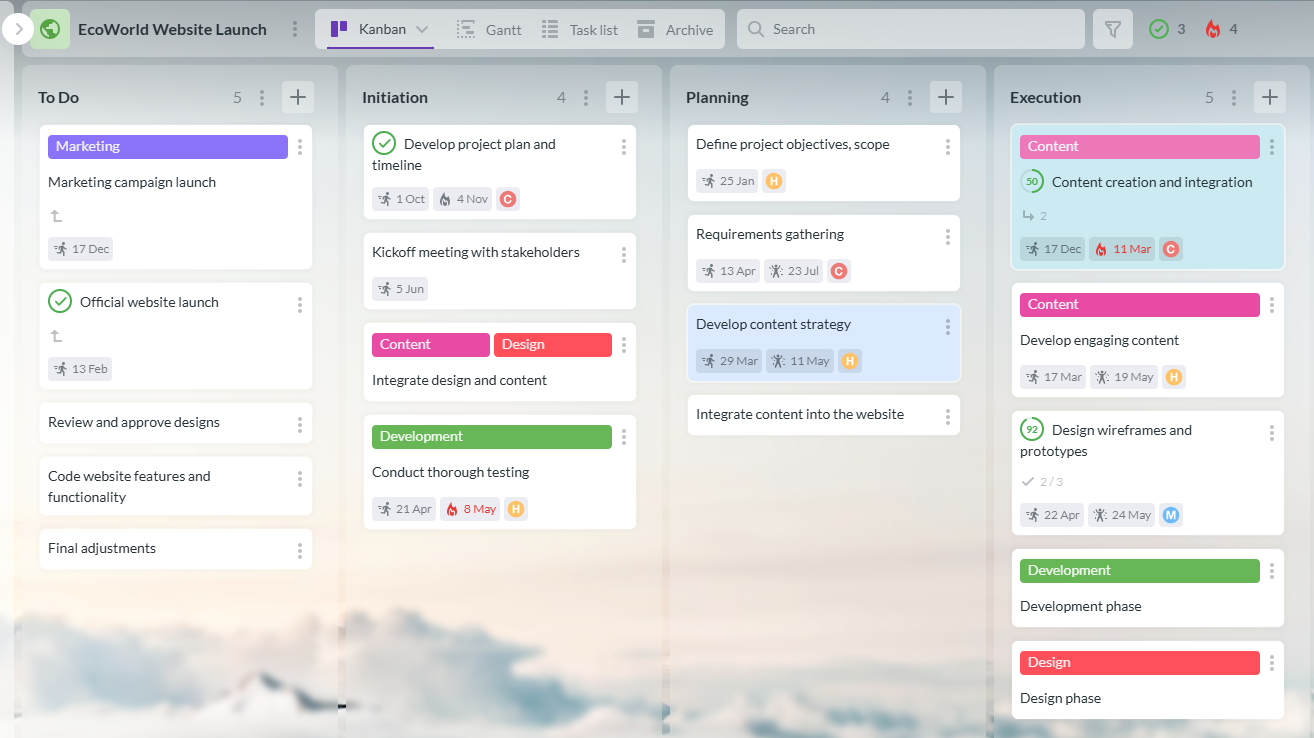
Kanbanchi brings together several visibility layers in one project management tool. Teams can use Kanban boards for daily execution, switch to a Gantt chart for timeline planning, and track time directly on task cards.
This matters because many teams otherwise split these functions across different apps. A board for tasks, a spreadsheet for dates, a separate timer for effort, and a slide deck for reporting. The more tools involved, the harder it becomes for leaders to trust the picture.
With Kanbanchi, the same work can be viewed from different angles. A task is not duplicated across systems just because a manager wants a timeline view or a team member prefers a board.
Kanbanchi supports attaching files from Google Drive and Shared Drives, and it also works with OneDrive and SharePoint for Microsoft 365 environments. Teams can create cards from Gmail, sync events with Google Calendar, communicate in task comments, organize work with tags and priorities, and use templates to speed up repeatable workflows.
This helps leaders because project context remains connected to execution. The task, file, discussion, deadline, and owner are not scattered across different places.
For Google Workspace teams that want a deeper project management layer, Kanbanchi’s guide to Google Drive project management explains how Drive can become part of a more structured workflow.
Leaders need recurring visibility, not occasional visibility. Weekly reviews, monthly leadership meetings, stakeholder updates, and retrospective discussions all depend on reliable data.
Kanbanchi helps teams monitor progress, review timing data, and export board information to Google Sheets for further analysis or dashboarding. This is useful for managers who want to connect project tracking with broader performance, capacity, or operational reporting.
The result is a more sustainable rhythm: teams update tasks as they work, and leaders review the data that naturally comes from that work.
Start a free trial of Kanbanchi now
Start with one active project or one team workflow. Create a board with simple stages such as To Do, In Progress, Review, Blocked, and Done. Add current tasks, assign owners, set due dates, and attach relevant files.
The first goal is not perfection. The first goal is to create a shared source of truth that everyone can see and update.
Leaders should use the board in meetings immediately. Instead of asking for verbal updates from memory, review the board together. This sends a clear message that the board is the workflow, not an extra administrative task.
Once the board is active, add more structure. Define priority rules. Add start dates and due dates where they matter. Use a Gantt chart for work that has dependencies or fixed milestones.
This is also the time to agree on simple operating rules. For example, every task needs an owner. Blocked cards must include a comment explaining the blocker. Overdue tasks must be reviewed before new work is added. High-priority tasks should be visible through labels or filters.
These rules improve visibility without making the process heavy. A short set of rules is usually enough to make the system reliable:
After two weeks of use, leaders should review what the board is revealing. Are tasks getting stuck in one stage? Are too many items assigned to one person? Are due dates realistic? Are files and comments being added to cards, or is context still living in chat and email?
Use this review to refine the workflow. Add swimlanes if multiple projects share one board. Create templates for recurring work. Use time tracking if effort estimates are important. Add filters or views for manager reviews.
Visibility improves through iteration. The tool gives leaders a starting point, but the team’s habits turn it into a reliable management system.
Some organizations buy tools with advanced functionality but poor adoption. The result is a sophisticated system with incomplete data. Leaders should prioritize the clarity of the workflow and the reliability of updates over a long list of rarely used features.
A tool that the team uses every day is more valuable than a complex platform that only project managers understand.
More tasks do not always mean more progress. Leaders should avoid using project tracking tools only to count activity. A healthy setup connects tasks to milestones, deliverables, priorities, and business outcomes.
This is where visual boards and timelines work well together. The board shows execution. The timeline shows whether execution supports the intended delivery path.
If managers need a separate weekly report to understand project status, the tracking system is probably not doing enough. Reporting should be an output of the workflow, not a second workflow.
This does not mean every stakeholder needs access to every detail. It means the underlying project data should be current enough to support reporting without manual reconstruction.
If every task requires half a dozen fields before it can be saved, updates slow down and data quality drops. Start with the minimum that makes the work legible: status, owner, priority, due date, files, comments. Add properties only when someone can explain what decision they support.
When the spreadsheet, the email thread, and the project board all claim to be the source of truth, nobody trusts any of them. Pick one place where work status is official, and be explicit that the others are not.
Project management tracking software is a system that helps teams plan, monitor, and manage work in one shared place. It typically tracks tasks, owners, statuses, due dates, files, comments, timelines, and time spent. The difference from a spreadsheet is that it stays current as a by-product of the work, rather than needing someone to update it separately.
Project tracking tools are software systems that help teams organize tasks, assign ownership, monitor deadlines, track progress, and report on project status. Modern tools often include boards, timelines, time tracking, comments, file attachments, notifications, and reporting features.
They create a shared source of truth. Instead of relying on scattered emails, meetings, and spreadsheets, leaders can see task status, owners, deadlines, blockers, timeline risks, and progress data in one place.
The most important features are visual task boards, clear ownership, due dates, timeline or Gantt views, filters, notifications, time tracking, reporting, and integrations with the tools the team already uses.
Google Workspace supports collaboration through Drive, Docs, Sheets, Calendar, Gmail, and Meet. However, it does not provide a full native project tracking system with Kanban boards, Gantt charts, workload visibility, and structured task workflows. A tool like Kanbanchi adds that project management layer while staying connected to Workspace.
A spreadsheet is usually a static tracker that requires manual updating. Kanbanchi provides visual boards, Gantt charts, time tracking, task comments, file attachments, notifications, filters, templates, and Google Workspace or Microsoft 365 integration, helping teams manage work as it happens.
Better visibility starts with better project management tracking software. Kanbanchi helps leaders and teams bring tasks, timelines, files, comments, priorities, and time data into one connected workspace.
If your team already works in Google Workspace or Microsoft 365, Kanbanchi can help you move beyond scattered updates and build a clearer project tracking workflow. Try Kanbanchi to see how visual boards, Gantt charts, time tracking, and integrated collaboration can give leaders the visibility they need to manage projects with confidence.
Start a free trial of Kanbanchi now


In this Article:
Start using Kanbanchi now
Start your free trial