
In this Article:
Try Kanbanchi now
Start your free trial

Basic task apps are often the first place a growing team organizes work in Google Workspace. They are easy to open, familiar to employees, and good enough for personal reminders, small checklists, and one-off follow-ups.
The problem appears gradually. A three-person team can remember context from a meeting. A 30-person team cannot. A simple task list can track what one person needs to do today, but it struggles to show cross-team ownership, dependencies, files, deadlines, workload, and progress. At that point, the issue is not that the team is disorganized. The issue is that the system has become too small for work.
For business owners and team leads, recognizing this moment early matters. If you wait until every update requires a meeting, every deadline is tracked in a different spreadsheet, and every manager has their own version of the truth, the cost of productivity loss becomes expensive.
Basic task apps inside or around Google Workspace can be helpful. Google Tasks, checklists in Docs, notes in Keep, due dates in Calendar, and simple trackers in Sheets all have a place. They are fast, lightweight, and easy for individuals to adopt.
They work best when the work has a few simple characteristics: a single owner, a short deadline, low risk, few dependencies, and no need for structured reporting. For example, a manager might use a basic task list to remember to approve a document, send a follow-up email, or prepare an agenda.
Team projects behave differently. A campaign launch, client onboarding process, procurement workflow, IT rollout, or product release needs more than a list of reminders. These projects require shared visibility, coordinated deadlines, clear handoffs, and a way to understand what is blocked before it affects the outcome. That is where teams begin to outgrow basic task apps in Google Workspace.
Teams rarely switch tools because of one dramatic failure. More often, they feel a slow increase in friction. Here are the signs that a lightweight task setup is no longer enough.
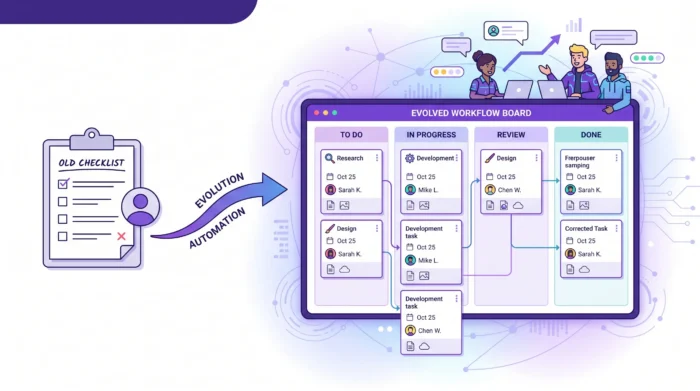
As teams grow, work usually shifts from personal checklists to shared boards where tasks, owners, and deadlines are visible together.
Google Workspace is excellent for communication and collaboration, but project work can become fragmented without a central execution layer. Requirements may live in Docs, assets in Drive, updates in Gmail, deadlines in Calendar, and status tracking in Sheets.
Each app is useful on its own. The difficulty is in connecting them into a single reliable workflow. When team members have to search Gmail threads, open multiple folders, and compare spreadsheets just to understand a task, execution slows down.
A proper project management tool should not replace Google Workspace. It should connect the work already happening there and make it easier to act on.
If a team lead needs to ask, “Where are we with this?” several times a day, the task system is not providing enough visibility.
Basic task apps can show what an individual has marked complete. They usually do not show the full picture: which tasks are waiting, which are blocked, which are overdue, which owner is overloaded, and which deadlines are at risk.
This creates a meeting tax. Instead of using meetings to make decisions, teams use them to collect status updates that should already be visible.
A due date tells you when something should be finished. A dependency tells you what must happen first.
Basic task apps often handle due dates well enough, but complex projects need timeline logic. If design approval slips by three days, what happens to development, review, launch preparation, and customer communication? If a vendor is late, which internal tasks should move?
This is especially important for teams in operations, logistics, and supply chain environments. A company coordinating freight, warehousing, trucking, and fulfillment depends on connected handoffs rather than isolated reminders. The same principle applies to any business in which a single late step can affect many others.
When deadlines become connected, teams need visual project planning, not just task reminders.
In a small team, people often know who is doing what because they sit close together or talk constantly. As the team grows, assumptions become risky.
A task may need a responsible owner, contributors, reviewers, and an approver. There may be comments, checklists, attached files, and related subtasks. A basic task app may capture the title and deadline, but not the full accountability structure.
Unclear ownership leads to duplicated work, missed handoffs, and the common phrase nobody wants to hear: “I thought someone else was handling that.”
Google Drive is a strong place to store project files, but files alone do not explain the work around them. A proposal, design mockup, or spreadsheet needs context: why it was created, who needs to review it, what decision is pending, and which task it supports.
When teams use basic task apps, the connection between the file and the task is often informal. Someone pastes a link into an email or drops it into a chat. Later, the team has to reconstruct the decision trail.
A stronger task management setup keeps files, comments, assignments, and dates together so people can understand the task without having to hunt through old messages.
Manual reporting is one of the strongest signs that a team has outgrown its tools. If managers spend Friday afternoons updating a spreadsheet with task status, overdue work, and progress percentages, the system is not doing enough of the work.
Basic task apps are not designed for advanced progress tracking across multiple projects. They may help individuals stay organized, but they rarely give leaders the data they need for planning, forecasting, and resource allocation.
When reporting becomes a separate job, it is time to consider a tool that captures project data in real time.
As teams grow, project access becomes more sensitive. Internal teams, external partners, contractors, and leadership may all need different levels of visibility. For larger organizations, security and compliance expectations also increase.
A project management tool used by a business should fit the organization’s existing policies as closely as possible. For Google Workspace teams, that means respecting the way the company already manages users, files, and collaboration across Drive and Shared Drives.
The difference is not simply “simple” versus “advanced.” It is about whether the tool is designed for individual productivity or team execution.
| Need | Basic task apps | Integrated project management tool |
|---|---|---|
| Personal reminders | Usually sufficient | Supported, but not the main purpose |
| Shared team workflow | Limited | Gantt chart, milestones, and dependencies |
| Timeline planning | Basic due dates | Progress is visible through boards, lists, and reports |
| File context | Links added manually | Files attached to tasks from Drive or Shared Drives |
| Status visibility | Often requires manual updates | Designed for multiple people, teams, and projects |
| Workload awareness | Limited | Easier to see ownership and active work |
| Cross‑functional collaboration | Hard to coordinate at scale | Designed for multiple people, teams, and projects |
| Reporting | Often need to explain long spreadsheets | Project data can be exported and connected to dashboards |
This is why many teams do not need a more complicated tool. They need a more connected one.
A better system should help teams keep the simplicity of Google Workspace while adding the structure required for project delivery. The goal is not to create administrative overhead. The goal is to make work visible, accountable, and easier to move forward.
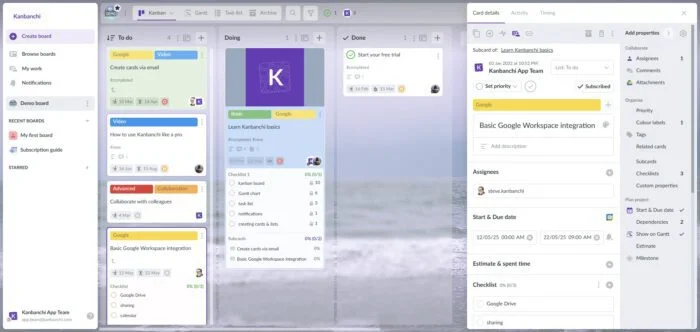
A Kanban board gives teams a shared picture of work in progress. Instead of reading through a list, people can see tasks moving through stages such as To Do, In Progress, Review, and Done.
For managers, this makes bottlenecks easier to spot. For team members, it clarifies priorities and reduces the need to ask where things stand.
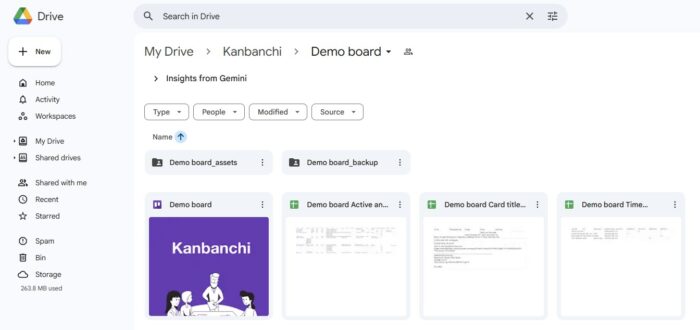
In Kanbanchi, teams can create project boards and cards within a Google Workspace environment, organize tasks with tags and color labels, sort and filter cards, and collaborate directly around the work.
Once projects involve launches, campaigns, client deliverables, or multi-step operations, timeline planning becomes essential. A Gantt chart helps teams understand how tasks relate over time and how changes in dates affect the schedule.
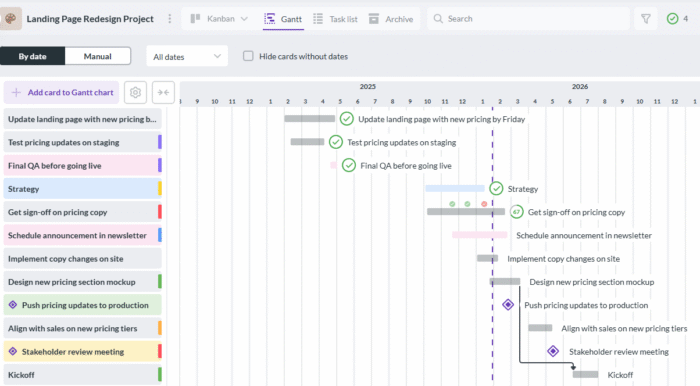
This matters because project risk is often hidden in the spaces between tasks. The task itself may look simple, but the handoff to the next team may be where the delay occurs.
Kanbanchi lets teams convert board work into a Gantt chart, giving leaders a timeline view without forcing the team to maintain a separate planning file.
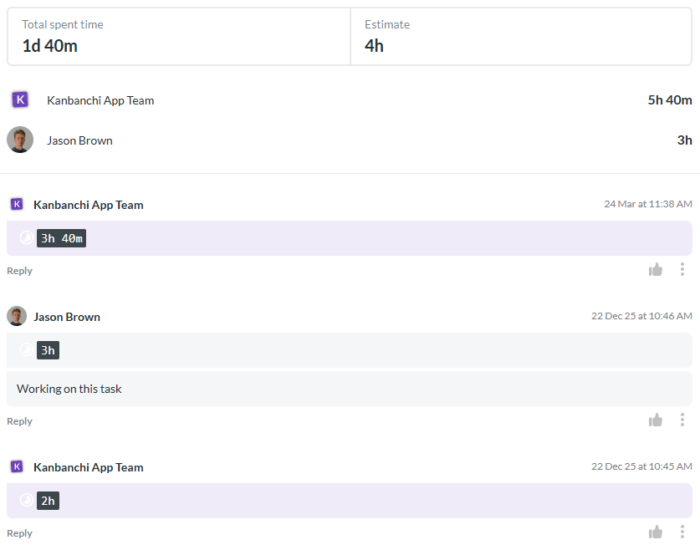
Time tracking is not only about monitoring hours. Used well, it helps teams understand effort, improve future estimates, and identify work that consistently takes longer than expected.
For business owners, this can support more realistic planning. For team leads, it can reveal where tasks are under-scoped, where team members need support, or where recurring work should be improved.
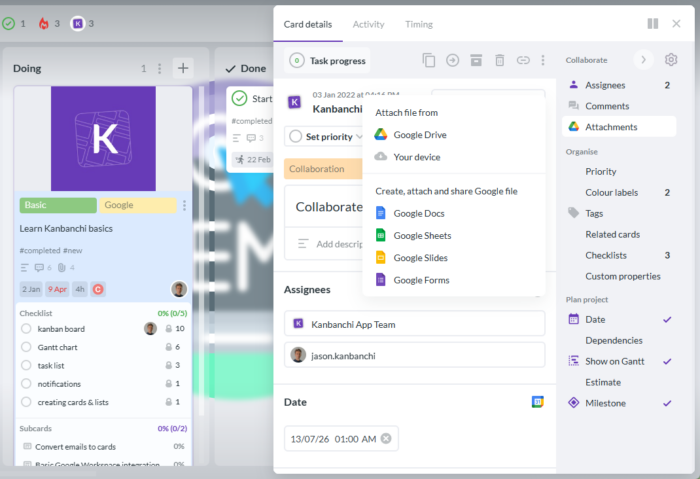
The best project management setup for a Google Workspace team should reduce app switching. That means connecting tasks with the tools employees already use every day.
Kanbanchi supports Google Drive file attachments, Shared Drives integration for enterprise users, Google Calendar sync, Gmail card creation, and export to Google Sheets. Teams can keep using familiar Google tools while adding a dedicated project layer for task management and progress tracking.
The biggest mistake is trying to redesign every workflow at once. A smoother transition starts with one important process and expands from there. Use this practical sequence:
This approach keeps adoption manageable. People learn by working on real tasks, not by attending long training sessions for a theoretical process. A connected project management setup gives leaders one place to review tasks, files, dates, and progress across the team.
Not every team needs full project management software. Basic task apps can still be the right choice if work is mostly personal, low-risk, and short-term.
They may be enough for individual reminders, simple recurring admin tasks, one-person checklists, or very small teams with minimal coordination needs. If no one needs cross-team visibility, dependency tracking, workload awareness, or reporting, a lightweight setup may be perfectly reasonable.
The tipping point comes when the cost of missing context exceeds the cost of adopting a stronger system. For most growing teams, that point arrives when projects involve multiple owners, shared files, deadlines, approvals, and leadership reporting.
Kanbanchi is designed for teams that want project and task management without leaving the Google Workspace environment. It combines Kanban boards, Gantt charts, and time tracking with integrations that help teams keep work connected to Google Drive, Gmail, Calendar, and Sheets.
For team leads, this means clearer progress tracking and fewer manual updates. For employees, it means tasks live closer to the files, emails, and calendars they already use. For organizations, it supports a more structured way to manage projects while staying aligned with existing Workspace collaboration habits.
Kanbanchi also supports Microsoft 365, which can be useful for organizations that work across both ecosystems. But for Google Workspace teams in particular, its value is strongest when basic task apps no longer provide enough visibility, accountability, or planning control.
The main limitation is that basic task apps are usually designed for individual task tracking rather than for complete team project management. They can handle reminders and simple due dates, but they struggle with shared workflows, dependencies, reporting, workload visibility, and project-level context.
A team should consider moving when work is spread across too many places, managers need frequent status meetings, deadlines depend on other tasks, files lose context, or reporting becomes manual. These are signs that the team needs a connected project workflow.
Google Workspace includes excellent collaboration tools such as Gmail, Drive, Docs, Sheets, and Calendar. However, it does not include a full project management system with built-in Kanban boards, Gantt charts, time tracking, and structured progress tracking.
Read more Google Workspace articles here
Look for strong Google Workspace integration, visual task boards, timeline planning, file attachments from Drive, Calendar sync, Gmail task creation, reporting options, security controls, and ease of adoption. The tool should support how the team already works rather than forcing a completely separate process.
Kanbanchi can act as the shared project management layer for teams that have outgrown basic task apps. Teams can manage tasks on Kanban boards, plan timelines with Gantt charts, track time, attach Google Drive files, sync with Google Calendar, and create cards from Gmail.
If your team is managing real projects with personal reminders, spreadsheets, and scattered email updates, it may be time for a more visible system.
Explore Kanbanchi to manage projects inside Google Workspace with Kanban boards, Gantt charts, time tracking, and connected collaboration around the tools your team already uses.
Sign up for a free Kanbanchi trial now


In this Article:
Start using Kanbanchi now
Start your free trial