
The Best Enterprise Project Management Software of 2025 – 2026: A Kanbanchi Comparison Guide
In the modern corporate environment, project management isn’t just about successfully tracking a few tasks. These days, an approach known as Enterprise Project Management is needed. It’s one of the fastest-growing business markets, estimated to reach $25.67 billion by 2033. What is it? Well, EPM is the engine that drives initiatives and transforms executive vision into deliverable results. So, choosing the right platform is essential. When teams manage a complex portfolio across multiple departments, a basic task manager will inevitably fail. Large enterprises need solutions to scale securely and deliver the results they need, all on demand. The best enterprise project management software will bridge the gap between high-level strategy and daily operational tasks.
It’ll offer comprehensive features like:
- dynamic resource allocation
- real-time risk assessment
- airtight security protocols
Without these, organizations risk a range of problems that can harm their reputation and future growth. That’s where Kanbanchi comes in!
We’ve put together this guide for team leaders, IT decision-makers, and executives navigating these choices. In it, we’ll objectively review some of the top EPM vendors, including established names like Wrike, monday.com, and Smartsheet. We’ll also introduce you to Kanbanchi, a real ladder in professional enterprise management software. Step forward and discover some great solutions today.
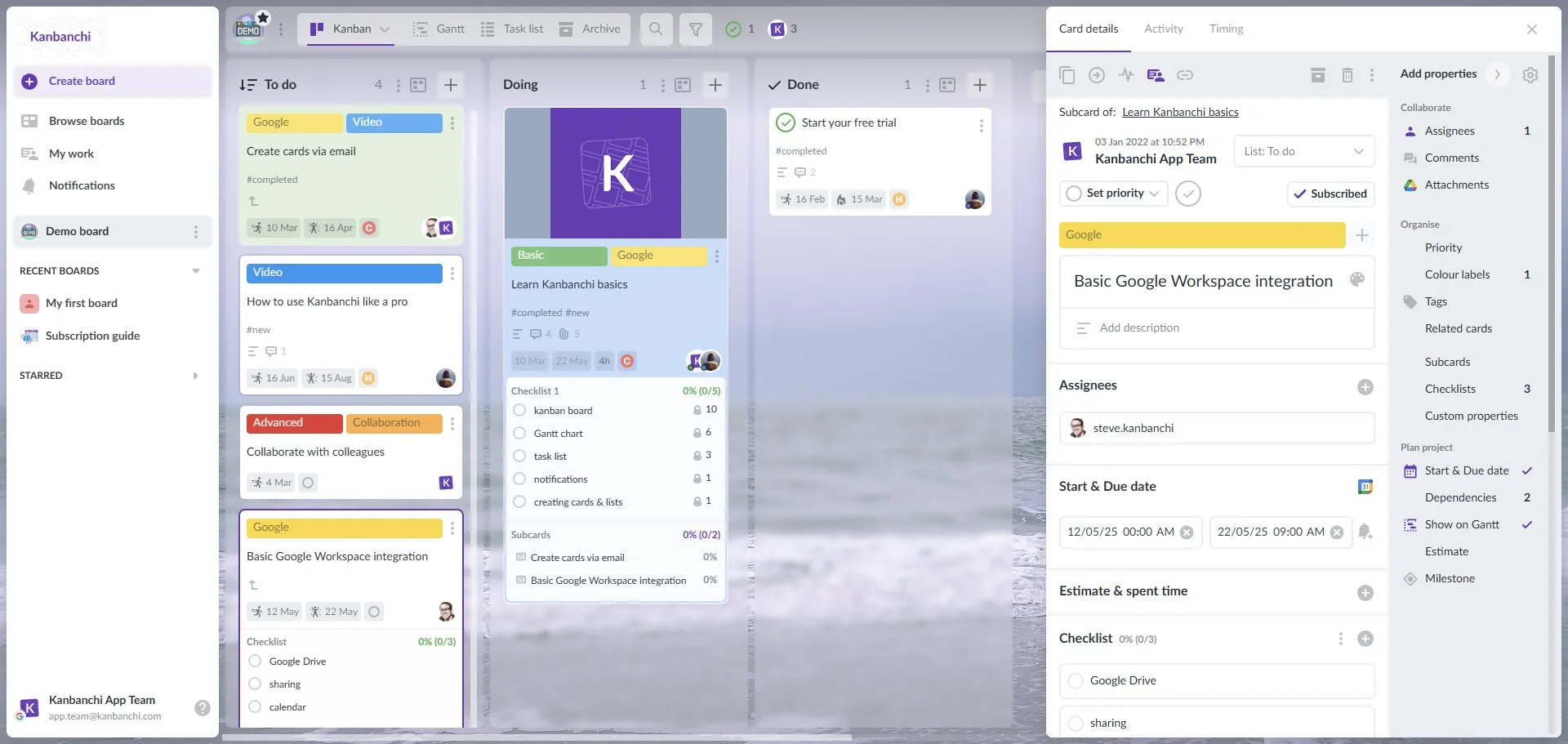
Kanbanchi interface showcasing a Kanban board used within the Google Workspace infrastructure. Lists represent the workflow stages, and cards represent the tasks.
The Unique Project Management Challenges Faced by Large Enterprises
Ever wondered why standard project management tools struggle when deployed across big companies? The difference is that what works for an SME often descends into chaos when it’s scaled across dozens of departments, hundreds of simultaneous projects (or both). Larger organizations need more specialized solutions, and this is the primary driver for seeking good-quality enterprise project management software.
Demands of Resource Allocation
In a large company, employees and resources are often called upon to work on different, competing projects. An SME tool might track time, but it rarely provides a centralized view of resources. This leads to a pervasive problem:
- resource starvation or
- over-allocation
Stakeholders and team leaders need to see the genuine capacity of every team member and manager across the entire organization, not just within one project board. Failing to manage this leads to:
- Burnout
- Missed deadlines
- Inaccurate budget projections.
Solving this requires better planning through the automated workload-leveling features baked into EPM systems.
Ensuring Strategic Alignment and Governance Targets are Met
Every project undertaken by a business must directly contribute to the company’s strategic, long-term goals. With no governance framework, projects can stall. It’s a common failure when scaling up project tracking tools. Robust enterprise project management software must govern processes and connect tasks to objectives, enabling executives to determine whether deadlines can be met easily.
Security and Compliance
For large corporations, security is non-negotiable. Data requirements, industry-specific compliance standards (like GDPR), and authentication are mandatory. Integrating a new tool means scrutinizing how it handles confidential data; for instance, it might introduce security gaps that an IT department can’t handle. For organizations already using Google Workspace, the ideal enterprise project management software should have the same high level of security and compliance mandated by Google. We’ve seen the challenges faced by companies that don’t use the right PMS; now, let’s look at how projects can be well-managed with the right EPM tools.
Managing Multiple Projects and Corporate Governance
For executives and project managers, the fundamental question is not what individual tasks are being completed, but how the entire portfolio of projects is performing against corporate strategy. This shift in perspective from tasks to strategic outcomes is where real enterprise-level functionality becomes indispensable. Teams need a single source of truth to ensure predictable outcomes and minimize risk.
Professional enterprise-level project management software solutions facilitate resource leveling. This means that shared resources are not over-allocated to competing projects. In doing so, team leaders can make informed decisions such as rearranging workloads to prevent team burnout or optimizing people’s roles. This approach is a hallmark of sophisticated EPM solutions.
Key Features of Enterprise Project Management Software
There is a checklist of non-negotiable features in enterprise project management software. Without these, scalability, security, and strategic alignment are difficult to achieve. Here are the essential features that define enterprise-grade PM tools.
Advanced Security and Single Sign-On
Enterprise security is paramount. EPM tools must offer robust authentication mechanisms, including single sign-on support with leading identity providers. This ensures centralized user management, enforced security policies, and simplifies access for thousands of employees. Beyond this, data encryption and compliance with global standards (GDPR, SOC2/ISO 27001) are mandatory. Organizations must be able to trust their EPM solution with sensitive project data.
Comprehensive Project Management
EPM software must provide tools for managing multiple projects. Leaders can then oversee numerous projects simultaneously, gaining a bird’s-eye view of progress, budgets, and strategic alignment. Equally vital is proper resource capacity planning and workload management. These are the cornerstones of effective project management software for enterprise environments.
Customizable Reporting
Executives and PMO leaders require real-time, actionable insights, not static reports. Enterprise solutions offer highly customizable dashboards that can pull data from various projects. This enables dynamic reporting on key performance indicators (KPIs), including budget variance, project health, resource utilization, and strategic goal achievement. The ability to tailor reports to different stakeholders, from project managers to the C-suite, is crucial for informed decision-making and transparent corporate governance.
Automated Workflows and Process Standardization
Large enterprises thrive on standardized processes. EPM tools should facilitate the creation of automated workflows for routine tasks, approvals, and notifications. It’ll boost efficiency and also enforce best practices, reduce human error, and ensure consistency across diverse teams. Templating capabilities for common project types are essential for quick deployment.
Scalability and Performance
An enterprise solution must handle thousands of users, millions of tasks, and terabytes of data without performance degradation. It needs to be designed for continuous operation and rapid growth, seamlessly accommodating new teams and projects. Cloud-based solutions are often preferred for their reliability.
Better Google Workspace or Microsoft 365 Integration
For enterprises already running on Google Workspace or Microsoft, native integration is needed. It means having seamless connectivity with Google Drive/SharePoint for document management, Google Calendar for scheduling, and Gmail/Outlook for communication. A truly integrated solution ensures that employees operate within a familiar ecosystem. It enhances collaboration and streamlines workflows, which is critical for efficient project delivery in large teams.
Kanbanchi excels in providing:
- Visual tools for portfolio and resource management
- Customizable reporting using the Google ecosystem
- Google Workspace/Microsoft integration
Its native design within Google Workspace also provides a distinct advantage, making it a powerful Google Workspace EPM tool.
Competitor Reviews: Where Kanbanchi Outperforms Traditional EPM Tools
When searching for the best enterprise project management software, large organizations often begin by evaluating market leaders. While competitors like Wrike, Smartsheet, ClickUp, and Asana are undeniably powerful, they pose challenges when deployed in a Google Workspace-centric enterprise. They’re great tools, but weren’t built natively for the Google ecosystem, creating administrative and user adoption challenges.
| Feature | Kanbanchi | Asana | Monday.com | Wrike |
|---|---|---|---|---|
| Client Portals | Via Shared Boards | Via Guest Access | ✓ | ✓ |
| Time Tracking | ✓ | Third-party | ✓ | ✓ |
| Budget & Billing | ✓ | Third-party | Third-party | Add-on |
| Google Workspace Integration | ✓ Native | Integration | Integration | Integration |
| Microsoft Integration | ✓ | Integration | Integration | Integration |
| Gantt Charts | ✓ | ✓ | ✓ | ✓ |
| Resource Management | ✓ | ✓ | ✓ | ✓ |
| Customizable Templates | ✓ | ✓ | ✓ | ✓ |
| Real-time Collaboration | ✓ | ✓ | ✓ | ✓ |
| Consulting-specific Templates | ✓ | ✓ | ✓ | ✓ |
The differences boil down to three critical areas for Google Workspace users:
- Cost and licensing models
- Integration with Google Workspace
- Project visualization
1. Cost and Licensing Models
EPMs operate on complex custom-priced licensing models. For a large organization needing thousands of seats, costs can quickly escalate. Furthermore, these platforms often bundle essential features such as advanced security (SSO) or portfolio views into their highest-tier, most expensive plans.
Traditional EPM Tools
Pricing is generally tiered, with essential EPM features restricted to the highest, often custom-quoted, Enterprise levels. Integrating with Google Workspace often requires additional, paid third-party connectors, adding to the cost.
The Kanbanchi Difference
Kanbanchi offers a clear, cost-effective structure designed for scale, and because it operates within the Google Workspace platform, its licensing is streamlined. This makes it an incredibly attractive alternative for organizations seeking advanced features like Multi-Board views and resource management without the pricing structure of the major competitors. It delivers an excellent return on investment by leveraging a company’s existing Google Workspace subscription.
2. Integration with Google Workspace
The degree of integration is the most critical differentiator for organizations already reliant on Google Drive, Gmail, and Calendar. Non-native tools, by definition, must connect to the Google ecosystem using external connectors or APIs.
Traditional EPM Tools
Integration with Google apps is functional but rarely seamless! Attaching a Google Drive file might involve pop-ups, authentication requests, or manual linking. This fragmented experience slows down users and often introduces administrative complexity for IT teams. Furthermore, IT departments must manage data security across multiple disconnected cloud environments.
The Kanbanchi Difference
Kanbanchi is the seamless solution. It functions as an integrated application within Google Workspace. Attaching a file from Drive is instant and native, collaboration via Google Chat is effortless, and scheduling via Calendar is instantaneous. This eliminates the learning curve and greatly boosts user adoption, a critical factor in successful enterprise software rollout. Employees are already familiar with the interface’s foundational elements, reducing training costs and increasing productivity from day one.
3. Project Visualisation
Effective project managers need flexibility in how they visualize work. They need a simple Kanban board for daily tasks, a Gantt chart for timeline management, and a Table view for bulk data entry and reporting. Many competitors require purchasing separate add-ons or moving between distinct product interfaces to achieve this view diversity.
Traditional EPM Tools
While most offer Kanban and Gantt views, they are often distinct interfaces. Switching between them can be clunky, and data may not flow smoothly across all views. This separation creates a disjointed user experience.
Kanbanchi’s 3-in-1 View
Kanbanchi provides a powerful, fluid 3-in-1 visualization of Kanban, Gantt, and Table all within a single project board. This seamless transition ensures that resource allocation and schedule dependencies visualized in the Gantt chart are instantly reflected in the task-based Kanban view. The holistic visual management is vital for project managers overseeing dynamic, cross-functional teams and is central to its strength as an EPM solution. Kanbanchi offers a simplified, consolidated, and natively secure experience tailored specifically for organizations that prioritize the Google Workspace environment. It delivers the required EPM power of:
- project portfolio management
- centralized resource allocation
- robust governance
Without the administrative friction and excessive cost associated with other platforms!
Kanbanchi is the Best Enterprise Project Management Software for Google Workspace
For organizations deeply integrated into the Google Workspace ecosystem, selecting the best enterprise project management software means it must enhance, not hinder, their existing workflows. Kanbanchi’s core value is in its native, deep integration that transforms the familiar Google environment into a powerful EPM engine. This familiarity is a significant driver of success in large enterprises. When a new system is introduced, the learning curve often dictates adoption rates. Kanbanchi’s interface is intuitive and aligned with the look and feel of Google products, user training is minimal, and adoption is rapid. Teams spend less time learning a new tool and more time executing projects.
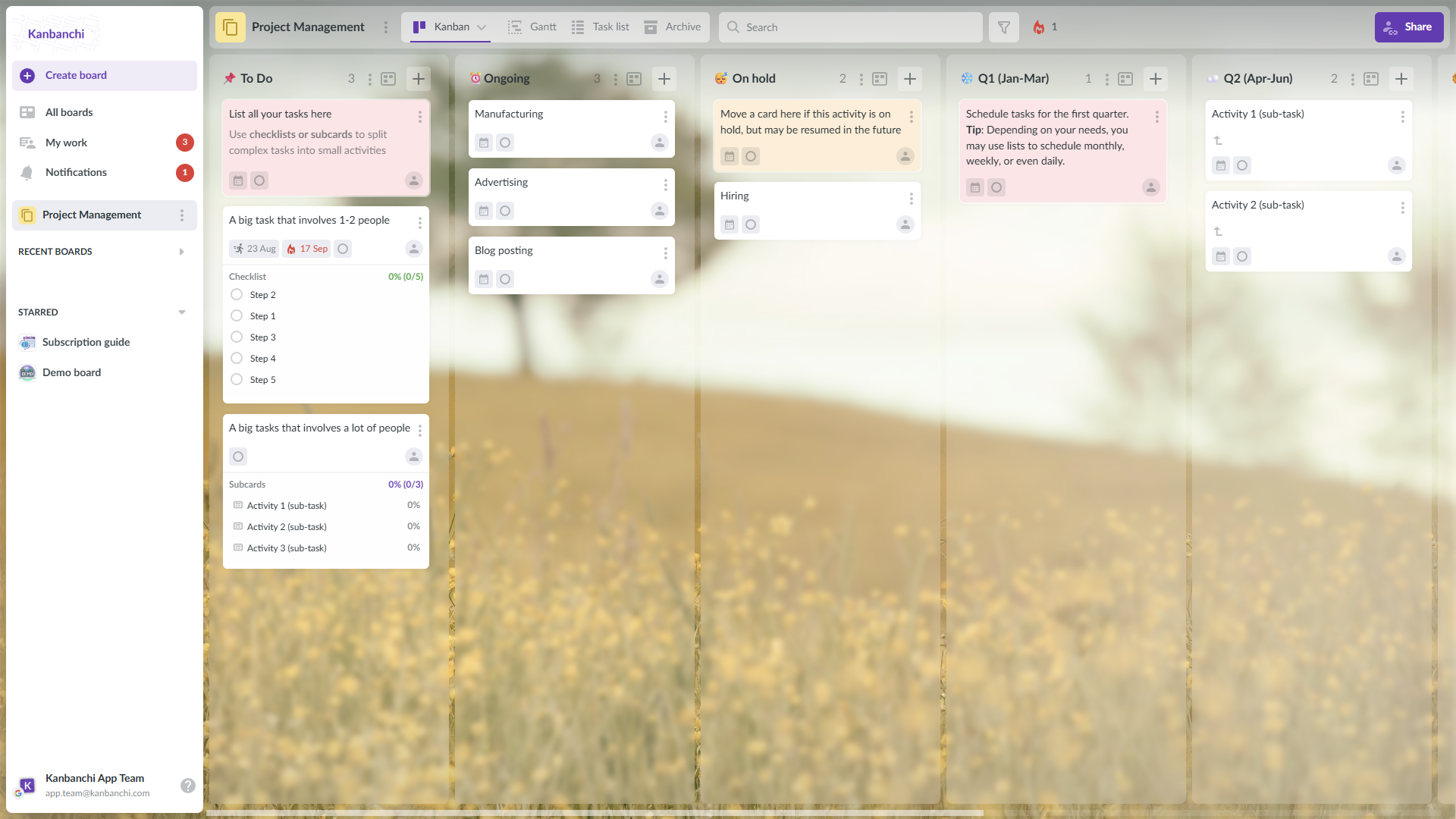
Example of Kanbanchi board used to manage different types of projects
Kanbanchi is engineered to handle the needs of large, complex organizations while maintaining the simplicity Google Workspace users expect:
- Seamless Data Integration: Attaching documents, spreadsheets, or presentations from Google Drive is not an import; it is a direct, native link. This ensures permissions are managed through Drive, guaranteeing consistent security and preventing the creation of redundant files in the cloud.
- Enterprise-Grade Security and IT Control: Kanbanchi supports advanced security features crucial for large organizations, including Single Sign-On (SSO) and stringent user access control. Since the application runs on Google Cloud infrastructure, it leverages Google’s robust, industry-leading security and compliance standards, satisfying IT governance requirements without introducing new security vulnerabilities.
This means that Kanbanchi is a leading Google Workspace EPM tool and one of the most scalable, secure, and user-friendly solutions for managing complex project portfolios. With this in mind, here’s an idea of how you can scale your project workflow with Kanbanchi.
Start a free Kanbanchi trial now
Step-by-Step: Scaling Project Workflows Across Your Organization
Successfully rolling out new top enterprise project management software across a large organization requires a structured approach. So, here is an actionable three-step guide for implementing and scaling your project workflows with Kanbanchi:
Step 1: Centralize your IT Setup for Security and Governance
The priority is ensuring security and control. For a large enterprise, this means centralized IT configuration.
- Configure Single Sign-On (SSO): Integrate Kanbanchi with your organization’s identity provider (e.g., Google Workspace Identity). This centralizes user management, enforces access policies, and ensures that only authorized personnel can access sensitive project data.
- Establish User Access Roles: Define granular permissions for users, including PMO leaders, project managers, and team members. This ensures that governance standards are upheld and critical data remains secure. This centralized control is essential for any EPM solution.
Step 2: Standardize Templates Across Departments
Standardization is the bedrock of efficient project portfolio management. Using standardized templates across departments ensures that data is collected consistently, making aggregation and reporting accurate.
- Create Departmental Templates: Develop pre-configured Kanbanchi board templates for common project types, such as IT deployments, HR onboarding, and marketing content pipelines.
- Define Standardized Fields: Ensure all templates use the same custom fields for key data points (e.g., Priority, Budgeted Hours, Status). This uniformity allows the PMO to reliably compare performance metrics across disparate projects.
Step 3: Rollup Reporting with Kanbanchi Data Export
The final step is leveraging the data for executive reporting. The PMO can transform decentralized project data into centralized, easily viewable, and easy-to-digest strategic insights.
- Implement Auto Export and Set Up Dashboards: Teach PMO users how to set it up. Then use Google Looker or Power BI to set up the reports that your company needs. Check out this guide for more details: “How to create a project management dashboard? Integrating Kanbanchi with Power BI and Google Looker for advanced reporting.”
By following this standardized, IT-governed rollout, large companies can rapidly transition to using Kanbanchi as their trusted Google Workspace EPM tool, maximizing both adoption and strategic oversight.
Strategic Control for the Google Workspace Enterprise
Choosing the best enterprise project management software is a high-stakes strategic decision, especially for large organizations that depend on predictable execution and transparent governance. Particularly for companies operating on Google Workspace, Kanbanchi provides an integrated, scalable, and secure alternative.
By delivering enterprise-grade features, such as multiple projects oversight, centralized resource allocation, and robust security (SSO) natively within the Google ecosystem, Kanbanchi eliminates the learning curve and IT headaches associated with third-party connectors. It transforms your Google Workspace investment into a powerful EPM solution.
For PMO leaders and IT executives seeking a platform that maximizes efficiency, ensures compliance with corporate governance requirements, and drives high user adoption across all departments, Kanbanchi is the definitive choice.
Ready to chat about taking the following steps with professional enterprise management software for your corporation? Great! We’d love to get the conversation started.
Get in touch with us right now, and we’d be happy to discuss your requirements.