
In this Article:
Try Kanbanchi now
Start your free trial


Growth rarely breaks because teams lack effort. It breaks because work becomes harder to see. A five-person team can often survive with a shared spreadsheet, a few chat threads, and a weekly meeting. A 50-person team can not. Deadlines start depending on other departments, files live in multiple places, managers need reliable status updates, and leaders need to know whether projects are on track before a customer, budget, or launch date is at risk.
That is why choosing the best project management software for a growing team is not just about choosing a tool. It is an operating model decision. The right platform should help people plan work, see priorities, coordinate handoffs, protect project data, and report progress without adding unnecessary administrative weight.
In a very small team, one person can remember who owns what. As headcount grows, memory becomes a risk. Work needs to be visible, searchable, assigned, dated, and connected to the files and conversations that move it forward.
Growing teams usually start looking for project management software when they notice patterns like these:
At this stage, the goal is not to buy the most feature-heavy system. The goal is to create a shared work environment that people actually use every day.
A growing team needs balance. If the tool is too light, managers will keep creating parallel spreadsheets to compensate. If the tool is too complex, adoption drops, and the system becomes another reporting chore.
The best project mgmt software for growing teams usually has three layers: a simple task board for daily execution, a timeline or Gantt view for planning, and reporting or export options for leadership visibility. It should also integrate with the ecosystem your team already uses, especially Google Workspace or Microsoft 365, because file storage, calendars, and email are where real work already happens.
More articles on Team management here
There is no universal winner for every company. The best choice depends on how your team works, what tools it already relies on, and how much structure you need. I put the table below to give a practical shortlist for growing teams, but you should invest in some evaluation.
| Software | Best for | Why does it fit growing teams? | Watch‑out |
|---|---|---|---|
| Kanbanchi | Google Workspace and Microsoft 365 teams | Best value appears when teams want project work connected to Google Drive, Shared Drives, OneDrive, or SharePoint | Common mistake is to replace CRM with it, might not work in some cases if you try to replace your CRM |
| Asana | Cross‑functional work and structured programs | Strong task hierarchy, project templates, automation, and portfolio‑style coordination | Requires governance as teams create more projects and fields |
| monday.com | Teams wanting a configurable work operating system | Flexible boards, dashboards, and many workflow templates | Flexibility can create inconsistent processes without admin standards |
| ClickUp | Teams that want many productivity features in one place | Tasks, docs, goals, dashboards, and multiple views in one platform | A broad feature set may require careful setup and training |
| Trello | Small teams and simple Kanban workflows | Very easy to start, visual, and familiar for lightweight task tracking | Scaling often requires add‑ons, conventions, and stronger reporting |
| Jira | Software, product, and IT teams | Deep Agile support for backlogs, sprints, releases, and technical workflows | Can feel too specialized for non‑technical business teams |
| Smartsheet | Operations and spreadsheet‑oriented project teams | Familiar grid format with project tracking, workflows, and reporting | Less natural for teams that prefer card‑based visual execution |
| Notion | Knowledge management plus lightweight projects | Combines docs, databases, wikis, and task lists | Teams must design and maintain their own project structure |
| Microsoft Planner and Project | Microsoft 365 organizations | Planner supports simple team tasks, while Project supports more formal scheduling | Teams may need to combine tools for boards, advanced timelines, and reporting |
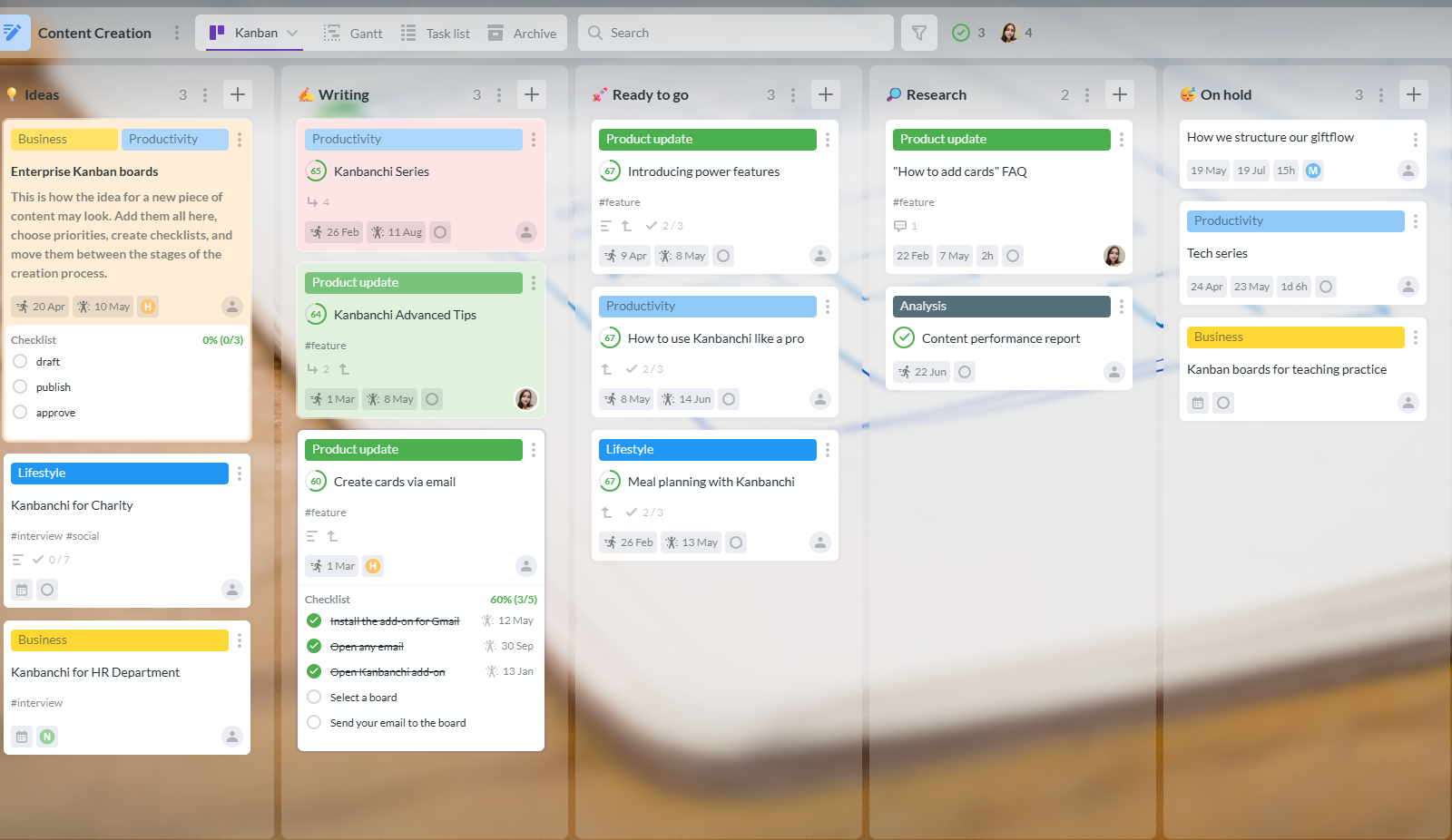
Kanbanchi is especially strong for teams that already live in Google Workspace or Microsoft 365 and want project management to feel like part of their existing environment rather than a separate island. It gives teams visual Kanban boards for execution, Gantt charts for timelines, a built-in time tracker, and integrations with files, email, and calendars.
For a growing company, that matters because the operational problem is rarely just task creation. The harder problem is keeping tasks, documents, people, deadlines, and reporting connected as the team expands.
Asana and monday.com are good fits when multiple business teams need a configurable project system with formal workflows, templates, and dashboards. They are often used for marketing, operations, customer success, and company-wide initiatives.
They work best when someone owns tool governance. Without naming conventions, template standards, and reporting rules, a highly flexible system can become fragmented over time.
Jira remains a strong option for software development, IT, and product organizations that need detailed Agile workflows, issue tracking, sprint management, and release planning. It is powerful, but it is not always the easiest choice for non-technical departments.
If your growing team includes engineering plus business functions, consider whether everyone should work in Jira or whether Jira should stay with technical teams while a broader project platform manages cross-functional work.
Both Trello and Notion are often attractive when teams are still small and want minimal setup. Trello is ideal for simple visual work. Notion is useful when documentation and task lists need to live together.
The risk appears when projects become more time-sensitive, cross-functional, or compliance-sensitive. At that point, teams often need stronger timeline planning, task ownership, file integration, and reporting.
Before comparing features, document how work actually moves through the team. A marketing campaign, client onboarding process, hiring workflow, product release, and procurement cycle all have different rhythms. The best tool should support those rhythms without forcing every department into the same rigid format.
If you need a broader buying framework, Kanbanchi has a detailed guide on choosing project management software that covers goals, team needs, integrations, and total cost of ownership.
| Evaluation factor | Why it matters for growing teams | Questions to ask |
|---|---|---|
| Ease of adoption | A tool only works if the whole team updates it consistently | Can a new user understand the workflow without long training? |
| Visual task management | Can users track time at the task level and review it later? | Can teams use boards, lists, filters, tags, and priorities? |
| Timeline planning | Growth creates dependencies and launch dates | Can the same tasks be viewed on a Gantt chart or timeline? |
| Time tracking | Better estimates require actual effort data | Does the tool fit your company’s policies for sharing and data management? |
| File integration | Project work depends on documents, assets, and approvals | Can files be attached from the storage system your company uses? |
| Email and calendar integration | Work often starts in inboxes and ends on calendars | Can emails become tasks and deadlines sync to calendars? |
| Reporting and export | Leaders need reliable project data | Can data be exported or connected to reporting dashboards? |
| Security and admin fit | Larger teams need access control and compliance alignment | Does the tool fit your company’s policies for sharing and data management? |
| Migration path | Growing teams often move from spreadsheets or another app | Can you import data from CSV, Trello, or other systems? |
A growing team does not need one giant dashboard for everything. It needs visibility at the right level for each role.
Individual contributors need to know what to do next. Team leads need to see blockers, priorities, and workload. Executives need confidence that strategic projects are on track and that risks are visible early.
If a platform only serves one of those levels, people will create workarounds. That is how teams end up with a project board for contributors, a spreadsheet for managers, and a slide deck for executives. The strongest systems reduce that duplication by letting teams view the same work in different ways.
The fastest way to lose adoption is to ask people to update the same work in several tools. If your team uses Google Drive, Gmail, Google Calendar, Docs, Sheets, and Meet every day, a project tool that integrates with Google Workspace will usually feel more natural. The same logic applies to Microsoft 365 teams that rely on OneDrive, SharePoint, Outlook, and Microsoft calendars.
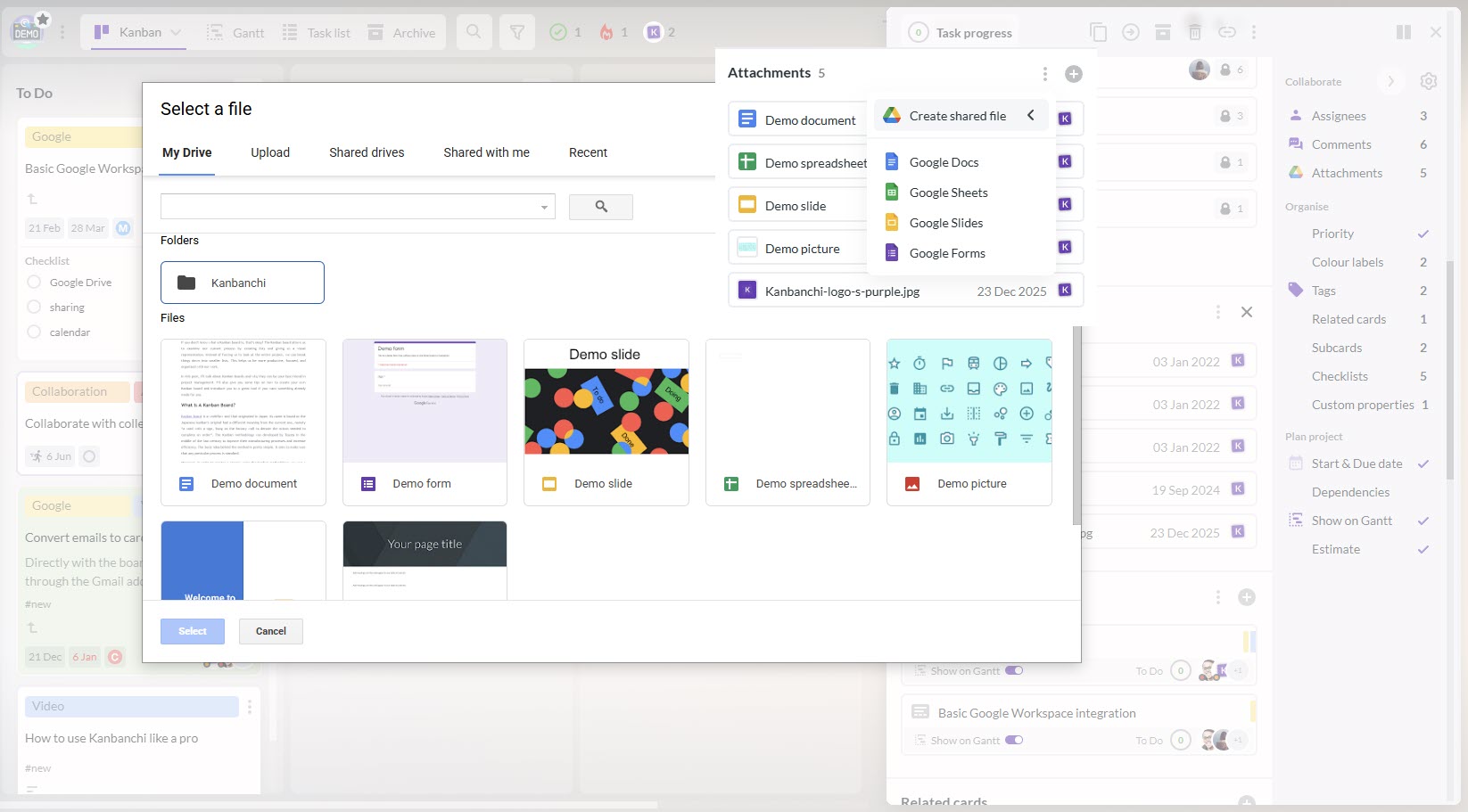
Integrations should not be decorative. They should reduce repeated actions, such as uploading files twice, copying email requests into task cards, manually creating calendar reminders, or rebuilding reports from scratch.
You can find even more evaluation criteria and guidance in my other guide:
How to Choose a Project Tracking Platform That Fits Your Team
Kanbanchi is built around a practical idea: project management should be visual, collaborative, and connected to the workspace where the team already works. For teams that are scaling beyond basic to-do lists and spreadsheets, that combination is valuable.
Kanban boards help teams see work moving from one stage to another. A growing team can create boards for departments, projects, clients, sprints, campaigns, or operational processes. Cards can hold task details, assignees, dates, checklists, comments, tags, priorities, and attached files.
The visual format is easy for new users to understand, which matters when teams are hiring or expanding across departments. Managers can quickly see what is waiting, what is in progress, what is blocked, and what is complete.
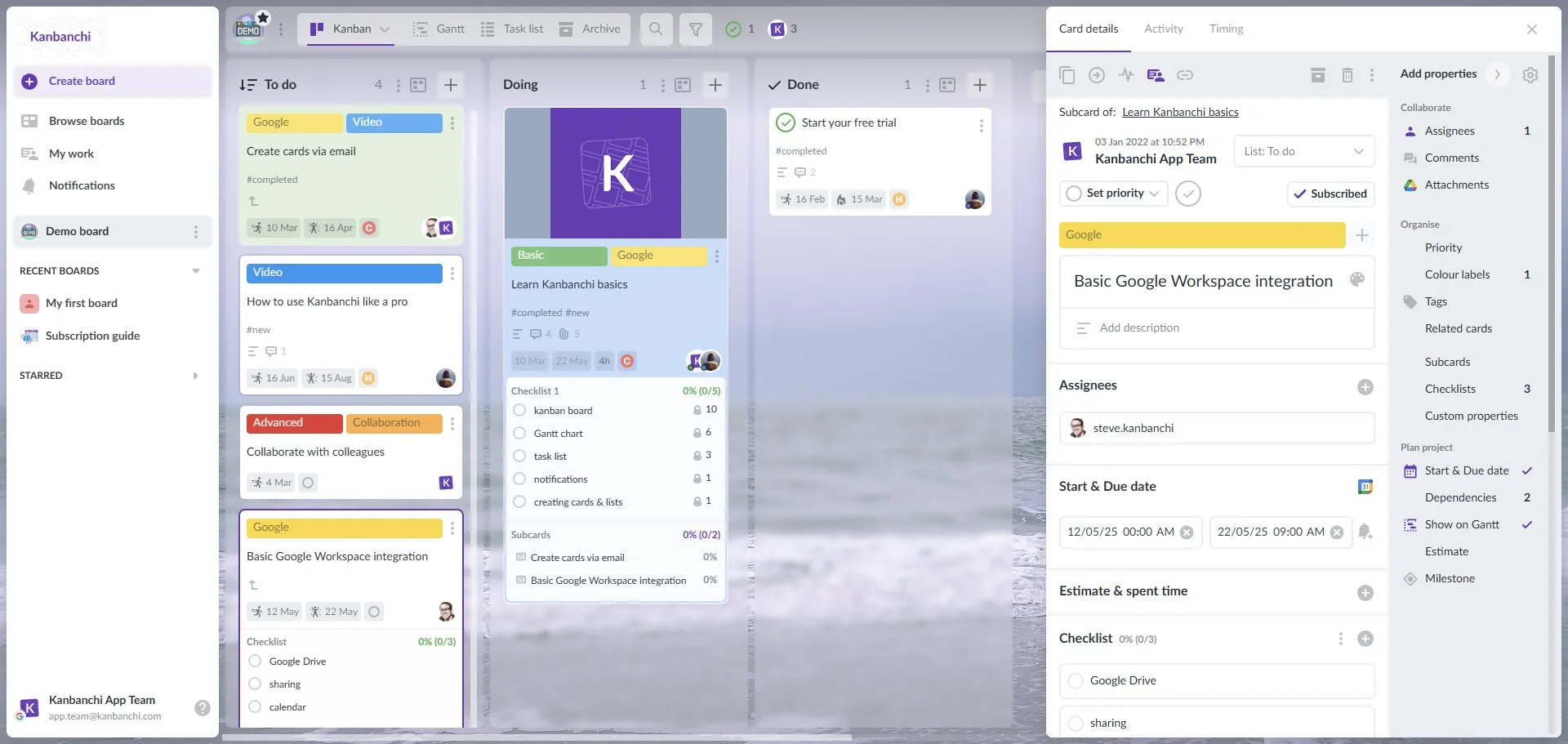
Kanbanchi also supports swimlanes, sorting, filtering, color tags, and list views, which help teams keep larger boards usable as the volume of work increases. For more on how boards support team collaboration, see Kanbanchi’s guide to project boards.
Kanban boards are excellent for flow, but growing teams also need dates. Launches, client commitments, hiring plans, procurement cycles, and product releases all depend on timing.
Kanbanchi lets teams convert a board into a Gantt chart with one click. This gives managers a timeline view of the same work, helping them understand schedules visually and plan project delivery without rebuilding tasks in a separate tool.
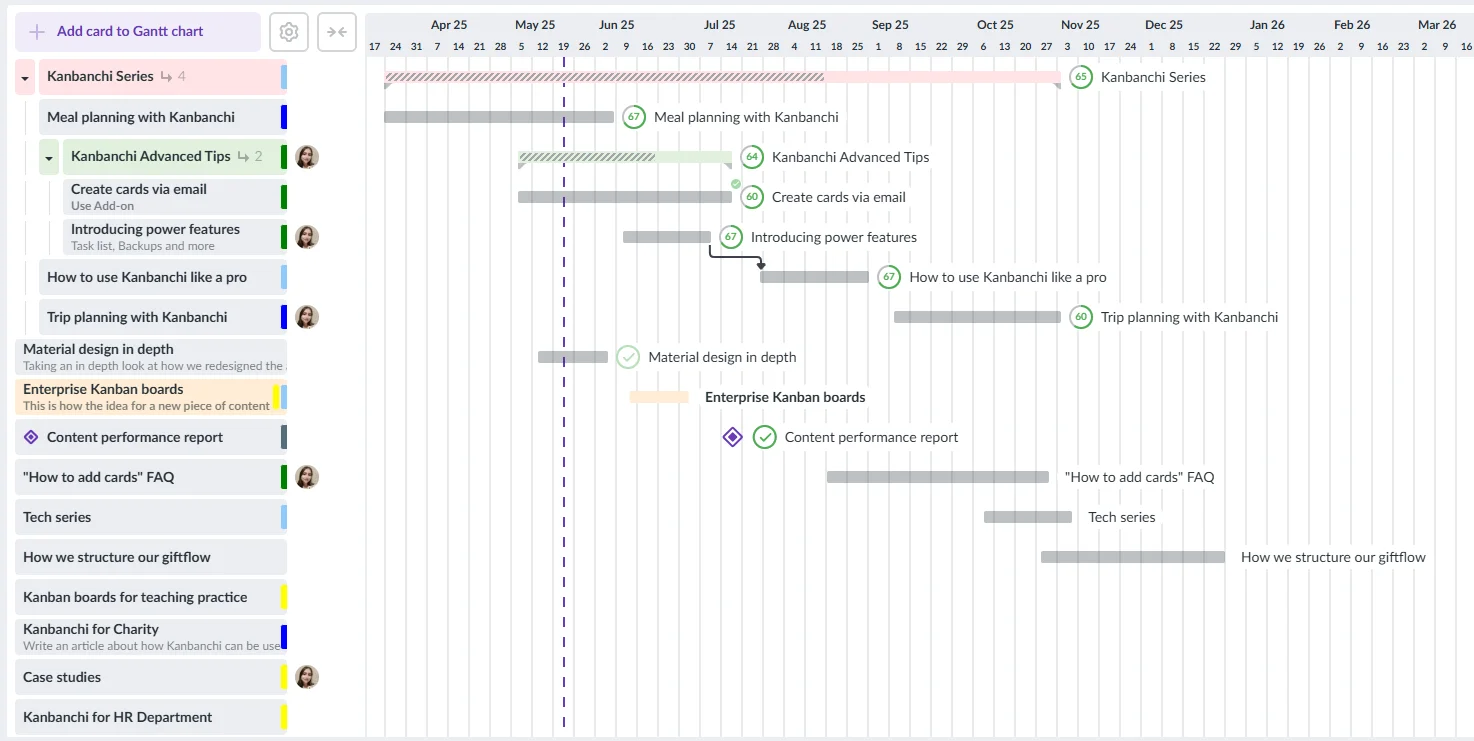
That is especially useful for hybrid teams that want the simplicity of Kanban for daily work and the structure of Gantt planning for deadlines. If your team is evaluating timeline features specifically, Kanbanchi also has a guide to Gantt chart software for project management.
As teams grow, leaders need to understand not only whether work was completed, but how much effort it required. Kanbanchi includes a time tracking tool that lets users start a timer directly on a card and review timing data in the Timing tab.
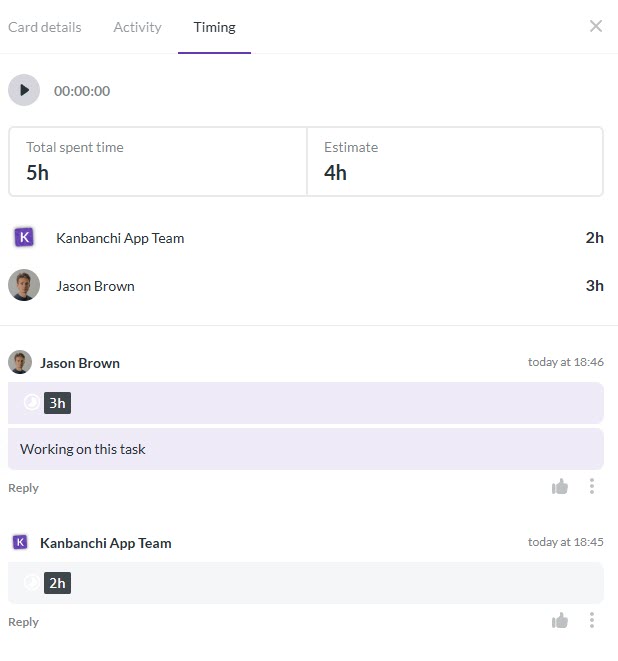
This helps managers compare estimates with actual effort, identify overloaded roles, and improve planning for future projects. It can also support more transparent client work, internal cost analysis, and operational reviews.
Kanbanchi integrates deeply with Google Workspace, including Google Drive, Shared Drives, Gmail, Google Calendar, and Google Sheets export. Teams can attach files from Google Drive and Shared Drives, create cards from Gmail, sync tasks with Google Calendar, and export board data to Google Sheets.
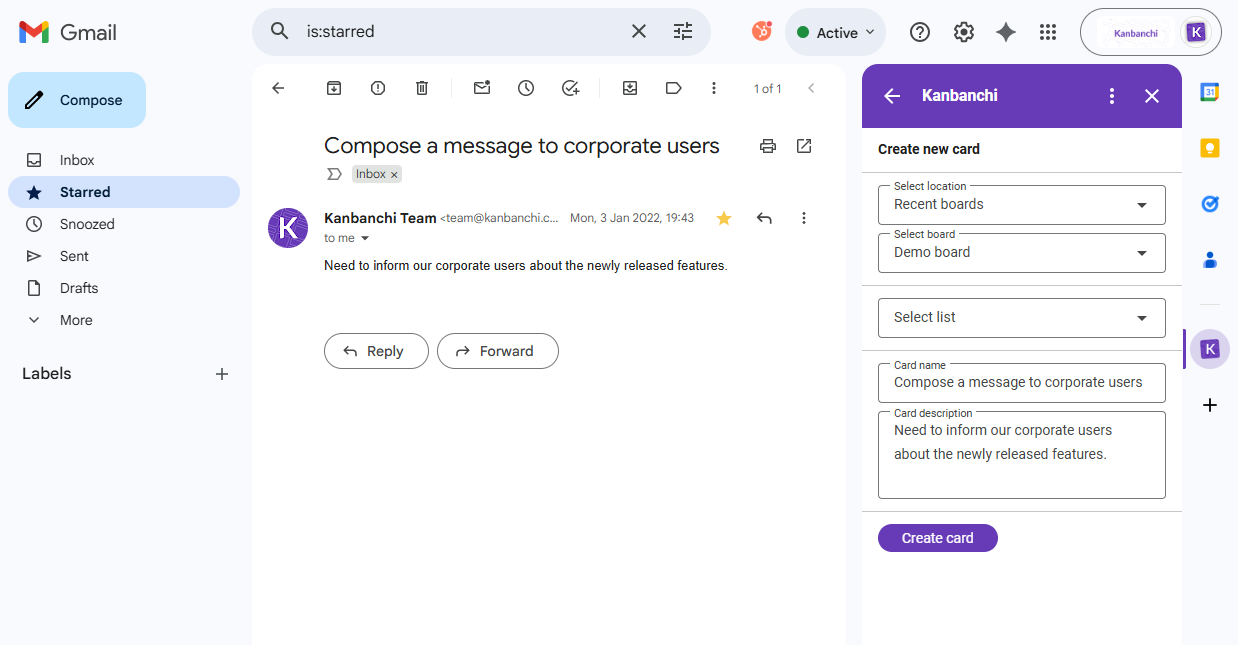
For Microsoft 365 teams, Kanbanchi is compatible with OneDrive and SharePoint, which helps keep project work connected to the file storage and collaboration systems people already use.
This is important for growing teams because files are often the real project assets: contracts, briefs, creative files, proposals, technical documents, onboarding materials, and reports. Keeping those assets linked to the tasks that require them reduces searching, duplicate uploads, and version confusion.
A growing team eventually needs repeatability. Kanbanchi supports templates, custom board setups, card templates, subcards, backups, corporate branding, and data export for reporting dashboards such as Google Looker Studio.
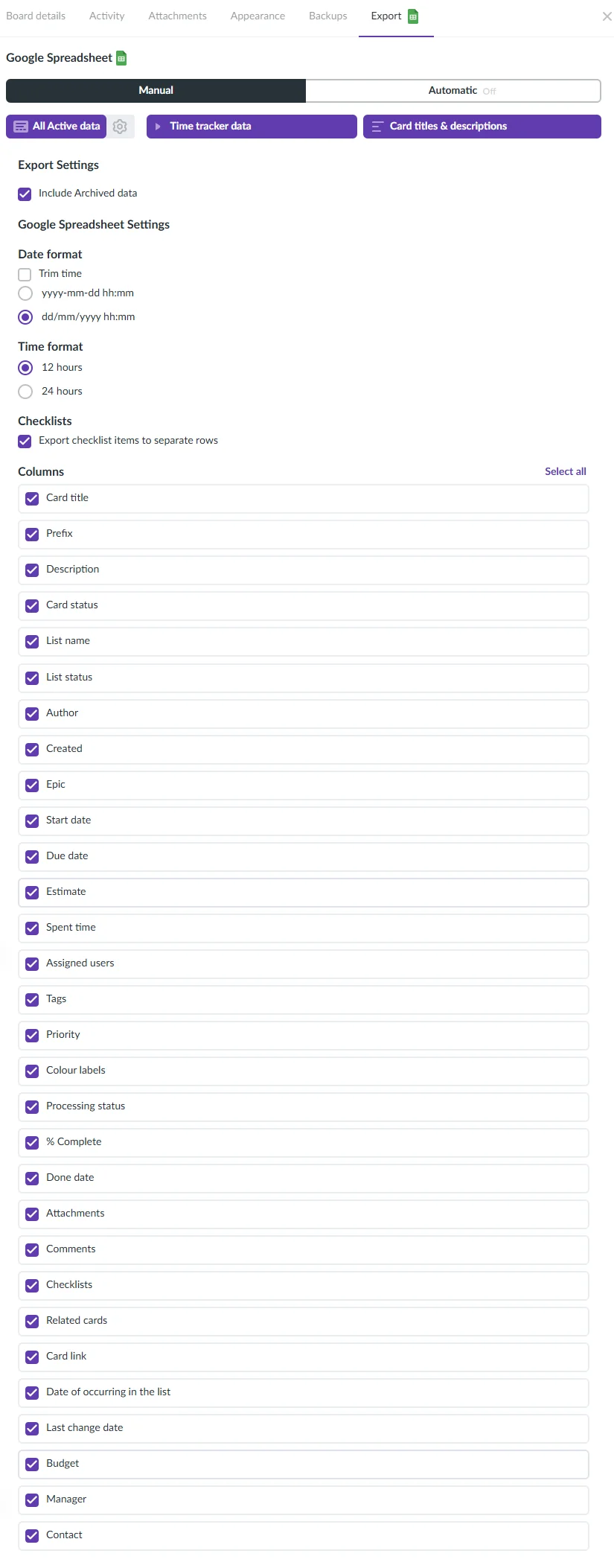
This helps teams turn successful workflows into reusable operating patterns. For example, a marketing team can create a campaign launch template, HR can create an onboarding template, and operations can create a procurement or quality-control board. Leaders get more consistency without forcing every team to abandon its own workflow.
A common mistake is assuming that a growing company needs one workflow for everyone. It usually does not. It needs one project management platform with enough flexibility for different departments and enough standards for leadership visibility.
Marketing teams, for example, may need campaign ideation, asset production, approvals, publishing, and performance learning. E-commerce brands may structure their project board around campaign ideas and creative assets, while the project management system tracks approvals, owners, deadlines, and launch readiness.
| Department | Typical work to manage | Useful software capabilities |
|---|---|---|
| Leadership | Kanban boards, Gantt timelines, file attachments, and calendar sync | Dashboards, reports, filters, exports, portfolio‑style board structures |
| Operations | Recurring processes, vendor tasks, quality checks | Templates, checklists, subcards, priorities, time tracking |
| Marketing | Campaign planning, approvals, and content production | Boards by pipeline stage, email‑to‑task creation, reminders, and file links |
| HR | Hiring pipelines, onboarding, policy rollouts | Templates, task ownership, due dates, shared files, and permissions alignment |
| Sales and customer success | Handoffs, onboarding, renewals, client requests | Boards by pipeline stage, email‑to‑task creation, reminders, and file links |
| Product and IT | Backlogs, releases, support tasks, improvement work | Visual boards, priorities, timelines, tags, timing data |
The platform should give each department the workflow it needs while keeping data structured enough for managers to review progress across teams.
Buying software is easy. Getting a team to use it consistently is the real implementation work. A phased rollout reduces risk and helps teams build habits before the platform becomes mission-critical.
The best rollout feels practical. People should quickly understand what changed, why it helps them, and how to use the system without waiting for a project management expert.
Complexity can look impressive during a demo, but it often slows adoption. A growing team needs enough structure to manage real projects, not every advanced feature available in the market.
If the platform requires heavy configuration before people can complete basic work, the team may keep using spreadsheets and chat messages in parallel.
Flexibility is helpful, but unlimited variation creates reporting problems. If every department uses different naming rules, status meanings, priority labels, and date conventions, leadership visibility becomes unreliable.
Standardize the basics: owner, due date, priority, status, project name, and completion criteria. Then let departments customize the parts that genuinely differ.
Project management software does not exist in isolation. If your company already has strong policies for Google Drive, Shared Drives, OneDrive, or SharePoint, your project platform should respect that environment as much as possible.
This is one reason Workspace-centered teams often prefer tools that integrate directly with their existing file and identity systems. It reduces friction for users and helps administrators keep work aligned with company policies.
Growing teams can fall into the trap of tracking everything because the tool allows it. More task updates do not automatically mean better performance.
Useful project reporting should answer practical questions: Are we on track? What is blocked? Who is overloaded? Which deadlines are at risk? What work has the highest priority? What did we learn from the last project?
The best project mgmt software for growing teams is the one that solves today’s visibility problems while supporting tomorrow’s scale. If your team only needs a simple board, Trello or Notion may be enough. For a software engineering organization, Jira may be the right core system. If you need a highly configurable cross-functional platform, Asana, monday.com, or ClickUp may fit.
If your team already works in Google Workspace or Microsoft 365 and wants a project management platform that combines daily task boards, timeline planning, time tracking, file integration, email-to-task workflows, calendar sync, templates, and reporting, Kanbanchi is a strong choice. It gives growing teams structure without forcing them into an overly complicated setup.
The key is to choose a tool that becomes part of how work happens, not a separate place where people report after the fact.
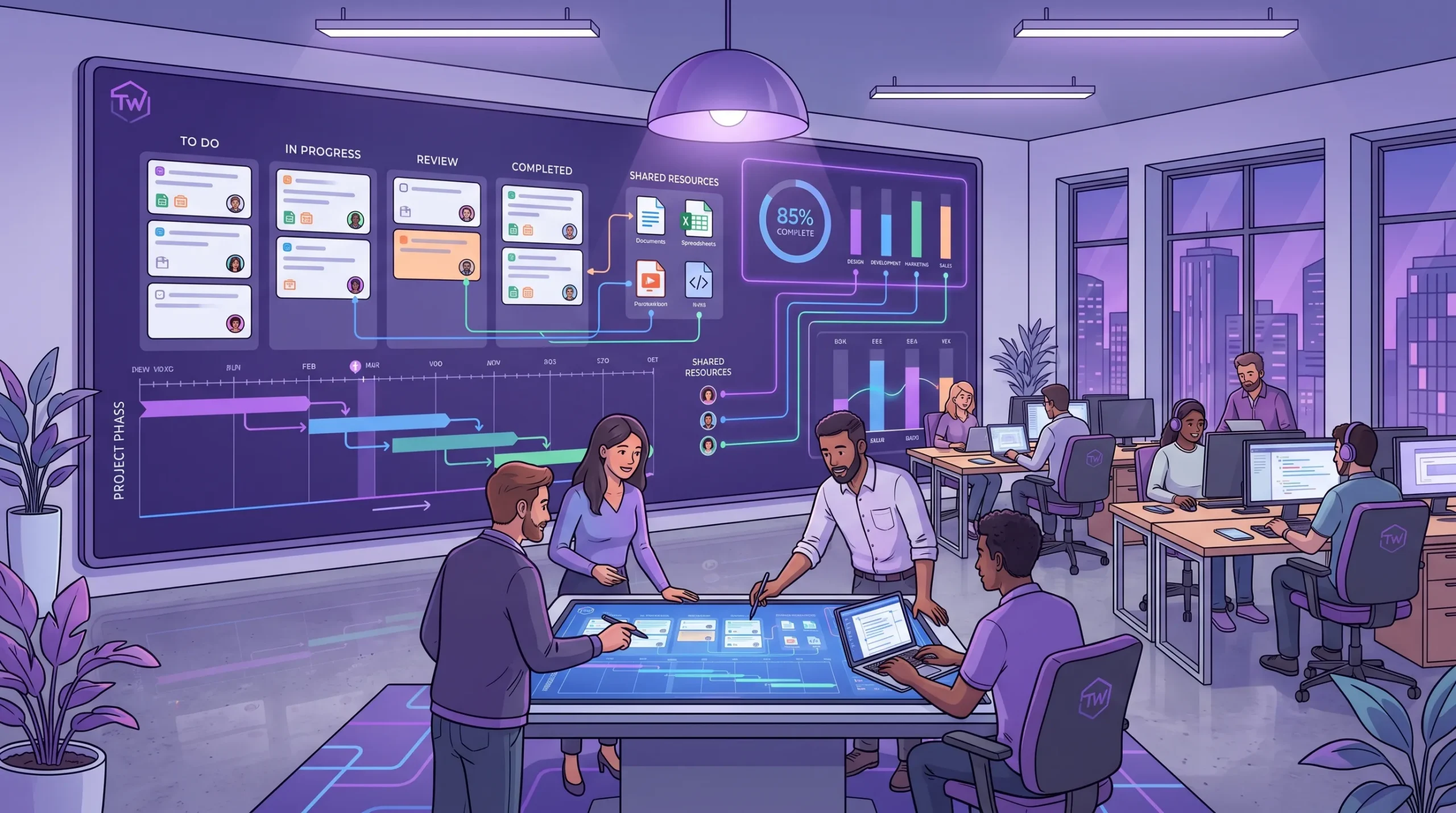
A scalable project workspace connects daily task boards, timeline planning, shared files, and reporting so managers can see both execution and risk.
The best choice depends on your team’s workflow, size, and existing tools. For Google Workspace and Microsoft 365 teams, Kanbanchi is a strong option because it combines Kanban boards, Gantt charts, time tracking, file integration, email task creation, calendar sync, and reporting in one connected workspace.
Move when spreadsheets stop giving reliable visibility. Common signs include missed deadlines, unclear task ownership, too many status meetings, duplicated files, manual reporting, and difficulty onboarding new team members into existing projects.
Most growing teams benefit from all three. Kanban boards are best for daily execution, Gantt charts are best for timeline planning, and list views are useful for filtering, reviewing, and quickly scanning large numbers of tasks.
Google Workspace is excellent for email, files, documents, meetings, and calendars, but it does not include a full native project management system with visual boards, Gantt charts, time tracking, and project reporting. A tool like Kanbanchi can add that project layer while staying connected to Google Workspace.
Team leads usually need clear ownership, due dates, priorities, workload visibility, timeline planning, file access, notifications, and reliable reporting. The software should help them manage exceptions and blockers, not just store tasks.
Start with a simple pilot, use real workflows, connect the tool to files and calendars, and define clear rules for updating work. Adoption improves when employees can see that the software reduces confusion and repetitive status reporting.
If your team is expanding and project visibility is becoming harder to maintain, it may be time to move from scattered updates to a connected project management system. Kanbanchi helps teams plan, track, and deliver work with Kanban boards, Gantt charts, time tracking, and deep Google Workspace and Microsoft 365 compatibility.
Choose to start with Kanbanchi and build a project workspace your team can keep using as it grows.



In this Article:
Start using Kanbanchi now
Start your free trial