-  views

Team Task Management: a Complete Guide

Try Kanbanchi now

Start your free trial

 

Team task management discussion: a team lead and four colleagues reviewing tasks and reports around a conference table

Personal task management is a solved problem. A list, a few dates, and some discipline will get one person through the week. Team task management is a different problem, and the difference is not scale. It is that work has to pass between people. A task moves from a writer to a reviewer, from sales to onboarding, from support to engineering. At every one of those points, something can be dropped, duplicated, misunderstood, or quietly stalled while both people assume the other one has it.

This guide covers how to manage tasks across a team: where handoffs break, how to make ownership unambiguous, how to give managers visibility without status meetings, and what to look for in a team task management app.

Two related guides sit alongside this one. If you want to know what an individual task card should contain and what its status should mean, read Kanban task management. If you want Kanban as a delivery methodology: principles, work-in-progress theory, flow metrics, read Mastering Kanban Project Management.

What Changes When Tasks Are Shared

Five problems appear the moment a task involves more than one person. They are the whole subject of team task management, and everything else in this guide follows from them.

ProblemWhat it looks like
HandoffsWork finishes on one side and sits waiting because nobody knew it was ready
OwnershipTwo people think someone else has it, or a group is “responsible” and nobody is accountable
VisibilityManagers cannot tell what is happening without asking, so they ask constantly
Coordination costThe team spends more time reporting on work than doing it
CapacityNobody can see who is overloaded until they miss something

Notice that none of these are about tracking tasks. A team can have every task recorded and still have all five.

Handoff: Where Team Task Management Actually Breaks

Most missed deadlines are not the result of someone working slowly. They are the result of dead time between people.

A designer finishes a mockup on Tuesday. The developer picks it up on Friday. Nobody was blocked, and nobody was idle. The developer simply did not know it was ready, because “finished” happened in the designer’s head and in a folder somewhere, not anywhere the developer would see.

Three things fix this, and none of them require a meeting.

1. Make the handoff a visible event. A list that means “waiting for the next person” is more useful than it sounds. When a task leaves In Progress and enters Review, or Ready for Development, or Ready for QA, that transition is the signal. If your workflow has no list representing “done with my part, not yet started on the next part,” handoffs will keep happening invisibly.

2. Name the receiver, not just the stage. Moving a card to Review tells you the stage. Assigning it to a person tells you who is expected to act. A card in Review with no assignee is a card waiting for whoever notices first, which in practice means whoever notices last.

3. Agree what a completed handoff includes. The receiving side usually knows what they need: the brief, the final file, the acceptance criteria, the ticket number. Write that down once, as a checklist on the card, and the handoff stops being a conversation.

Visibility Without Status Chasing

Managers schedule status meetings because they need confidence. If the board gives them that confidence, most of those meetings stop being necessary. The habit that makes this work is simple enough to state in one line: update the task before someone has to ask.

In practice, that means agreeing when updates happen. When work starts, when status changes, when a blocker appears, when a date moves, and when the task is finished. Some teams add an update window instead: everyone brings their cards current by Thursday afternoon, and the lead reviews the board on Friday morning. Either approach replaces a recurring status meeting for most teams.

Review exceptions, not everything. The highest-value review habit is looking only at work that needs attention: overdue tasks, blocked tasks, tasks with no owner, high-priority items that have not moved, and anything sitting in Review waiting for approval. Reading out completed work helps nobody. If the information is already visible, trust it.
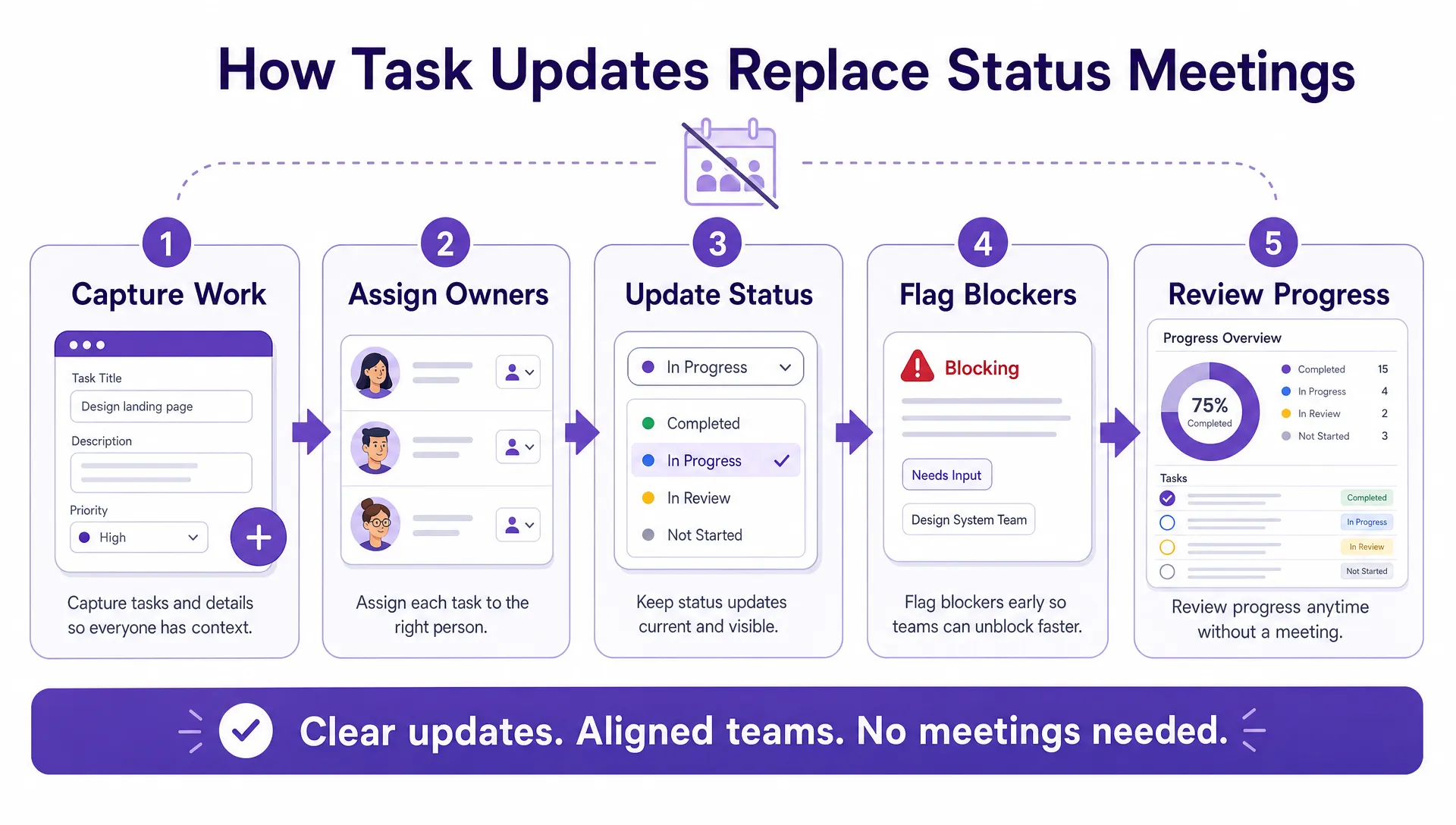
A simple five-step workflow diagram showing how task updates replace status meetings: capture work, assign owners, update status, flag blockers, and review progress

Replacing status meeting with timely task updates is easy: capture work, assign owners, update statuses, flag blockers, and review progress

Ownership: One Name, Never a Group

Shared ownership tends to become no ownership. Two people assigned to the same task will each reasonably assume the other is driving it.

The rule worth holding to is one accountable owner per task. That does not mean one person does all the work. It means one named person is answerable for the task moving forward, and for saying so when it cannot.

This is also the fastest audit you can run on any board. Filter for tasks with no assignee. Whatever comes back is the work your team has not really committed to yet.

Kanban task management covers what else belongs on a card in more detail.

Priorities That Mean the Same Thing to Everyone

Teams hold extra meetings about priorities because priority labels are usually undefined. Left undefined, everything drifts to high. Priority becomes useful when it is tied to business impact and expected behavior rather than to a feeling:

PriorityMeaningExpected behaviour
CriticalBlocking revenue, customer delivery, compliance, or major operationsAddress immediately; escalate if blocked
HighImportant work due soon or tied to a major commitmentPlan into the current work cycle
NormalValuable work with a reasonable deadlineComplete as capacity allows
LowNice to have, or a future improvementKeep visible, do not interrupt active work

Once those definitions exist, a lead can sort and filter rather than convening a call to ask what matters most. The expected-behavior list is the part that does the work. It turns a label into an instruction.

Capacity: Seeing Overload Before It Costs You

The most common cause of a late task is that its owner has too much open, and nobody could see it.

Two views make this visible. Grouping tasks by assignee shows how work is distributed across the team at a glance. Counting active tasks per person shows fragmentation: a five-person team with twenty tasks in progress does not have an effort problem; it has a context-switching problem.

A reasonable starting point is two or three active tasks per person, with everything else waiting. When someone is consistently well above that, the conversation should be about capacity, not discipline.

Choosing a Team Task Management App

Most task app comparisons list features. For team task management specifically, the capabilities that matter are the ones about coordination between people rather than the ones about organizing your own work.

Worth checking before you commit:

  • Shared access that matches your permissions model. Whether people outside the team can see a board, and whether that follows rules you already manage or a second set you now have to maintain.
  • Assignment to individuals, plus visibility of who has what. A per-person view is not a nice extra; it is how you spot overload.
  • Notifications that reach the receiving side of a handoff. If the next person only finds out by checking, handoffs stay invisible.
  • Comments and mentions on the task itself, so decisions live with the work rather than in a chat channel nobody can search later.
  • Filtering by owner, status, priority, and date, which is what makes exception-based review possible.
  • Connection to where context already lives – your files, calendar, and email. If the app cannot reach them, people will keep switching tools and losing information in transit.
  • Reporting or export, so leadership visibility does not depend on someone preparing a manual update each week.

How This Differs By Team

The five problems are universal, but the handoffs are not. Where your team loses time depends on what kind of work it does.

Product and engineering teams hand off constantly and in both directions: design to development, development to QA, QA back to development. The dead time between those stages is usually the highest hidden cost, and it is why these teams benefit most from explicit ready-for-next-stage lists.

Marketing teams run parallel production with a fixed external date. Copy, design, legal review, and development often proceed at once, and the launch is set by whichever finishes last. The coordination problem is less about sequence than about knowing which of the parallel tracks is behind.

IT and support teams have a different shape again: high-volume intake from outside the team, most tasks small, a few enormous. The problem is triage and routing rather than handoff, and the risk is that the large tasks get buried under the volume of small ones.

Operations and finance teams run recurring processes with hard deadlines: monthly close, payroll, compliance cycles. The same sequence runs every period, so templates matter more here than anywhere else, and the failure mode is a step that gets skipped because it lives in someone’s memory.

Detailed guides for each of these are coming. They will cover the specific workflows, handoff points, and board structures each type of team needs.

Getting Started

Pick one workflow with visible pain and real handoffs. Customer onboarding, campaign production, hiring, and support intake all work well.

  • One shared board for a workflow that actually exists
  • Lists that include the handoff points, not just work stages
  • One named owner per task
  • Agreed priority definitions
  • A visible way to flag blocked work
  • One weekly look at exceptions only

After a month, check the signals rather than the appearance of the board: are handoffs faster, are fewer tasks unowned, and are managers asking for fewer manual updates?

Where Kanbanchi fits

Kanbanchi is built for teams that want shared task visibility inside the productivity tools they already use. Boards live in Google Drive and follow the sharing rules you already manage, cards can be created from Gmail, dates sync to Google Calendar, and board data exports to Google Sheets for reporting. It also supports Microsoft 365 teams through OneDrive and SharePoint.

There is a fuller overview in What is Kanbanchi?
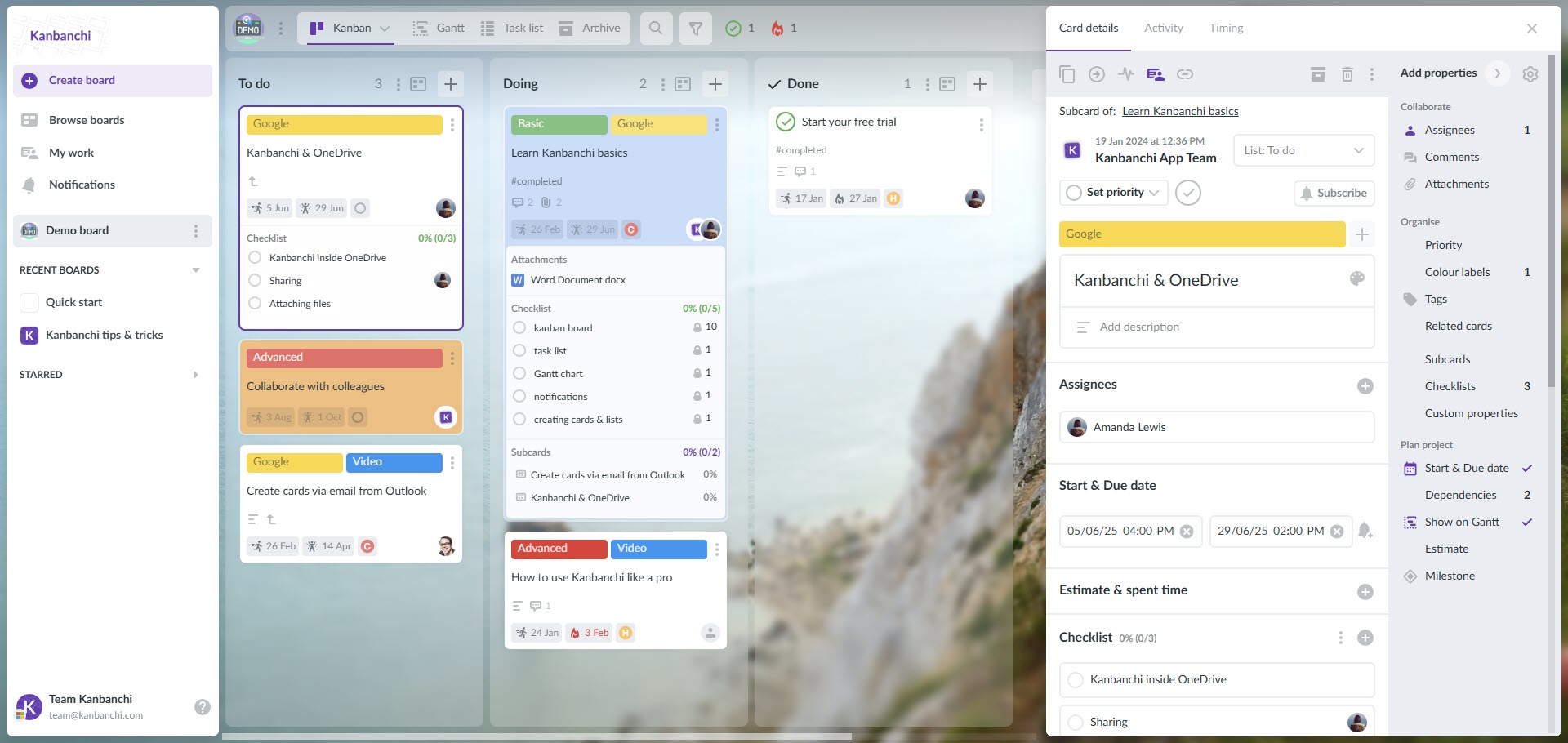
Kanbanchi interface example when using Microsoft environment

Kanbanchi interface example when using Microsoft environment

Start a free trial of Kanbanchi today

Frequently Asked Questions

What is team task management?

Team task management is the practice of coordinating tasks across multiple people. Making sure work has a clear owner, moves cleanly between people, and stays visible without anyone having to ask for updates. It differs from personal task management mainly in the handoffs: most delays in team work happen in the gaps between people rather than while someone is working.

What should you look for in a team task management app?

Prioritize coordination over organization: assignment to individual people, a view of who has what, notifications that reach the next person in a handoff, comments on the task itself, filtering by owner and status, and integration with the files and calendar your team already uses.

How do you stop tasks getting lost between people?

Make handoffs visible events. Add a list that means “finished on my side, not yet started on the next,” assign the card to the person expected to act rather than leaving it unassigned, and agree in advance what a completed handoff includes. Most lost work is not lost; it is sitting somewhere nobody was watching.

Can one task have more than one owner?

It can be assigned to several people, but one person should be accountable for it. Two owners usually means each assumes the other is driving. Use one named owner for the task and assign others to subtasks or reviews.

How do you give managers visibility without daily status meetings?

Agree when cards get updated: at minimum when work starts, when status changes, when something is blocked, and when a date moves. Then have managers review exceptions rather than everything: overdue, blocked, unowned, and stalled tasks. That covers what most status meetings were for.

Read all Task Management articles here

Make the Handoffs Visible

Team task management is mostly not a tracking problem. The work is usually already written down somewhere. What goes wrong is that ownership is vague, handoffs happen invisibly, and nobody can see who is carrying too much.

Fix those three and the coordination overhead – the meetings, the status chasing, the repeated questions – falls away on its own.

    MultipleAuthors\Classes\Objects\Author Object
    (
        [term_id] => 973
        [term:MultipleAuthors\Classes\Objects\Author:private] => 
        [metaCache:MultipleAuthors\Classes\Objects\Author:private] => Array
            (
                [user_email] => olga.alekseeva@kanbanchi.com
                [user_id] => 20
                [first_name] => Olga Alekseeva
                [last_name] => 
                [job_title] => Growth hacking expert with over 10 years of experience with Kanbanchi
                [description] => Olga wears multiple hats across marketing, sales, product, and ops after 10+ years in the SaaS world. She is passionate about helping teams streamline their workflows with Kanbanchi and Google Workspace or Microsoft 365. "When I'm not optimizing processes or writing guides, I'm probably tweaking our product roadmap or diving into the latest productivity tools".
                [user_url] => https://linkedin.com/in/olgksv
            )
    
        [userObject:MultipleAuthors\Classes\Objects\Author:private] => WP_User Object
            (
                [data] => stdClass Object
                    (
                        [ID] => 20
                        [user_login] => olga.alekseeva
                        [user_pass] => $wp$2y$10$WuiuvYMj7CDnLrRbWchEkuBwKzmbBakK64Uk5c68bDY3qA46MFam6
                        [user_nicename] => olga-alekseeva
                        [user_email] => olga.alekseeva@kanbanchi.com
                        [user_url] => https://linkedin.com/in/olgksv
                        [user_registered] => 2025-09-03 15:47:58
                        [user_activation_key] => 
                        [user_status] => 0
                        [display_name] => Olga Alekseeva
                    )
    
                [ID] => 20
                [caps] => Array
                    (
                        [editor] => 1
                        [author] => 1
                        [contributor] => 1
                        [wpseo_editor] => 1
                        [wpseo_manager] => 1
                        [administrator] => 1
                    )
    
                [cap_key] => wp_capabilities
                [roles] => Array
                    (
                        [0] => editor
                        [1] => author
                        [2] => contributor
                        [3] => wpseo_editor
                        [4] => wpseo_manager
                        [5] => administrator
                    )
    
                [allcaps] => Array
                    (
                        [moderate_comments] => 1
                        [manage_categories] => 1
                        [manage_links] => 1
                        [upload_files] => 1
                        [unfiltered_html] => 1
                        [edit_posts] => 1
                        [edit_others_posts] => 1
                        [edit_published_posts] => 1
                        [publish_posts] => 1
                        [edit_pages] => 1
                        [read] => 1
                        [level_7] => 1
                        [level_6] => 1
                        [level_5] => 1
                        [level_4] => 1
                        [level_3] => 1
                        [level_2] => 1
                        [level_1] => 1
                        [level_0] => 1
                        [edit_others_pages] => 1
                        [edit_published_pages] => 1
                        [publish_pages] => 1
                        [delete_pages] => 1
                        [delete_others_pages] => 1
                        [delete_published_pages] => 1
                        [delete_posts] => 1
                        [delete_others_posts] => 1
                        [delete_published_posts] => 1
                        [delete_private_posts] => 1
                        [edit_private_posts] => 1
                        [read_private_posts] => 1
                        [delete_private_pages] => 1
                        [edit_private_pages] => 1
                        [read_private_pages] => 1
                        [wpseo_bulk_edit] => 1
                        [copy_posts] => 1
                        [ppma_edit_post_authors] => 1
                        [ppma_edit_own_profile] => 1
                        [wpseo_edit_advanced_metadata] => 1
                        [wpseo_manage_options] => 1
                        [view_site_health_checks] => 1
                        [switch_themes] => 1
                        [edit_themes] => 1
                        [activate_plugins] => 1
                        [edit_plugins] => 1
                        [edit_users] => 1
                        [edit_files] => 1
                        [manage_options] => 1
                        [import] => 1
                        [level_10] => 1
                        [level_9] => 1
                        [level_8] => 1
                        [delete_users] => 1
                        [create_users] => 1
                        [unfiltered_upload] => 1
                        [edit_dashboard] => 1
                        [update_plugins] => 1
                        [delete_plugins] => 1
                        [install_plugins] => 1
                        [update_themes] => 1
                        [install_themes] => 1
                        [update_core] => 1
                        [list_users] => 1
                        [remove_users] => 1
                        [promote_users] => 1
                        [edit_theme_options] => 1
                        [delete_themes] => 1
                        [export] => 1
                        [bcn_manage_options] => 1
                        [manage_security] => 1
                        [restrict_content] => 1
                        [list_roles] => 1
                        [create_roles] => 1
                        [delete_roles] => 1
                        [edit_roles] => 1
                        [cfdb7_access] => 1
                        [ppma_manage_authors] => 1
                        [ppma_manage_layouts] => 1
                        [ppma_manage_custom_fields] => 1
                        [ppma_manage_author_categories] => 1
                        [iwc_read_posts] => 1
                        [iwc_create_posts] => 1
                        [iwc_edit_posts] => 1
                        [iwc_delete_posts] => 1
                        [iwc_read_users] => 1
                        [iwc_create_users] => 1
                        [iwc_edit_users] => 1
                        [iwc_delete_users] => 1
                        [iwc_read_comments] => 1
                        [iwc_create_comments] => 1
                        [iwc_edit_comments] => 1
                        [iwc_delete_comments] => 1
                        [iwc_upload_files] => 1
                        [iwc_read_media] => 1
                        [iwc_edit_media] => 1
                        [iwc_delete_media] => 1
                        [iwc_read_terms] => 1
                        [iwc_create_terms] => 1
                        [iwc_edit_terms] => 1
                        [iwc_delete_terms] => 1
                        [editor] => 1
                        [author] => 1
                        [contributor] => 1
                        [wpseo_editor] => 1
                        [wpseo_manager] => 1
                        [administrator] => 1
                    )
    
                [filter] => 
                [site_id:WP_User:private] => 1
            )
    
        [hasCustomAvatar:MultipleAuthors\Classes\Objects\Author:private] => 1
        [customAvatarUrl:MultipleAuthors\Classes\Objects\Author:private] => Array
            (
                [url] => https://www.kanbanchi.com/wp-content/uploads/2025/09/photo_2024-04-10_17-25-16.jpg
                [url2x] => https://www.kanbanchi.com/wp-content/uploads/2025/09/photo_2024-04-10_17-25-16.jpg
            )
    
        [avatarUrl:MultipleAuthors\Classes\Objects\Author:private] => 
        [avatarBySize:MultipleAuthors\Classes\Objects\Author:private] => Array
            (
                [96] => 
                [80] => 
                [50] => 
            )
    
    )
    
  • Growth hacking expert with over 10 years of experience with Kanbanchi

    Olga wears multiple hats across marketing, sales, product, and ops after 10+ years in the SaaS world. She is passionate about helping teams streamline their workflows with Kanbanchi and Google Workspace or Microsoft 365. "When I'm not optimizing processes or writing guides, I'm probably tweaking our product roadmap or diving into the latest productivity tools".

    All articles
Share

Try Kanbanchi now

  • Collaborate seamlessly
    with your team
  • Integrate Kanbanchi
    with Google or Microsoft
  • Manage all your work in one place
Start for free

Start using Kanbanchi now

Start your free trial