
In this Article:
Try Kanbanchi now
Start your free trial

Kanbanchi vs Hive: two project management tools that offer everything from Kanban boards and Gantt charts to time tracking features.
But here’s where they differ. One stores your project data inside Google Drive, while the other merges your existing tools into a single platform.
Not sure which to choose? This Kanbanchi and Hive project management review provides the specifics: honest pricing, integrations, customer support, real user experiences, and pros and cons to help you make the right decision for your team.
Want fast onboarding and a clean interface? Kanbanchi is the better fit. You can begin running real projects in Kanbanchi on the same day if your team already uses Google Drive’s infrastructure.
Hive suits teams that want a broader, all-in-one platform and are willing to invest time in configuration. This option makes sense if you want to consolidate task management, chat, proofing, and email in one place.
Kanbanchi is the more practical and cost-effective choice for most SMBs. Hive offers more features, but not all of them will be used.


User Ratings at a Glance: Kanbanchi scores 4.7/5 on G2 and 4.5 on Capterra, with users consistently highlighting its intuitive interface and support team quality. Hive’s G2 score is 4.6/5 and, at 4.4, is slightly lower on Capterra. Hive reviewers praise its breadth of features, though the lengthy learning curve and missing features are recurring concerns.
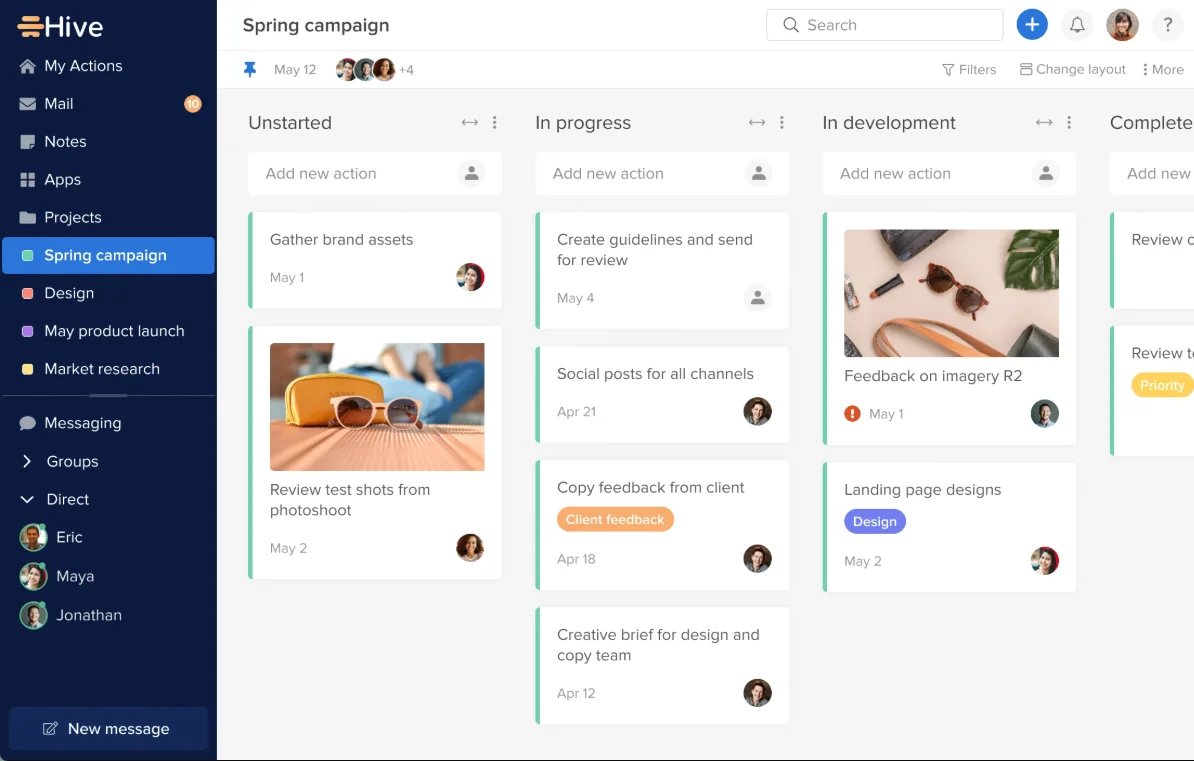
Hive is a US-based project management and collaboration platform designed for fast-moving creative teams. It goes well beyond basic task management by combining:
Hive also features over 1,000 integrations, ideal for marketing agencies and cross-functional SMBs that need a single platform to replace multiple project management tools.
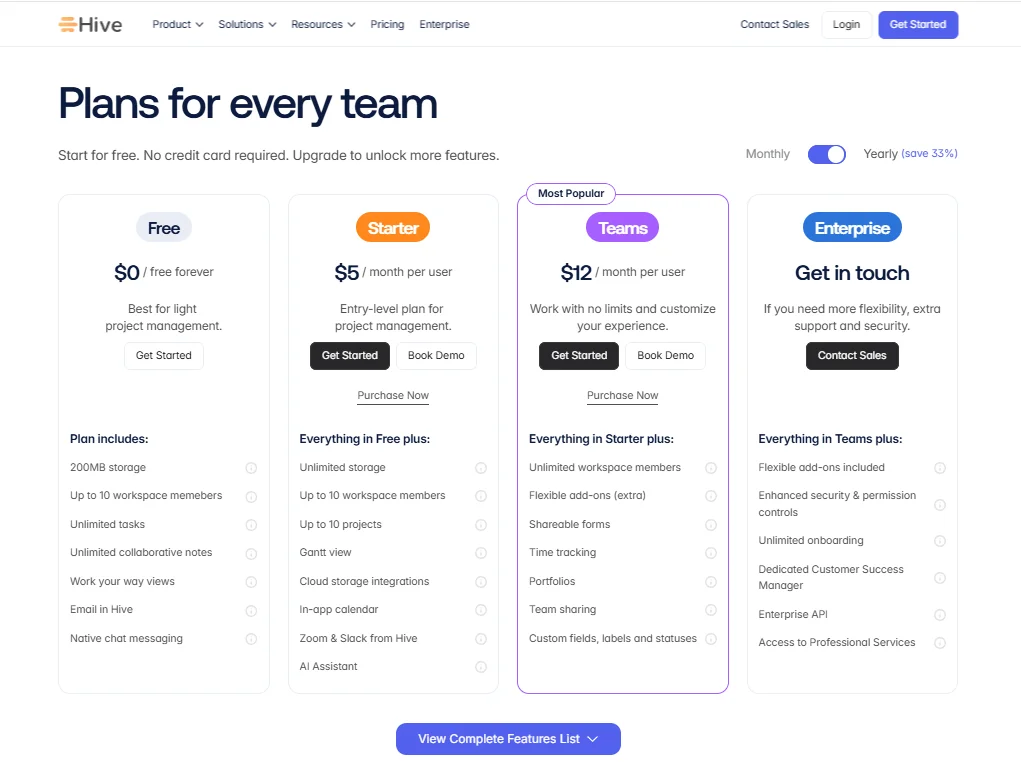
Its free plan allows up to 10 members with unlimited tasks and 200MB of storage. The Starter plan costs $5 per user per month, while the Teams plan, where most features unlock, is $12 per user per month. And if you’re looking for more advanced features, like resourcing and proofing, you can purchase these as add-ons.
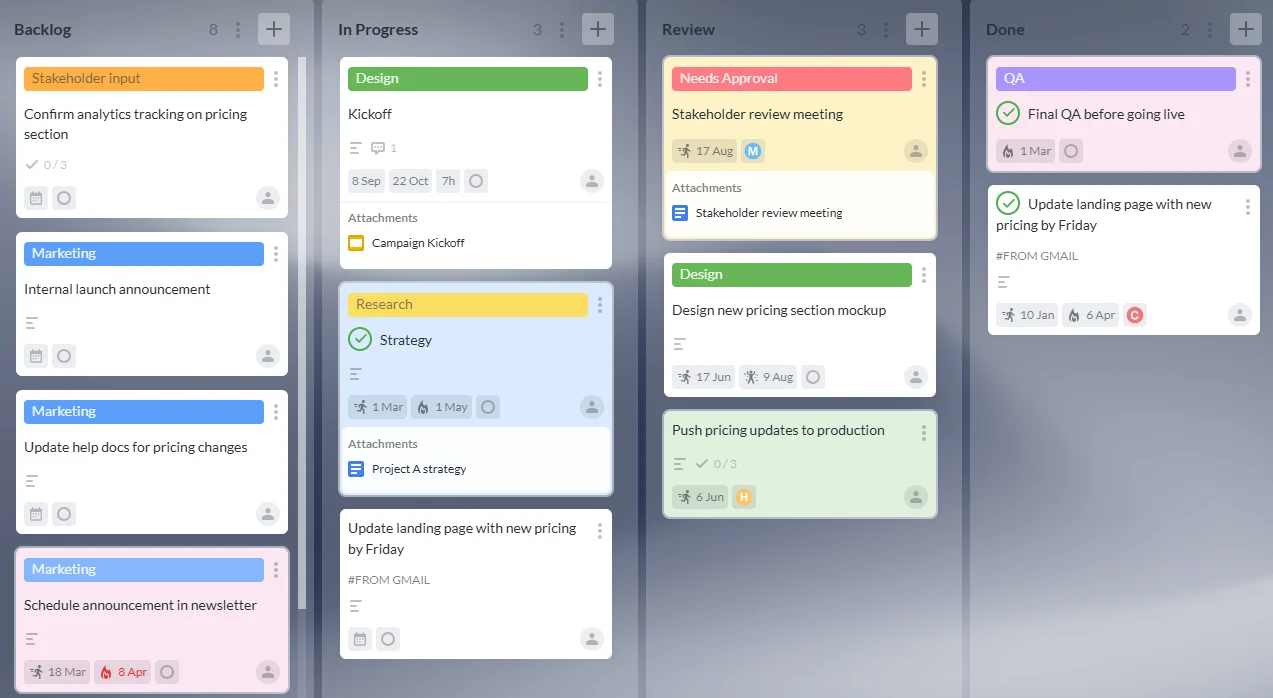
Kanbanchi is a project management tool built for Google Workspace, with a Microsoft 365 version also available. What sets Kanbanchi apart is that boards you create are stored directly as files in your Google Drive or Shared Drive. Access permissions and data governance all run through your Google Admin console, rather than a separate platform login.
Another major benefit of this tool is that it offers several views across the same card data model, including:
Along with enterprise-grade security credentials that safeguard your data, Kanbanchi also supports Google Vault to retain, hold, search, and export your organization’s Google Workspace data.
These features can be accessed through a free plan, with deeper Google Drive integration available through paid tiers. They start at $3.97 per user per month on annual billing.
The result of Kanbanchi’s simple integration and three-in-one interface is that it’s consistently described by users as the most intuitive Kanban board Google Workspace option available.
| Feature | Kanbanchi | Hive |
|---|---|---|
| Kanban board | Yes (all plans) | Yes (all plans) |
| Gantt chart | Yes (Professional+) | Yes (Starter+) |
| Time tracking | Yes (Professional+) | Yes (Teams+) |
| Swimlanes | Yes (Professional+) | Yes (Teams+) |
| Team workload view | Yes (Professional+) | Yes (Teams+) |
| Task dependencies | Yes (Professional+) | Yes (Starter+) |
| Recurring tasks | Yes (Premium+) | Yes (Starter+) |
| Custom fields | Yes (Professional+) | Yes (Teams+) |
| Built-in team chat | No | Yes (all plans) |
| File proofing | No | Yes (add-on) |
| AI assistant | None built-in | Yes (Buzz, all plans) |
| Automation | Recurring cards, status automation, email-to-card | Workflow automation (Teams+) |
| Native Google Workspace storage | Yes (boards stored in Drive) | No (external database) |
| Microsoft 365 integration | Yes | Partial |
| Mobile app (iOS or Android) | Yes | Yes |
| Free plan | Yes (unlimited users and projects, 36 active cards per project) | Yes (up to 10 members, 200MB storage) |
| SOC 2 Type II | Yes | Yes |
| SSO | Via Google / Microsoft account (all plans) | Enterprise+ only |
The biggest gap we identified when comparing Kanbanchi vs Hive is their Google Workspace integration capabilities. Kanbanchi stores project data natively in your Drive, while Hive’s is stored in its own cloud servers. We’ll take a closer look in the next section.
If your team runs on Google, Google Workspace integration should be your biggest decision point between Kanbanchi and Hive. Both connect to Google apps, but differentiates each tool is where your data is stored and who can access it.
Here’s why:
Kanbanchi boards are stored as files in your Google Drive or Shared Drive. This makes it incredibly easy when an employee leaves – your IT admin simply removes them, and their access to every Kanbanchi board is revoked automatically, without completing a separate offboarding step or sending a support ticket.
These boards can also be subject to Google Vault holds, meaning your project records travel through the same compliance framework as emails and Drive documents. This is especially useful if you’re subject to HIPAA or records retention requirements.
Some of the highlights of Kanbanchi’s Google Workspace integrations include:
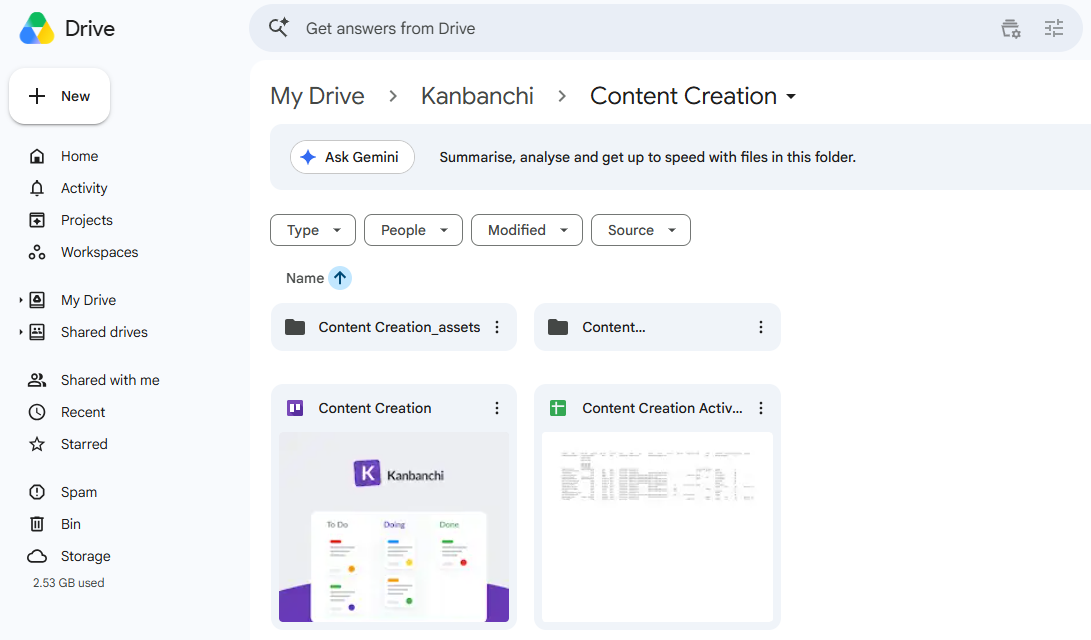
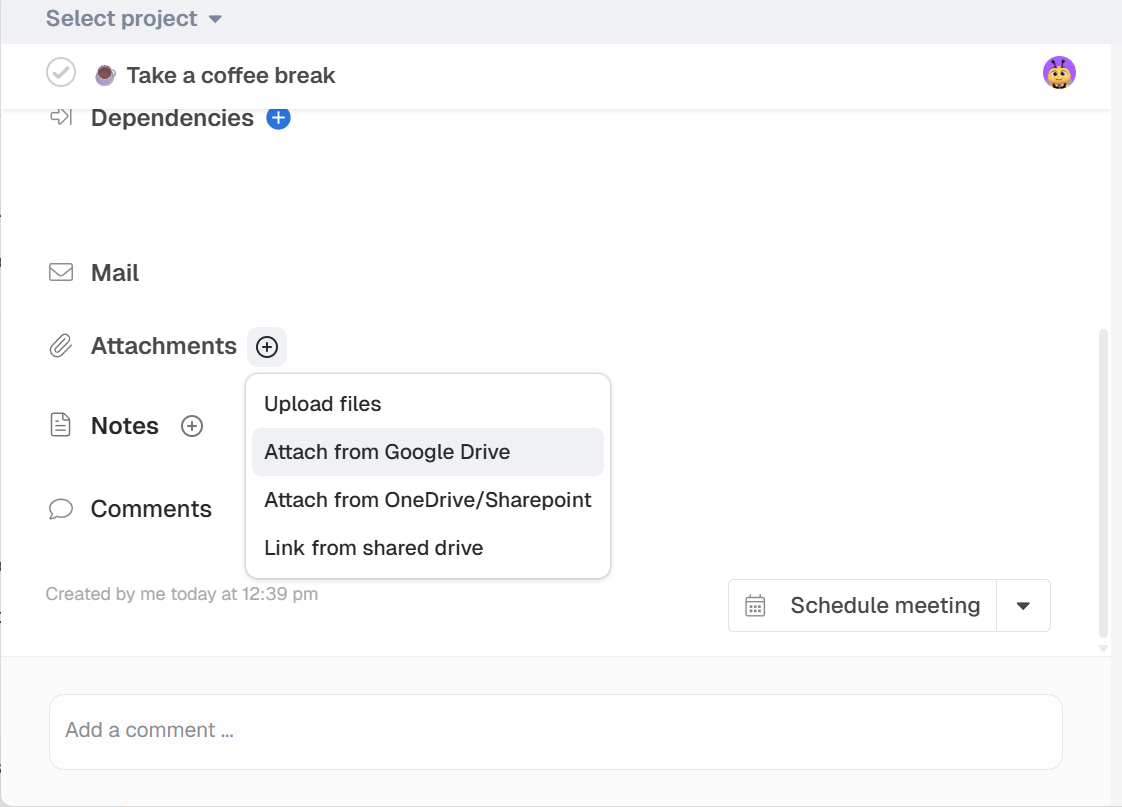
Hive’s practical integration points cover the regular daily workflows that most organizations require, from Google SSO and Drive file attachment to Google Calendar sync. You can sign in with your Google account and attach Drive files to tasks without leaving the platform.
As we’ve already mentioned, Hive doesn’t store your project data in Drive. Unlike Kanbanchi, your data lives in Hive’s own database. This creates an additional management process through Google Admin, as you’ll have to separately remove employees who leave.
So, for teams that rely on Google Admin, Kanbanchi wins here. It extends your existing Google Workspace structure, rather than creating a second one alongside it.
Rather than choosing a tool that manages every part of your project, the key question you should be asking is “How long before my team can actually use the tool productively?”
This is something we considered when testing both Hive and Kanbanchi’s project management software for Google Workspace users. Hive is incredibly rich in features, meaning there’s lots to configure during onboarding. G2 reviewers note average onboarding times of 2-3 weeks before their teams feel comfortable with daily use.
Kanbanchi’s first session is a different experience. To begin, you’ll be asked to:
The result? Most teams are running their first real project on the same day.
| Milestone | Kanbanchi | Hive |
|---|---|---|
| First board created | Under 10 minutes | 20–40 minutes |
| First team using the board | Same day | 1–3 days |
| Gantt and time tracking active | Day 1–2 (Professional plan) | 1–2 weeks |
| Team comfortable with daily use | First week | 2–3 weeks |
| Admin confident with settings | Same day (through Google Admin) | 1–2 weeks |
Simple onboarding is especially important in smaller organizations.
Consider a five-person team, for example. Say they adopt a new tool without having a dedicated IT function. The configuration costs here fall on the most technically capable employee, which is usually the person doing the most actual work. A tool that’s productive on day one lowers the risk of adoption failure.
Larger teams that have a dedicated project manager to support onboarding may consider investing in Hive. But for those that need to be up and running immediately, or who just want an easier setup process, Kanbanchi is the clearer choice when it comes to task management for small teams.
Kanbanchi’s Gantt chart is completely unified, with no separate file to maintain. Instead, any card with dates automatically appears as one view of the same board you use daily. You can reschedule, set dependencies, create milestones, and spot scheduling conflicts without leaving the board context.

Hive’s tool works differently. It’s available from the Starter plan, but at the Teams tier, you can view timelines across multiple projects simultaneously. This cross-project view is an advantage if you’re managing five or more concurrent workstreams and is a Gantt chart capability that Kanbanchi doesn’t currently offer.
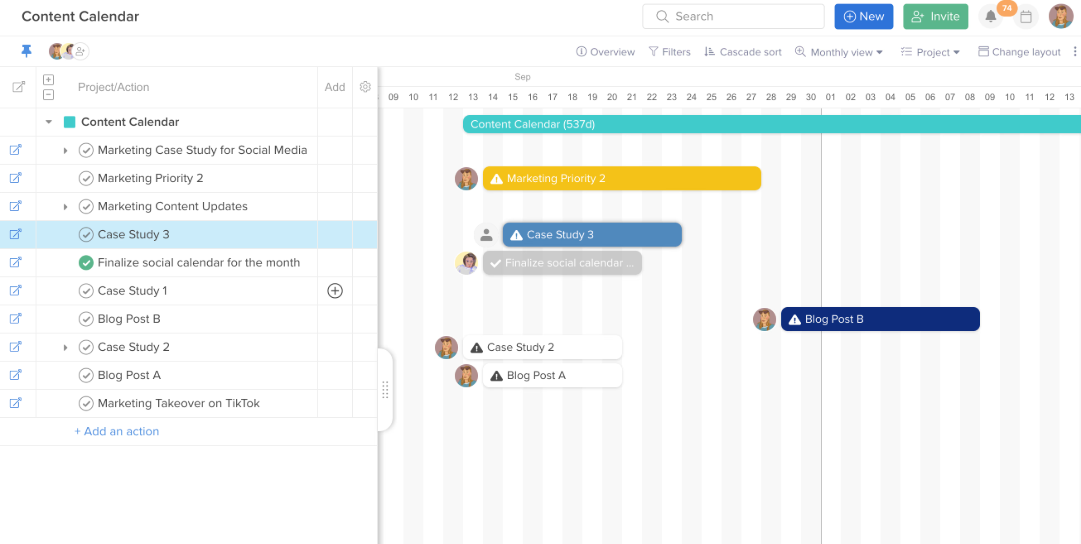
SMBs running just one or two projects at a time will benefit from Kanbanchi’s fast and visually clear Gantt. But if you’re managing any more than this simultaneously, the timeline capabilities Hive offers may be a stronger option.
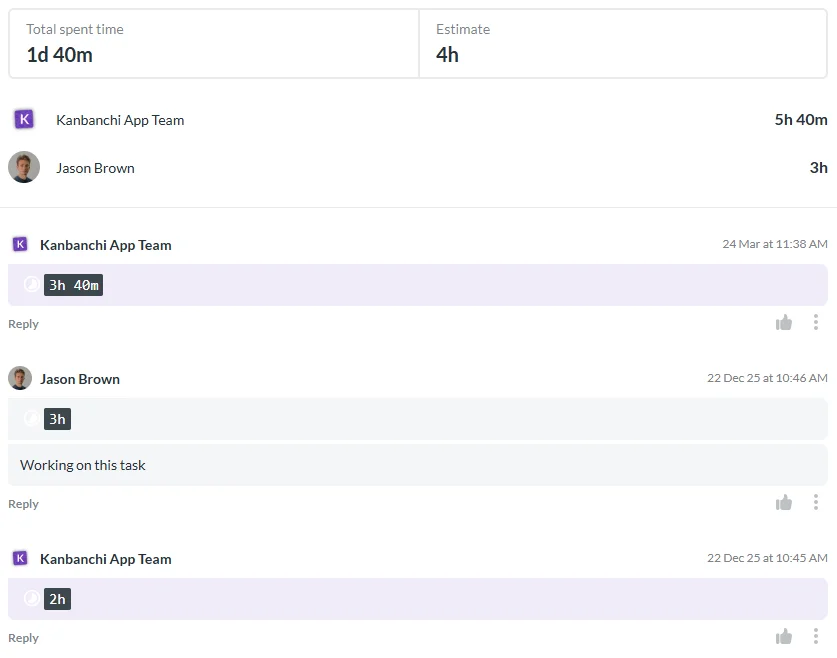
Both tools handle internal project tracking well, but Hive’s Team plan is the more detailed offering, especially if you’re an agency billing by the hour. It supports:
Kanbanchi’s time tracking software is easier to set up: simply start a timer on a task and stop it when done. Your entry appears in the card’s history, and time data exports directly to Google Sheets. This fits naturally into reporting workflows if you regularly use Google Workspace.
Hive initially seems to be the more self-contained workspace compared to Kanbanchi, with native team chat and a built-in email inbox. But in practice, many teams still find themselves using other communication platforms like Slack a year later, since their colleagues outside the immediate team haven’t switched platforms.
Kanbanchi’s comment section on a card solves the communication issue. You’ll get @mentions and activity notifications automatically to keep departments aligned. All discussions are connected to actual tasks. Team members get updates in real-time. Kanbanchi collaborative features help track who is currently on the board and which card they are working on.
Kanbanchi covers the most common project automation needs with its contained 3-in-1 structure: recurring cards, status automation, and email-to-card workflows.
How the two tools differ here is depth. Hive’s workflows support multi-step automations across integrations and notification routing, but only if you choose the Teams tier. This is the best choice if your team needs complex, repeating workflows across multiple tools.
Each one of Kanbanchi’s pricing tiers offers solid and secure board-level sharing controls to help you manage who can view or edit your boards. Specifically with the Enterprise plan, you’ll get:
Hive’s role-based permissions within projects and workspaces include SOC 2 compliance, which applies to all plans. However, enhanced security controls, including SSO and advanced permission settings, are only available at the Enterprise tier.
But what do these differences mean for your team, especially if you operate in a regulated industry like healthcare or finance?
Kanbanchi’s HIPAA compliance comes from the fact that it doesn’t store data within its own systems, instead working in your Google Drive or Google Cloud Platform project. This means your existing compliance framework covers it automatically. No permission setting in Hive can replicate this architecture.
If you’re looking for a project management tool with plenty of integrations, this is one of Hive’s clearest strengths – it has over 1,000!
It provides the full range of tools most SMBs already use, including native connections to Slack, Zoom, Salesforce, GitHub, Jira, and Dropbox. Any good Hive alternatives comparison will show that few tools match its breadth for teams with mixed tech stacks.
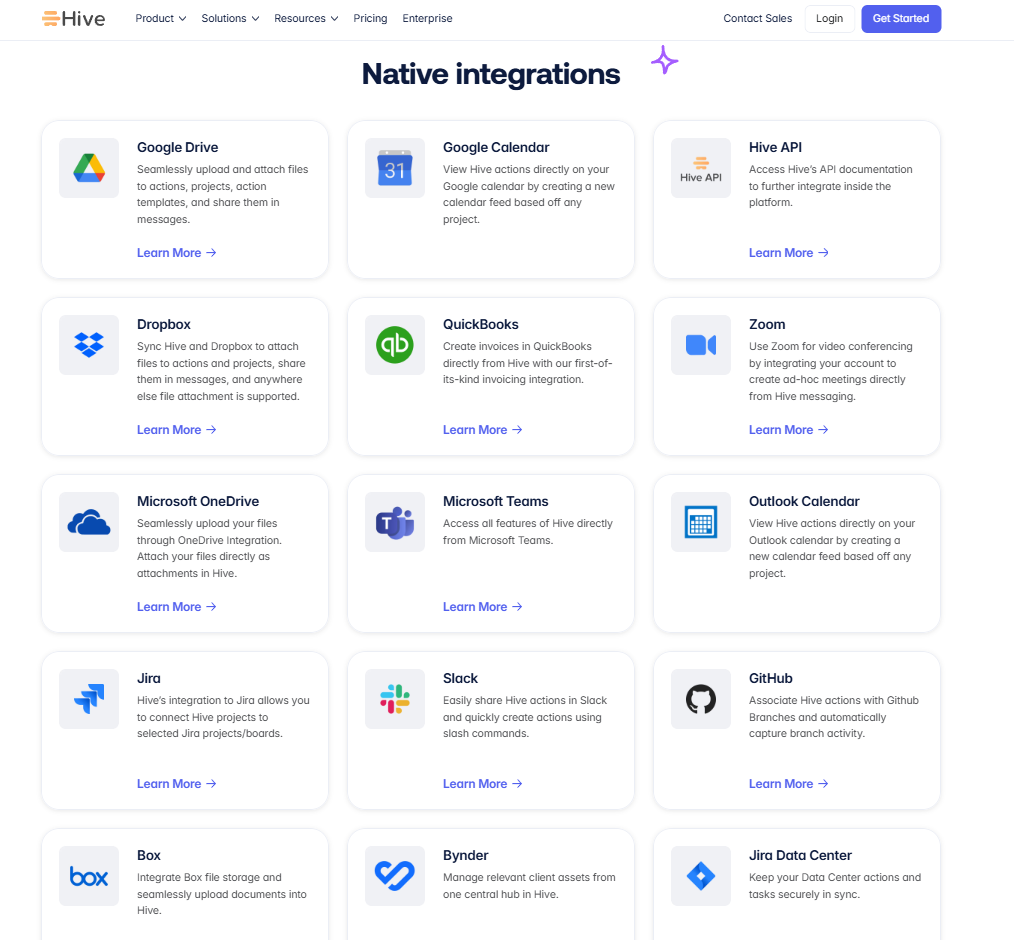
Kanbanchi’s integration list is shorter but deeper within its target ecosystem. The six Google Workspace integration points cover the daily workflow for Drive-first teams without requiring third-party connectors or Zapier middleware. Overall, Kanbanchi’s native integrations are ideal if you run entirely on Google apps. If you have a broader mixed tech stack, you may enjoy Hive’s integration depth more.
Both Kanbanchi and Hive offer iOS and Android apps, so the question here is quality rather than availability. Neither tool fully replaces the desktop experience if mobile project management is your primary daily workflow.
Hive’s mobile app scores 7.8 out of 10 on G2 for quality, compared to 9.3 for its web version. Multiple reviewers note that the mobile experience lacks some features available on desktop, including email and calendar connections, and feels slower and less polished.
Kanbanchi’s mobile app covers everything you need to use the tool daily: viewing boards, creating and updating cards, checking due dates, and leaving comments.
Support quality may feel like a minor consideration during a free trial, but it becomes much more important once you begin running a live project.
Why? Consider a 10-person team spending even just 90 minutes per week dealing with tool issues or waiting on support responses. That’s several hours of lost productivity per year. A tool with reliable customer service works out cheaper in real operational terms than one with lower initial costs and longer resolution times.
Hive receives generally positive support ratings, with an overall G2 quality of support score of 9.3. However, recurring themes in reviews include delayed response times on lower-tier plans and issues that persist through weekly software updates. Many users report spending two to five hours per week working around bugs during periods of software instability.
Kanbanchi’s support is where this project management tool truly stands out.
Reviewers consistently describe support interactions as fast and personal. The team handles product questions and broader workflow challenges without scripts or first-level triage routing, and genuinely gets to the root of the problem. Users are often surprised by how much the support team understands their actual business context, not just the product.

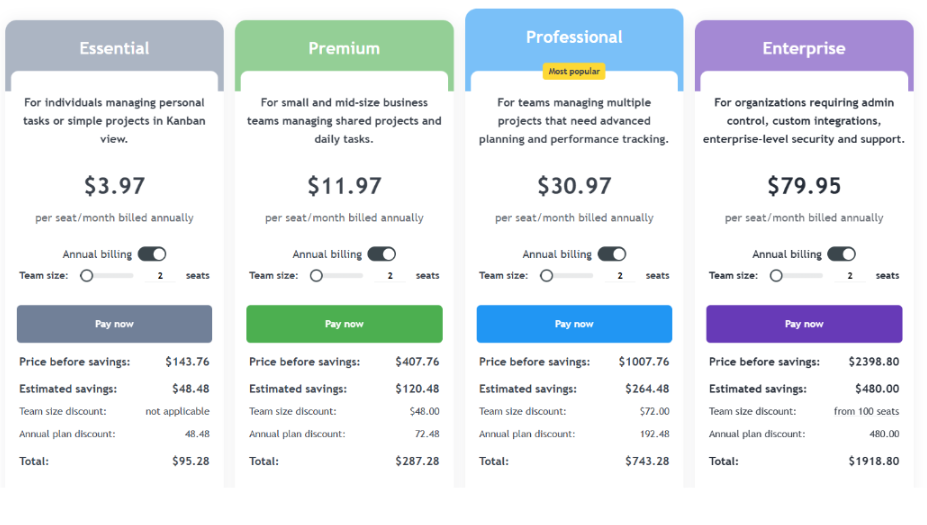
Here’s how Kanbanchi vs Hive pricing compares across plan tiers:
| Plan | Kanbanchi | Hive |
|---|---|---|
| Free | Yes (unlimited users, unlimited projects, 36 active cards per project) | Yes (up to 10 members, 200MB storage, unlimited tasks) |
| Entry paid | Essential: $3.97/user/month (annual) or $5.99/user/month (monthly), from 2 seats | Starter: $5/user/month (annual) |
| Mid-tier | Premium: from $11.97/user/month (annual); Professional: from $24.47/user/month (annual) | Teams: $12/user/month (annual). Resourcing, proofing, and advanced analytics sold as separate add-ons. |
| Top tier | Enterprise: from $9.95/user/month (annual, volume discount from 100 seats) | Enterprise: custom pricing |
What you see on Kanbanchi’s pricing page is what you pay, with the volume discounts applying from 2 seats. This means the more seats you add, the lower the per-user cost. And if you’re an educational institution or a nonprofit, it gets better – you’ll qualify for a 25% discount on all annually billed plans other than Essential.
So, what does each tier offer? Google Drive integration is included on all plans, including the free plan. The Professional Plan covers Gantt charts, time tracking, team workload management, task dependencies, swimlanes, and priority support, too.
Hive pricing hides an important detail at the Teams level. The $12 per user per month figure covers the core platform, but resourcing, proofing, and advanced analytics are sold as add-ons at an extra cost. The per-user cost increases considerably above that $12 figure, making it much more expensive for organizations that need all three add-ons to operate effectively.
| Choose Kanbanchi if… | Choose Hive if… |
|---|---|
| Your team runs on Google Workspace and uses Drive as primary storage | You want a single platform for projects, chat, email, and proofing |
| Fast onboarding matters more than maximum feature depth | You manage a mixed tech stack and need broad third-party integrations |
| Your IT admin needs to control all access through Google Admin | Your team has time to invest in platform configuration upfront |
| You’re in a regulated industry with data compliance requirements | AI-assisted task management and OKR tracking are priorities |
| You want transparent pricing with no hidden add-ons | You need cross-project timeline visibility from the entry paid plan |
| Support quality and fast response times are a priority | You’re building a cross-functional hub for marketing or creative agency workflows |
Whether you choose Kanbanchi or Hive comes down to how you want project management to fit into your existing setup.
Hive works best as a platform investment: a tool you configure properly upfront, with a team that has the time and tech experience to adopt it. Marketing agencies running high-volume creative workflows will find Hive genuinely powerful once set up, especially for its built-in chat and AI features.
Kanbanchi handles project management well, onboards in minutes, stores data where your IT admin already manages it, and provides support that actually solves problems rather than routes them. Factor in realistic Hive pricing, including add-ons, and the productivity cost of a multi-week setup, and it’s clear that Kanbanchi provides the most value.
This makes Kanbanchi the more practical choice for most SMBs, and particularly those who already use Google Workspace.
Looking for project management software for Google Workspace that feels native to your existing tools? Start your Kanbanchi free trial today, with no credit card required.
Kanbanchi is the stronger choice for Google Workspace teams wanting fast onboarding, native Drive storage, expert support, and predictable pricing. Hive suits teams that need a broader platform with built-in chat, proofing, and AI features. Kanbanchi delivers better day-to-day value without the setup overhead, particularly for SMBs that already have a Google Workspace setup.
Yes, Hive supports Google SSO, Drive file attachments, and Google Calendar sync. However, it stores project data in its own database, not in your Drive. Kanbanchi stores boards directly as Drive files.
Hive’s Starter plan costs $5 per user per month. The Teams plan is $12, with advanced features like resourcing and proofing sold as add-ons. Kanbanchi’s Essential plan starts at $3.97 per user per month on annual billing with no add-on pricing. Both tools offer a permanent free plan or free trial.
Kanbanchi’s free plan allows 36 active cards per board, with paid plans unlocking more advanced Gantt, swimlane, and time tracking features. New users also receive a free trial of the Enterprise plan upon signing up, which later reverts to the free plan version. Hive also offers a permanent free plan, which supports up to 10 workspace members with unlimited tasks, but limits storage to 200MB.
Hive works for small teams, particularly in marketing or creative industries looking to consolidate tools. That said, its learning curve and add-on pricing can create friction for teams without a dedicated project manager. Small teams running on Google Workspace typically get faster, more practical value from Kanbanchi.
Yes, Kanbanchi has a Microsoft 365 version that supports Microsoft sign-in, OneDrive, and SharePoint. The core features, including Kanban, Gantt, time tracking, and team workload views, are the same across both versions. Teams outside both Google Workspace and Microsoft 365 should check Kanbanchi’s current platform requirements before signing up.
Read more articles related to Project Management


In this Article:
Start using Kanbanchi now
Start your free trial