
In this Article:
Try Kanbanchi now
Start your free trial

Search for developer productivity, and you get two completely different conversations.
One is about measurement: DORA metrics, cycle time, deployment frequency, platforms that tell a VP of Engineering whether the org is getting faster. Useful at a certain scale, and entirely beside the point if you are the person writing the code.
The other is about friction: the twenty small delays between having an idea and shipping it. That’s the one this guide is about.
Developer productivity at the individual level is not a throughput problem. Nobody writes twice as much code by trying harder. It’s an interruption problem, and every tool below removes one specific interruption. That’s how this list is organized: not by category, but by what breaks the work.
For the wider picture across every category, see our guide to productivity apps.
The most expensive interruption is also the least visible, because each instance costs four seconds. Finding a file, checking a value, converting a timestamp, opening the right window. Individually trivial, and collectively the reason a two-hour block produces forty minutes of work.
Raycast replaces the launcher with something extensible: clipboard history, snippets, window management, and extensions that put your issue tracker, your cloud console, and your documentation behind the same keystroke. The productivity gain isn’t the time saved per action. It’s that the action never becomes a reason to leave the keyboard, and leaving the keyboard is what ends the block.
What to watch: it started as a macOS tool, and platform availability has been changing. Check the current position for your team’s operating systems before standardizing on it.
Warp does the equivalent for the terminal. Commands and their output become discrete blocks you can navigate and share rather than a scrolling wall, and the editing behaves the way every other text field on the machine behaves.
What to watch: a modern terminal is a personal preference with unusually strong opinions attached. Do not roll it out. Let people who want it use it.
Code review is where most teams lose the most calendar time, and almost none of it is spent reviewing. It’s spent waiting.
GitHub or GitLab is where this happens, and neither needs an introduction. What’s worth saying is that the review process is a configuration decision rather than a fixed cost. Required reviewers, auto-assignment, draft pull requests, and CI that runs before a human looks at anything are all levers, and most teams never touch them after the initial setup.
The number worth measuring is time-to-first-review, not time-to-merge. Time-to-merge includes the actual reviewing. Time-to-first-review is pure waiting, and it’s usually the larger number.
What to watch: more required checks means more waiting. Every gate you add is a real cost paid on every pull request, so add them for things that have actually broken, not for things that might.
The worst way to learn about a production error is from a support ticket, because by then it’s a conversation rather than a bug.
Sentry catches errors with the stack trace, the release, the browser, and the user action attached, so the first thing you see is a reproducible case rather than a description of one. Tying errors to releases is the useful part: knowing that something started at 14:20 on Tuesday tells you which deployment to look at, which is usually most of the debugging.
What to watch: alert fatigue is the real failure mode. A project that fires on every caught exception becomes a channel people mute, and a muted channel is worse than no channel. Tune the alerting in week one, not month six.
Every team has decisions that were made once, discussed in a thread, and are now folklore.
Obsidian is a local, plain-text, linked notebook, and it earns its place for developers over the hosted alternatives for two reasons. The files are Markdown on your disk, so they outlive any vendor and work with the tools you already use. And the linking model matches how technical knowledge actually connects, which is as a graph rather than a hierarchy.
What to watch: personal notes and team documentation are different problems. Obsidian is excellent at the first and awkward at the second. If the goal is documentation the whole team maintains, that belongs somewhere shared.
Kanbanchi is not an issue tracker. Issues belong where the code is, linked to branches and pull requests, in a tool built for that. Anything else is a downgrade dressed as consolidation. The narrow thing it’s useful for is the work around a release that isn’t code.
Every ship has a tail: documentation, the changelog, support training, the announcement, the migration email, the pricing page update, the legal review of the new terms. None of it is a ticket; all of it has a date, and all of it blocks the release as effectively as a failing test does. It also involves marketing, support, and sometimes legal, none of whom are in the issue tracker and none of whom should be given a seat in it.
A release board with one card per commitment, an owner on each, and a timeline showing whether the fourteen items converge before the date you announced. For teams on Google Workspace, the release docs stay in Drive and the dates land in the shared calendar, so the support lead sees the plan without anyone forwarding it. That’s the whole recommendation. It sits alongside the issue tracker, not instead of it.
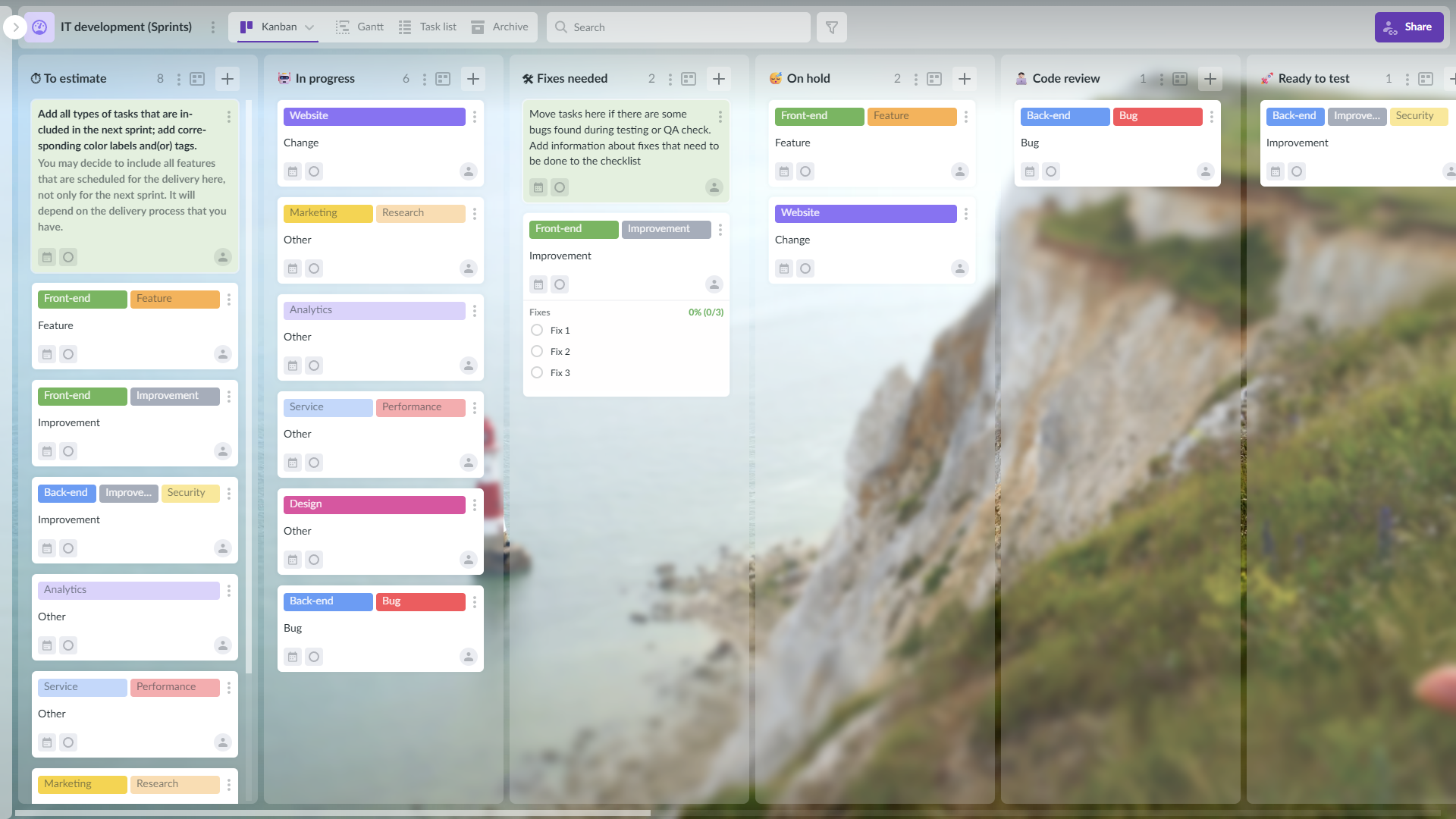
Kanban board is a great tool that helps to visualize all the stages of workflow and check when tasks will be done
Try managing sprints with Kanbanchi
An editor, a terminal, a version control platform, and a launcher. Everything else is intermittent. The tools worth investing in are the ones touched hourly, because a one-second improvement to something done two hundred times a day compounds, and a better dashboard does not.
At team level, look at time-to-first-review, deployment frequency, and change failure rate. At individual level, don’t. Individual metrics are gameable, and they discourage the unmeasured work that teams depend on, particularly code review and mentoring. If you need to know whether a specific person is struggling, that is a conversation, not a dashboard.
For code, no. The issue tracker covers it, and adding a second system creates two backlogs. For the work around a release, usually yes, because documentation, support training, announcements, and legal review involve people who aren’t in the issue tracker and shouldn’t be. That’s a coordination problem rather than a development one. If you’re evaluating tools for it, our guide to team task management is the relevant one.
Interruption, and the largest single source is waiting: for review, for CI, for a decision, for an environment. Most of that waiting is invisible because it doesn’t appear on anyone’s calendar. Measuring how long pull requests sit before anyone looks at them usually reveals more than any tooling change you could make.
More in this series: productivity apps is the full guide by category.
Also in the series: productivity apps for product teams and marketing teams, and productivity software for operations teams.


In this Article:
Start using Kanbanchi now
Start your free trial